Some gadgets try to change your life with twelve apps, six cloud subscriptions, and a notification sound that makes your left eye twitch. Then there is the humble Word of the Day e-paper calendar: a small screen, one useful word, a date, maybe a definition, and absolutely no social feed trying to sell you socks because you once googled “warm feet.”
That is why this little maker project feels so charming. A word-of-the-day calendar is already a nice idea. It gives your brain one tiny snack every morning. But when it is built with an e-paper display, a Raspberry Pi Zero 2 W, and a clean frame made from something as delightfully normal as a decorative light switch plate, it becomes more than a language-learning tool. It becomes a perfect example of using the right technology for the right job.
E-paper does not beg for attention. It sits there like paper, readable in daylight, sipping power instead of chugging it like a gaming laptop with a caffeine problem. For a display that changes once a day, that is exactly the point. A word calendar does not need video. It does not need animated confetti. It just needs to show today’s word clearly, quietly, and beautifully.
What Is the Word of the Day E-Paper Calendar?
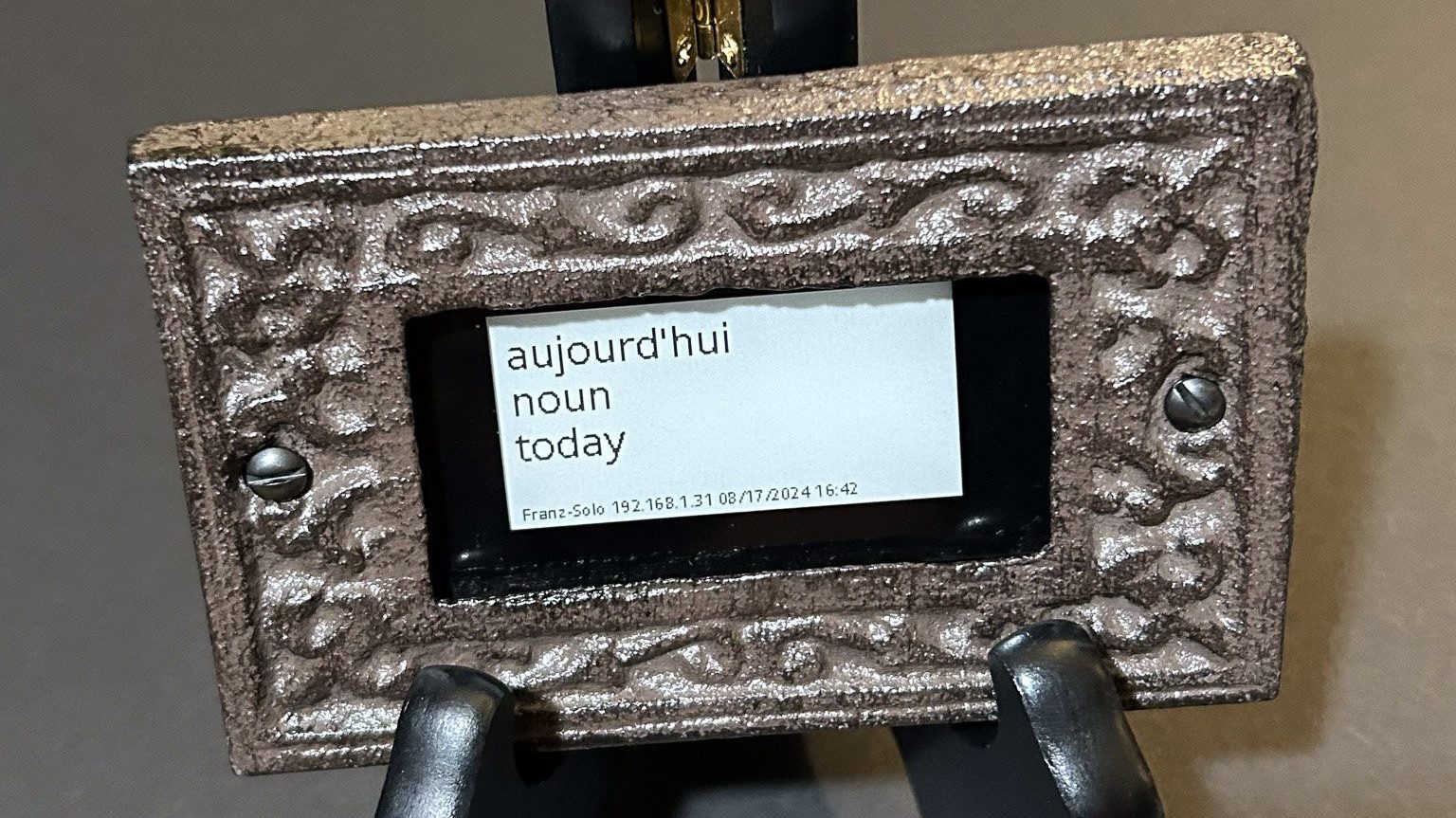
The project that inspired this discussion was a DIY word-of-the-day calendar built to help someone learn French. The setup used a Raspberry Pi Zero 2 W paired with a small Waveshare e-paper screen. The hardware was placed inside a decorative light switch plate and mounted on a small stand, turning basic electronics into a desk-friendly object that looks more like a tiny framed print than a science fair escapee.
On the software side, the Pi runs a Python script. The script gathers a daily French word, formats it with a short description, and sends the final image to the e-paper display. Python tools such as BeautifulSoup can help parse web content, while image libraries like Pillow can create the final layout before the screen updates.
The result is wonderfully simple: a compact vocabulary display that shows a new word, its meaning, and the current date or time. It is the kind of gadget that makes people say, “Wait, I could build that,” which is one of the highest compliments in the maker world.
Why E-Paper Is Perfect for a Daily Calendar
The magic of e-paper is not that it does everything. It is that it does a few things extremely well. E-paper, also called electronic paper or E Ink-style display technology, is designed to mimic ink on paper. Unlike LCD or OLED screens, most e-paper displays are reflective, meaning they use ambient light instead of a bright backlight. That makes them easier to read in many lighting conditions and gives them a calm, printed look.
Even better, e-paper displays are known for their low power consumption. They generally use power when the image changes, not when the image simply remains visible. That makes them ideal for information that updates occasionally: a calendar, weather dashboard, meeting list, grocery reminder, bus schedule, or yes, a daily French word that may or may not make you sound sophisticated at breakfast.
A Word Calendar Is Static by Nature
A daily vocabulary calendar changes once every 24 hours. Maybe it refreshes at midnight. Maybe it updates at 6 a.m. when the learner is awake enough to absorb language but not awake enough to understand why coffee takes so long. Either way, the content is mostly static.
That makes e-paper a much better fit than a standard screen. A bright LCD panel would spend the whole day drawing power just to display one word. It would also look more like a miniature tablet than a calendar. E-paper, by contrast, behaves like a printed page that happens to update itself. The technology matches the rhythm of the object.
It Feels Like a Real Object, Not Another Screen
One underrated benefit of e-paper is emotional. A phone screen feels like an invitation to distraction. You open it to check a word, and fifteen minutes later you are watching a video about raccoons stealing cat food. E-paper does not have that problem. It can show information without turning into a portal of doom.
That makes a word-of-the-day calendar feel closer to a physical desk object. It can sit by a coffee maker, on a bookshelf, near a workstation, or in a classroom. It offers a tiny learning moment without asking the user to unlock anything, dismiss anything, or remember another password. That alone deserves applause and maybe a small parade.
The Hardware: Small Board, Smart Display, Clever Frame
The core hardware behind this type of build is refreshingly accessible. A Raspberry Pi Zero 2 W is powerful enough to run Python scripts, connect to Wi-Fi, fetch data, process text, and generate images. It is also small enough to hide behind a compact display or inside a custom enclosure.
The Waveshare e-paper display handles the visual side. Many small e-paper modules are designed for Raspberry Pi or microcontroller projects, and they often connect through common interfaces such as SPI. They are popular in DIY dashboards because they can show readable text and basic graphics while consuming very little energy compared with always-on traditional displays.
The frame choice is where the project earns extra charm points. Using a decorative light switch plate as the front frame is clever because it gives the display a polished border without needing custom machining. Hobby stores are full of small frames, plaques, cases, and odd little objects that can become electronics enclosures if you look at them with enough curiosity and a mild disregard for their original purpose.
The Software: Python Does the Quiet Heavy Lifting
A project like this is not complicated in concept, but the details matter. The software has to fetch or select a word, clean up the text, format it nicely, and render it to match the e-paper screen’s resolution. It may also need to handle accented characters, line wrapping, fonts, spacing, and the occasional word that is much longer than expected because languages enjoy pranking designers.
BeautifulSoup for Fetching and Parsing
BeautifulSoup is commonly used in Python projects to parse HTML and extract specific content from web pages. In a word calendar project, it can help locate the word, definition, part of speech, or example sentence from a chosen source. The same idea could be adapted for French, Spanish, English vocabulary, technical terms, historical facts, idioms, or even “tiny word crimes committed by corporate jargon.” Today’s phrase: “circle back.” Sentence: “We circled back until we were dizzy.”
Pillow for Layout and Image Rendering
Pillow, the modern fork of the Python Imaging Library, can be used to create the final image sent to the e-paper display. This is important because many e-paper modules work best when you generate a bitmap or image buffer that matches the screen’s dimensions. Pillow can place the word in a large font, add a definition below, include the date, and arrange everything with enough spacing to look intentional rather than “I typed this in a panic at 2 a.m.”
For a daily word calendar, typography is not decoration; it is usability. The main word should be visible at a glance. The definition should be readable from a comfortable distance. The layout should avoid crowding. Good design makes the device feel finished, even when the underlying code is delightfully scrappy.
Language Learning: Why One Word a Day Works
A single daily word will not make anyone fluent by itself. No one learns French purely by staring at “fromage” once and suddenly negotiating apartment leases in Paris. But a daily word calendar does something valuable: it creates a habit. It turns vocabulary into a low-friction routine.
Small, repeated exposure matters in language learning. Vocabulary becomes easier to remember when learners encounter words in context, revisit them over time, and connect them to daily life. A word-of-the-day calendar is not a full language course, but it can become a tiny anchor. It says, “Here is today’s bite-sized idea. Chew politely.”
The best version would not simply show a word and definition. It could include pronunciation, part of speech, gender for nouns in languages that use grammatical gender, an example sentence, and maybe a small icon. For French, it might display:
- la pluie rain
- Example: La pluie tombe doucement.
- Meaning: The rain falls softly.
That is far more useful than a naked word floating in space. Words need context the way plants need water and office meetings need someone to ask, “Do we actually need this meeting?”
Why This Project Is Better Than a Phone App
There are plenty of word-of-the-day apps. Many are excellent. But the e-paper calendar has a different personality. It is passive in the best possible way. It does not require opening an app, accepting updated terms, or swiping past five notifications. It simply exists in your environment.
This matters because friction kills habits. If learning a word requires unlocking a phone, finding an app, and resisting the urge to check messages, the habit is already fighting a small battle. If the word is sitting on your desk while you drink coffee, it becomes part of the room.
That is the secret strength of ambient technology. It does not demand attention; it rewards glances. You see the word in the morning, again during lunch, and maybe once more before leaving the room. By the end of the day, the word feels familiar. Tomorrow, a new one appears. Slowly, the calendar becomes a vocabulary drip feed.
Customization Ideas for a Better Word Calendar
The beauty of this concept is that it can be customized almost endlessly. A basic version shows one word and one definition. A more advanced version could become a full learning companion.
Add Pronunciation
A small button or touch input could play audio pronunciation through a tiny speaker. For language learners, this would be a major upgrade. Seeing a word is useful; hearing it helps build confidence. Of course, adding audio also adds complexity, power requirements, storage concerns, and the possibility of your desk suddenly saying “grenouille” while guests are over. Worth it.
Add Review Mode
The display could show today’s word in the morning, then cycle back to previous words later in the week. This would turn the calendar from a novelty into a spaced-review tool. A small button could show yesterday’s word, last week’s word, or a random word from the archive.
Add Themes
Vocabulary could be grouped by theme: kitchen words, travel phrases, verbs, adjectives, slang, business terms, academic vocabulary, or “words you can use to sound calm while your code refuses to compile.” Themed weeks make learning feel organized and help users build clusters of related meaning.
Add Multiple Languages
French is a natural use case, but the same structure could support Spanish, German, Japanese romaji and kana, Vietnamese, Italian, English vocabulary, SAT words, medical terminology, legal terms, or technical jargon. A writer could use it for rare English words. A student could use it for science vocabulary. A household could use it for bilingual family learning.
Design Lessons from the Project
The biggest lesson is restraint. Many DIY smart displays try to show everything: calendar, weather, stock prices, moon phase, inbox count, inspirational quote, and probably the emotional state of the refrigerator. That can be useful, but it can also become visual soup.
The word-of-the-day calendar succeeds because it has one job. Its purpose is clear. The user does not need a manual. The screen does not need tabs. The interface does not need a hamburger menu, unless the word of the day is literally “hamburger,” in which case congratulations to lunch.
Good product design often comes down to matching form, technology, and behavior. A daily word is slow information. E-paper is slow display technology. A desk calendar is a glanceable object. Those three things fit together neatly.
Where E-Paper Calendars Fit in the Smart Home
E-paper dashboards are becoming popular for the same reason this calendar works: they make digital information feel physical. A family calendar on a refrigerator, a meeting display outside an office, a weather panel near the door, or a daily vocabulary screen on a desk can all benefit from the same approach.
Unlike tablets, e-paper displays are not ideal for fast animation or rich video. That is fine. Not every screen needs to be a tiny television. E-paper shines when the content is text-heavy, slow-changing, and meant to be read rather than watched. In other words, it is perfect for calendars, notes, labels, schedules, signs, and educational prompts.
As color e-paper improves, these projects may become even more attractive. Full-color e-paper can make dashboards, signage, and learning tools more expressive while keeping the paper-like look. Still, monochrome displays remain excellent for word calendars because vocabulary is mostly a text experience. Black text on a calm background is hard to beat.
Potential Challenges and Practical Fixes
Like all maker projects, an e-paper word calendar has a few little dragons hiding under the table.
Text Wrapping Can Get Weird
Some words are short. Some definitions are not. A clean layout should account for long words, multiple lines, accented characters, and definitions that need trimming. The software should gracefully shorten or resize text rather than letting it crash into the edge of the screen like a shopping cart with one bad wheel.
Power Management Matters
A Raspberry Pi is more power-hungry than many microcontrollers. For a battery-powered version, builders may want sleep modes, scheduled wake-ups, or a lower-power board such as an ESP32, depending on how much processing and networking the project requires. If the device will live near an outlet, the Pi is convenient. If it needs to run for months, power design becomes the main event.
Data Sources Need Stability
If the script scrapes a website, changes to that site’s HTML can break the parser. A more robust version might use a dictionary API, a local word list, or a curated database. Local storage also allows the device to keep working even if Wi-Fi is down. After all, your vocabulary journey should not collapse because the router decided to take a personal day.
Personal Experience: Living With a Word-of-the-Day E-Paper Calendar
The first thing you notice about a word-of-the-day e-paper calendar is that it does not feel like a gadget. That sounds strange because, technically, it is absolutely a gadget. There is a board inside, a display driver, a script, a power cable, and enough tiny parts to make a carpet dangerous. But once it is assembled and placed on a desk, it behaves more like a small framed note.
That difference changes how people interact with it. A phone app feels intentional: you must decide to open it. A printed calendar feels passive: you glance at it because it is there. The e-paper version captures the best of both. It updates automatically, but it still has the calm presence of paper. In daily use, that makes the learning habit feel lighter.
Imagine placing it beside a coffee machine. Every morning, while waiting for the first cup, you see a French word. On Monday it might be éclat. On Tuesday, doucement. On Wednesday, something with enough accents to make your keyboard nervous. You do not need to study aggressively. You simply notice the word, read the example, and move on. Later, when you see it again, your brain says, “Hey, I know that one.” That tiny recognition is surprisingly satisfying.
In a home office, the calendar becomes a quiet productivity companion. It offers a little mental reset between tasks. Instead of grabbing your phone during a break, you look over and learn a word. It is not a dramatic lifestyle transformation. No one is going to write a documentary called The Display That Saved Breakfast. But small improvements are often the ones that stick.
The project also sparks conversation. Visitors notice e-paper because it looks different from a normal screen. It does not glow. It does not animate. It just sits there with crisp text, like a printed card that has somehow gained Wi-Fi. People ask what it is, and suddenly you are explaining e-paper, Raspberry Pi, language learning, and why a light switch plate became a frame. That is the maker hobby at its best: one object, five conversations, and only one person pretending they already knew what electrophoretic ink was.
There is also a nice emotional layer in the original project being built as a gift. A homemade word calendar says, “I noticed what you are trying to learn, and I built something to help.” That is more thoughtful than buying another generic desk gadget. It has personality. It supports a goal. It is useful without being pushy.
For students, teachers, writers, and language learners, the experience could be even richer. A teacher could place one in a classroom and use the word as a warm-up prompt. A writer could display unusual English words to fight vocabulary boredom. A family could use it for bilingual learning at breakfast. A software developer could display one programming term per day, because apparently “dependency injection” was not intimidating enough the first time.
The biggest joy is that the device encourages gentle consistency. It does not shame you for missing a lesson. It does not keep a streak counter. It does not send passive-aggressive reminders. It simply gives you another word tomorrow. That makes it a rare kind of smart device: one that helps without nagging.
Conclusion: A Small Calendar With a Big Idea
The Word of the Day e-paper calendar is a great reminder that useful technology does not have to be loud, expensive, or overloaded with features. Sometimes the best gadget is the one that does one job gracefully. This project combines language learning, low-power display technology, Python automation, and approachable design into a tiny object that feels both practical and delightful.
E-paper is a natural match for daily information because it is readable, quiet, and efficient. A word-of-the-day calendar is a natural match for e-paper because it changes slowly and benefits from being visible all day. Together, they create a tool that feels less like another screen and more like a living piece of paper.
For makers, it is an approachable project with room to grow. For learners, it is a gentle vocabulary habit. For everyone else, it is proof that the future of technology does not always need to blink, beep, or ask for your location. Sometimes it just needs to teach you one good word before breakfast.
Editorial note: This article was written from a synthesis of real public information about DIY e-paper projects, e-paper display technology, Raspberry Pi Zero 2 W hardware, Waveshare and Adafruit-style e-paper modules, Python image rendering tools, vocabulary learning concepts, and the original Hackaday coverage of the Word of the Day calendar project. No source links are inserted in the article body as requested.