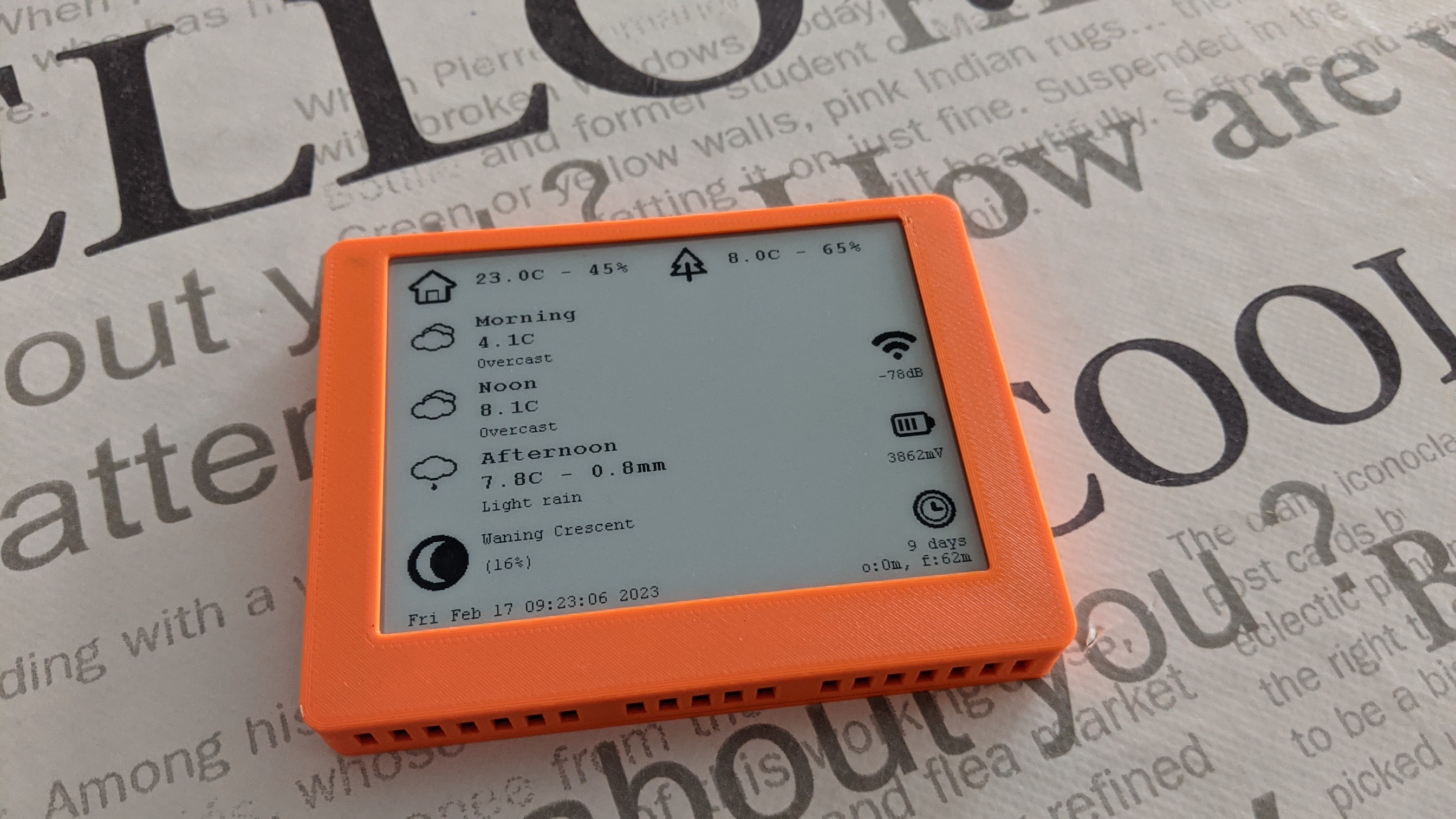
A weather station that runs for months on a tiny battery sounds like something built by a wizard who also owns a soldering iron. But the real magic is not magic at all. It is the careful marriage of an E-Ink display, a sleepy microcontroller, efficient sensors, and a design philosophy that treats every milliamp like it owes rent.
The project behind the title is a clever low-power weather station built around an ESP32-C3 microcontroller and a 4.2-inch E-Ink display. The display shows local temperature, humidity, and forecast information, yet the whole device can operate for about 60 days from a single 600 mAh lithium battery. That is not bad for a gadget that talks to sensors, checks the internet, updates a screen, and still manages to behave like it is on a long vacation.
The big lesson is simple: battery life is not won by one heroic component. It is won by a thousand tiny decisions. Use a screen that does not need constant power. Put the processor to sleep whenever possible. Wake only when needed. Avoid unnecessary wireless activity. Pick sensors that sip power instead of chugging it. Do that consistently, and suddenly “months of runtime” becomes a realistic engineering target, not marketing confetti.
Why E-Ink Is Perfect for a Low Power Weather Station
Most screens are needy little rectangles. LCDs and OLEDs generally require ongoing power to keep an image visible, and backlights can be especially hungry. E-Ink, also called e-paper, works differently. Once an image is written to the display, the image remains visible with little to no power required. The display only consumes meaningful energy when it refreshes.
That makes E-Ink a natural fit for weather data. Weather changes, but not every second. A home weather station does not need to redraw a cloud icon 60 times per second like a video game. It can update every few minutes, every 15 minutes, or every couple of hours depending on the design. Between updates, the screen can sit there calmly showing the last reading, as if it is printed on paper.
The display does the quiet work
In the referenced project, the 4.2-inch e-paper module has a 400 x 300 pixel resolution, enough for readable text, icons, charts, and a tidy dashboard layout. During updates, the display uses power for only a short period. Once the image is set, the display keeps showing the data while the rest of the electronics can go into deep sleep.
This is exactly why E-Ink weather displays have become popular in maker projects. They are readable in daylight, easy on the eyes, and very efficient for information that changes occasionally. Their weakness is refresh speed, but for weather readings, that “weakness” barely matters. Your thermometer does not need cinematic frame pacing. It needs to tell you whether you should wear a jacket.
The Real Power Saver: Sleeping Most of the Time
The most important low-power strategy is not using less power while working. It is working less often. A microcontroller that stays awake all day is like a person standing at the fridge with the door open “just in case” they need a snack. Efficient battery-powered devices wake up, do the job, and go back to sleep quickly.
Modern microcontrollers such as ESP32-family chips support sleep modes that shut down unnecessary parts of the system. In deep sleep, the CPU and many peripherals can be powered down, while a timer or wake source remains active. When the timer fires, the chip wakes, runs a short task, then returns to sleep.
Wake, measure, update, sleep
A smart weather station follows a repeating pattern:
- Wake the microcontroller.
- Read indoor temperature and humidity sensors.
- Occasionally turn on Wi-Fi to fetch forecast data.
- Update the E-Ink display only when useful.
- Shut down wireless hardware and return to deep sleep.
That rhythm matters. Wireless communication is one of the most power-hungry tasks in a small IoT device. Wi-Fi can draw far more current than a sensor reading. So the design avoids constant connections. Instead, it checks online weather data on a schedule, then disconnects and sleeps. The result is a device that acts connected without paying the full-time energy bill of being connected.
How the Weather Station Gets Months From a Small Battery
The headline number is impressive: roughly 60 days from a 600 mAh lithium battery. That does not happen by accident. The project uses several practical low-power techniques that any builder can learn from.
1. The CPU clock is reduced when full speed is unnecessary
A microcontroller running at high speed can finish work quickly, but it may also draw more current. In this project, the CPU runs at a low clock speed when reading local sensors and at a higher speed only when Wi-Fi is required. This is a thoughtful compromise. Sensor reads are simple. They do not need a processor sprinting like it is late for a flight.
2. Wi-Fi is used sparingly
Weather forecasts from online APIs are useful, but the internet does not need to be consulted every minute. The device can fetch a forecast every couple of hours and rely on local sensors in between. Reducing Wi-Fi wakeups can dramatically extend battery life.
3. The E-Ink display avoids constant drain
The screen is the star of the project because it lets the weather station remain useful while sleeping. With a conventional screen, the display subsystem may dominate the power budget. With E-Ink, the display updates briefly, then holds its image without needing continuous refresh power.
4. Sensors are chosen for low current operation
Environmental sensors such as the BME280 are popular in weather projects because they combine temperature, humidity, and barometric pressure in a compact, low-power package. These sensors can operate in forced or sleep modes, allowing the host microcontroller to trigger measurements only when needed.
5. The update interval matches the real-world need
Battery life improves when the device does not behave like a nervous squirrel. Indoor temperature does not need second-by-second reporting. Forecasts do not need constant refreshing. Choosing sensible update intervals is one of the easiest ways to save power without making the product feel worse.
E-Ink vs LCD: Why the Display Choice Matters
An LCD weather station can absolutely be optimized for low power, especially if the display is small, monochrome, or rarely backlit. But E-Ink has a unique advantage: it is bistable. That means it can hold an image without continuous energy input.
For weather stations, this creates a different design mindset. Instead of asking, “How do we keep the display on all day?” the better question becomes, “How rarely can we update the display while still keeping the information useful?” That shift changes the entire battery equation.
Where E-Ink wins
E-Ink works beautifully for static dashboards, labels, calendars, clocks that update by the minute, sensor displays, and forecast panels. It is easy to read in bright light and does not blast your eyes in a dark room unless a front light is added.
Where E-Ink struggles
E-Ink is not ideal for animations, fast graphs, video, or rapidly changing interfaces. Full refreshes may blink or take a moment. Some displays are sensitive to temperature, and partial updates can leave ghosting if not handled properly. In other words, E-Ink is wonderful, but it is not a tiny television. Treat it like paper with a brain.
Designing a Practical Battery-Powered Weather Station
A reliable low-power weather station needs more than a clever circuit. It also needs a practical enclosure, good sensor placement, and a weather-aware attitude toward weather. Nature is charming until it sends rain sideways into your electronics.
Sensor placement matters
For useful temperature and humidity readings, the sensor should be protected from direct sunlight and placed where air can circulate. A radiation shield is important because sunlight can heat the sensor housing and create falsely high readings. Avoid mounting the temperature sensor too close to walls, roofs, asphalt, concrete, or other heat-retaining surfaces.
For outdoor weather stations, placement is always a compromise. Professional guidance often recommends locating temperature and humidity sensors several feet above representative ground cover and away from obstructions. In a real backyard, there may be fences, trees, pets, grills, patios, and one suspiciously judgmental neighbor. The goal is to reduce obvious measurement errors, not to build a national laboratory behind the shed.
Protect the electronics, not the airflow
The enclosure must keep water out while still allowing the sensor to measure real air. If the sensor is sealed inside a plastic box, it will mostly measure the box. Good designs separate the electronics from the sensing chamber or use vents, shields, and breathable layouts that prevent direct water entry.
Choose the battery carefully
Lithium batteries are common in compact low-power builds because they offer good energy density. However, temperature affects battery performance. Cold weather can reduce available capacity and increase internal resistance. If the device will live outdoors, the battery chemistry, enclosure location, and expected temperature range should all be considered.
Power Budget: The Math Behind the Magic
Battery life is easier to understand when you think in averages. A device might draw tens or hundreds of milliamps while Wi-Fi is active, but if that happens for only a few seconds every few hours, the average current can remain low. Meanwhile, deep sleep current may be measured in microamps if the board is designed well.
For example, imagine a weather station wakes every 15 minutes. It spends a few seconds reading sensors and occasionally updates the display. Every two hours, it wakes longer to connect to Wi-Fi and download forecast data. If sleep current is low and active time is short, the average current over a full day can be tiny.
This is also where many DIY builds lose battery life. The microcontroller chip may support deep sleep, but the development board might include power LEDs, voltage regulators, USB-to-serial chips, pull-up resistors, or display driver circuits that continue drawing current. A low-power chip on a not-so-low-power board is like putting racing tires on a shopping cart. Technically impressive, but not the full solution.
Common Mistakes That Drain Battery Life
Leaving power LEDs connected
Power LEDs are useful during development, but they can waste energy continuously. A tiny LED drawing even a fraction of a milliamp can become a major drain over weeks. In low-power design, the innocent little “on” light is often the villain wearing a green hat.
Refreshing the display too often
Because E-Ink uses power during refresh, unnecessary updates still matter. If the temperature changes by only 0.1 degrees, the display may not need to refresh. Smarter firmware can update only when values change enough to matter.
Keeping Wi-Fi alive
Wi-Fi should be treated like a power tool: turn it on when needed, then put it away. Reconnecting too often, scanning networks repeatedly, or failing to disable wireless functions before sleep can shorten runtime dramatically.
Using inefficient regulators
Voltage regulators have quiescent current, which is the current they consume simply by existing in the circuit. For a device that sleeps most of the time, regulator quiescent current can dominate the power budget. Choosing a low-IQ regulator is one of those boring decisions that produces exciting battery life.
What This Project Teaches About Low-Power IoT
The best part of this weather station is not just that it runs for months. It shows a repeatable pattern for low-power IoT devices. The same principles apply to soil moisture monitors, mailbox sensors, air-quality displays, remote thermometers, smart labels, and small dashboards.
First, pick a display that matches the data. If the information is mostly static, E-Ink makes sense. Second, reduce active time. Third, choose components that support sleep modes. Fourth, measure real current instead of trusting dreams, guesses, or forum optimism. Fifth, keep the user experience practical. A weather station that updates every two hours may be more useful than one that updates every 10 seconds and dies before the weekend.
Specific Example: A Sensible Update Schedule
A balanced weather station might read indoor temperature and humidity every five minutes, check an outdoor sensor every 15 minutes, and fetch online forecast data every two hours. The display could refresh only when the visible data changes or when a scheduled forecast update arrives.
This creates a pleasant user experience. The dashboard remains current enough for daily life, but the system avoids waste. You can glance at it before leaving home, decide whether to grab a hoodie, and move on with your life. The device does not need to shout updates constantly. Weather stations should inform, not behave like caffeinated parrots.
Experience Notes: Building and Living With a Low-Power E-Ink Weather Station
Anyone who has built a battery-powered weather station learns one thing quickly: the first version is usually not low power. It is a prototype with ambition. You wire the sensor, display the temperature, add Wi-Fi, admire the dashboard, and then discover the battery is draining like someone left the faucet open. That is when the real engineering begins.
The first practical experience is learning to measure current in different states. Awake current, Wi-Fi current, display refresh current, and sleep current are separate stories. A multimeter or power profiler reveals the truth. Sometimes the microcontroller sleeps beautifully, but the board still draws too much because of a regulator, LED, sensor board, or display module. The lesson is humbling: “deep sleep” in code does not automatically mean deep sleep in hardware.
The second experience is discovering that update intervals are emotional. At first, you want fresh data all the time. Every minute feels reasonable. Then battery math taps you on the shoulder and asks whether the living room humidity really needs breaking-news coverage. Most users are perfectly happy with slower updates, especially if the display remains readable. A station that updates every 15 or 30 minutes can feel completely normal in daily use.
The third experience is enclosure design. Indoor builds are forgiving, but outdoor sensors introduce sunlight, condensation, wind, bugs, and mystery grime. A proper sensor shield matters. Direct sun can ruin temperature readings. A sealed box can trap heat. A poorly placed sensor near brick, concrete, or roofing can report the temperature of the building rather than the air. This is where weather station design becomes part electronics, part meteorology, and part “why is there a spider in my enclosure?”
The fourth experience is that E-Ink changes how people interact with the device. Because it looks like paper, it becomes a calm household object rather than another glowing screen. It can sit on a shelf, desk, or wall without demanding attention. The display is visible in daylight, readable from across the room, and pleasantly quiet. There is no notification anxiety, no bright panel, and no sense that the device is secretly judging your screen time.
The fifth experience is firmware refinement. The best low-power designs avoid doing work unless the work matters. Cache the last values. Skip display refreshes when changes are tiny. Retry failed Wi-Fi connections intelligently instead of looping forever. Turn off peripherals before sleeping. Store forecast data so the display remains useful even if the network is temporarily unavailable. Good firmware is polite: it wakes up, does what it promised, cleans up after itself, and goes back to sleep.
The final experience is satisfaction. There is something delightful about building a device that quietly runs for weeks or months. It feels different from plugging in yet another gadget. A long-running E-Ink weather station is a small reminder that technology does not always need more power, more brightness, more noise, or more everything. Sometimes the smartest device in the room is the one that spends most of its life asleep and still tells you when rain is coming.
Conclusion
The low-power E-Ink weather station proves that long battery life is not a fantasy. It is the result of matching the right display to the right job, using deep sleep aggressively, limiting Wi-Fi activity, choosing efficient sensors, and designing around real-world behavior. E-Ink is especially powerful in this role because weather data is mostly static and highly readable text is more important than fast animation.
For makers, this project is more than a neat desk gadget. It is a compact lesson in efficient IoT design. For everyday users, it is a practical reminder that useful technology does not have to glow, buzz, and beg for charging every night. Sometimes the best smart device is one that wakes up only when necessary, updates a paper-like screen, and then goes right back to conserving energy like a tiny electronic monk.
Note: This article is written as original web-ready content based on real low-power electronics practices, E-Ink display behavior, ESP32 sleep-mode design, environmental sensor use, and practical weather station placement principles.