You have a copy of Guitar Hero II, a working PlayStation 2, and absolutely no plastic guitar in sight. Perhaps the guitar controller disappeared during a move. Perhaps a younger relative mistook it for an unusually rigid toy. Whatever happened, your dreams of virtual rock stardom are not over.
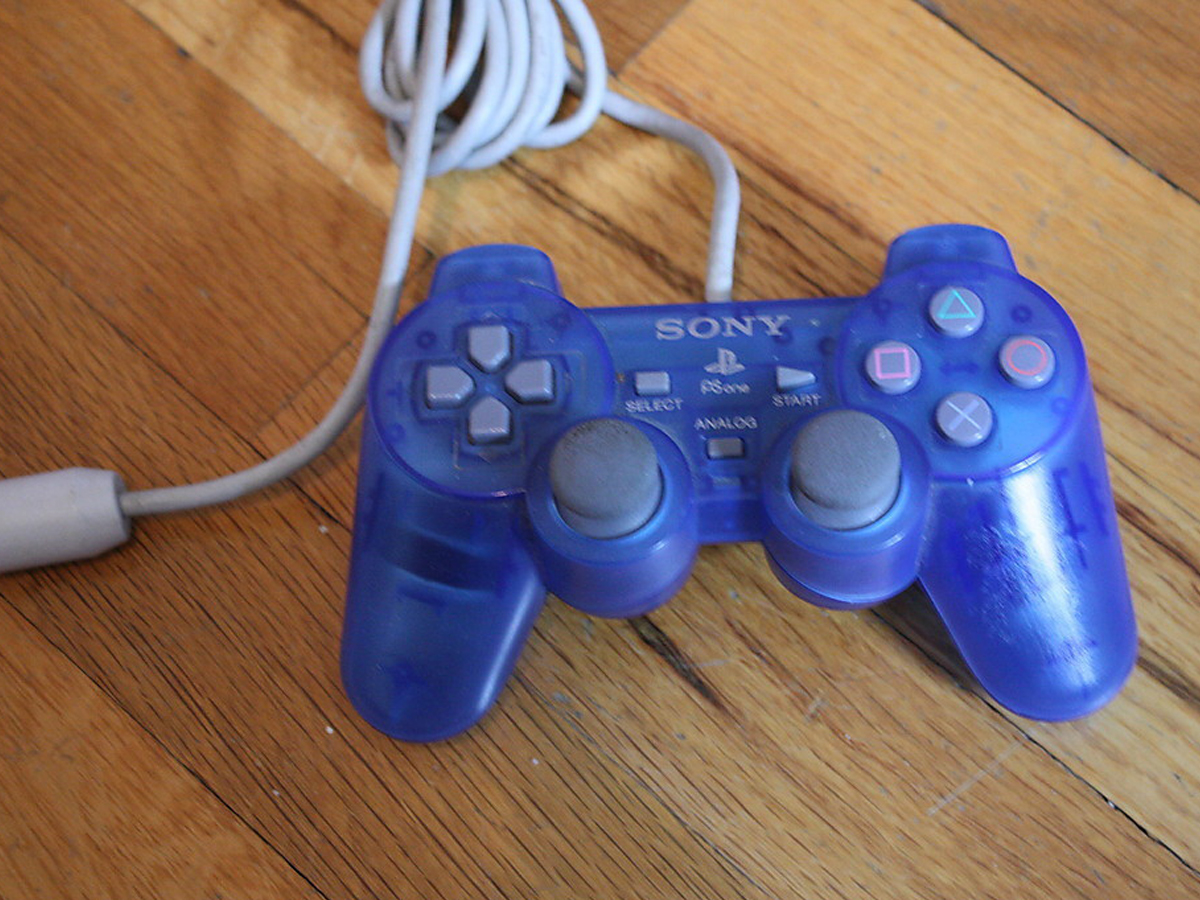
The PlayStation 2 version of Guitar Hero II supports a standard DualShock 2 controller. Instead of holding colored fret buttons and operating a strum bar, you play notes with the four shoulder buttons and the X button. Better yet, the game automatically “strums” whenever you press one of those note buttons, so you do not need a separate strumming input.
This guide explains how to play Guitar Hero 2 with a PS2 controller in two simple steps, followed by practical advice for chords, sustained notes, Star Power, difficult songs, and common controller problems.
Can You Play Guitar Hero 2 Without the Guitar?
Yes. The original PlayStation 2 release of Guitar Hero II can be played with a standard DualShock 2 controller. The game was designed primarily around the cherry-red Gibson SG-style peripheral, but the regular gamepad has its own built-in control layout.
The overall objective remains unchanged: watch the colored notes travel down the on-screen fretboard and press the matching control when each note reaches the target line. The major difference is that the DualShock 2 combines the fret and strum actions. Pressing the correct note button at the correct moment plays the note automatically.
This arrangement is convenient, portable, and surprisingly effective on Easy or Medium difficulty. On Hard and Expert, however, the gamepad can turn into a small piece of ergonomic revenge. Fast passages, rapid chords, and complicated combinations demand considerable finger independence.
What You Need
- A PlayStation 2 console
- A working DualShock 2 or compatible PS2 controller
- A PlayStation 2 copy of Guitar Hero II
- A television connected to the console
- An optional PS2 memory card for saving progress
No guitar-shaped controller, adapter, microphone, amplifier, leather pants, or suspiciously dramatic stage fog is required.
Step 1: Connect the PS2 Controller and Start the Game
Plug the DualShock 2 controller firmly into controller port 1 before starting the console. Insert the Guitar Hero II disc, turn on the PlayStation 2, and wait for the game to load.
Use the directional pad to navigate the menus. Press the X button to confirm selections and the Triangle button to go back or cancel. The Start button confirms certain menu choices and pauses the game during a song.
Choose a Beginner-Friendly Mode
For your first attempt, choose Quick Play or begin a Career on Easy difficulty. Easy mode introduces only the green, red, and yellow note lanes, allowing you to become comfortable with the shoulder-button arrangement before blue and orange join the party.
Practice mode is another excellent starting point. It lets you rehearse difficult sections without failing the song and provides slower playback settings. This is especially useful when a solo arrives with the subtlety of a shopping cart rolling down a staircase.
Check That the Controller Is Recognized
If you can move through the menus, the game is receiving controller input. Start a song and press one of the mapped note buttons as a note crosses the target line. You should hear the guitar part and see the note register.
If menu navigation works but note inputs do not, restart the system with the controller already connected. Also test another controller if one is available. Older PS2 gamepads can develop worn shoulder buttons, damaged cables, or intermittent connections after years of being dropped, twisted, and blamed for perfectly innocent missed notes.
Step 2: Use the PS2 Button Mapping to Play Notes
The key to playing Guitar Hero 2 with a PS2 controller is memorizing five note controls. Four colors use the shoulder buttons, while the orange note uses X.
| Guitar Hero Note | PS2 Controller Button | Suggested Finger |
|---|---|---|
| Green | L2 | Left middle finger |
| Red | L1 | Left index finger |
| Yellow | R1 | Right index finger |
| Blue | R2 | Right middle finger |
| Orange | X | Right thumb |
There is no separate strum command in the normal DualShock 2 control scheme. Each time you press a note button, the game treats that action as selecting and strumming the note. Therefore, you should press the button only when the corresponding note reaches the target row.
How to Hit Single Notes
Watch the scrolling fretboard and identify the color of the approaching note. When the note overlaps the circular target at the bottom, press its assigned controller button.
For example, press L2 when a green note reaches the target. Press L1 for red, R1 for yellow, R2 for blue, and X for orange. Timing matters more than force. Hammering the controller like it owes you money will not improve accuracy.
How to Play Chords
Chords appear as two or more notes aligned horizontally. Press all corresponding buttons simultaneously. A green-and-yellow chord, for example, requires L2 and R1 at the same time. A red-and-blue chord requires L1 and R2.
Because pressing a note button also triggers the strum, the buttons in a chord need to land almost simultaneously. If one finger arrives noticeably early, the game may interpret it as an incorrect individual note and break your streak.
Practice common pairs away from a song:
- L2 + L1 for green and red
- L1 + R1 for red and yellow
- R1 + R2 for yellow and blue
- L2 + R1 for green and yellow
- L1 + R2 for red and blue
Press each combination repeatedly until both fingers move as a single action. This feels awkward at first, but the brain eventually accepts that the shoulder buttons are now a tiny five-note instrument.
How to Play Sustained Notes
A sustained note has a long colored tail. Press the correct button as the note reaches the target and continue holding it until the tail ends. Releasing too early reduces the number of points earned from the sustain.
You do not need to press the button repeatedly. One well-timed press followed by a steady hold is enough. During long notes, avoid shifting your grip unnecessarily, particularly if another note follows immediately afterward.
How to Use the Whammy Effect
Move the left analog stick upward while holding a sustained note to imitate the guitar controller’s whammy bar. The effect bends the sound of the held note. On glowing Star Power sustains, using the analog stick can also help extract additional Star Power.
Do not sacrifice timing merely to wiggle the analog stick. Hitting the next note is generally more valuable than performing a magnificent virtual string bend immediately before missing an entire phrase.
How to Activate Star Power
Complete the glowing groups of notes known as Star Power phrases to fill the blue meter. Once enough energy has been collected, activate it by pressing Select or Up on the directional pad.
Star Power doubles your current score multiplier. If your multiplier is already at 4x, activating Star Power raises it to 8x. For higher scores, wait until you have a healthy note streak and a dense section of notes. For survival, activate it when the Rock Meter begins sinking toward the red zone.
Using Select is usually more comfortable than reaching for the directional pad during a busy section. Your right thumb can briefly move from X to Select, although you should avoid activating Star Power directly before a run of orange notes.
Understanding the Guitar Hero 2 Screen
The scrolling highway contains five lanes: green, red, yellow, blue, and orange. Colored notes move toward a row of targets at the bottom. Successful hits produce points and preserve the guitar part in the music. Missed notes create an unpleasant sound, break your streak, and move the Rock Meter toward failure.
Score Multiplier
Your score multiplier increases as you maintain a streak:
- 10 consecutive notes produce a 2x multiplier.
- 20 consecutive notes produce a 3x multiplier.
- 30 consecutive notes produce a 4x multiplier.
Missing a note resets the multiplier. Consistency is therefore more important than attacking every note with frantic enthusiasm. A clean, controlled performance usually earns more points than alternating between brilliance and total controller-based panic.
Rock Meter
The Rock Meter shows how well the performance is going. Green means the crowd is pleased, yellow means caution, and red means the song is in danger. Continue missing notes while the meter is at the bottom, and the performance ends early.
When survival is the priority, save Star Power as emergency insurance. Activating it during a difficult solo can stabilize the Rock Meter and help you reach the next section.
Best Hand Position for a DualShock 2
Keep both index fingers on L1 and R1 and both middle fingers on L2 and R2. Let your right thumb rest near X. This position gives every note its own finger, reducing unnecessary movement.
Do not use only your index fingers to alternate between L1 and L2 or between R1 and R2. That may work on Easy, but it becomes slow and unreliable when notes appear quickly. Assigning one finger to each shoulder button is initially strange but much more efficient.
Relax Your Grip
A tense grip reduces speed and makes chords harder. Hold the controller securely without squeezing it. Keep your wrists neutral and your fingers lightly touching the buttons.
Take a break if your hands become sore, numb, or cramped. A DualShock 2 was designed for general console games, not for repeatedly performing miniature drum rolls across four shoulder buttons for an entire evening.
Tips for Improving Your Timing and Accuracy
Listen to the Rhythm, Not Just the Notes
The visual highway tells you which controls to press, but the song helps you predict when to press them. Listen for drum beats, guitar attacks, and repeated rhythmic patterns. Many sections become easier once you stop treating every note as a separate emergency.
Look Slightly Above the Target Line
Do not stare directly at the targets. Focus a short distance above them so you can see upcoming notes while still judging their arrival time. This gives your fingers time to prepare for chords and color changes.
Start With Easy Difficulty
Easy mode is not an insult to your musical dignity. It is a training environment. Learn the timing window and shoulder-button layout before adding blue and orange notes. Move to Medium when the first three colors feel automatic.
Use Practice Mode for Difficult Sections
Practice mode allows you to select a song section and reduce its speed. Start at the slowest comfortable setting, identify the pattern, and increase the speed gradually. Repeating a 20-second solo is far more productive than replaying a five-minute song only to be defeated by the same 20 seconds.
Favor Accuracy Over Button Mashing
Unlike some action games, random inputs are actively harmful in Guitar Hero II. Every unnecessary note-button press counts as an extra strum and can break your streak. Keep your fingers quiet until a real note reaches the target.
Common Problems and Quick Fixes
The Controller Works in Menus but Misses Every Note
Confirm that you are using the correct mapping. Green is L2, not L1; red is L1; yellow is R1; blue is R2; and orange is X. This order can feel backward because L2 represents the first color even though it sits behind L1.
Notes Register Before You Intend to Play Them
Remember that pressing a mapped note button automatically strums. Do not hold a button in advance for ordinary notes as you would hold a fret on the guitar controller. Press it when the note reaches the target, then release it unless it is a sustain.
Chords Keep Breaking the Streak
Practice pressing both buttons at precisely the same time. One finger may be moving faster than the other. Slow the section in Practice mode and exaggerate the synchronized movement until the chord feels like one command rather than two.
The Game Feels Delayed on a Modern Television
Older PS2 games were commonly played on low-latency CRT televisions. Modern flat-panel displays may add processing delay. Enable the television’s Game Mode and disable motion smoothing, noise reduction, frame interpolation, or other image-enhancement features. Connect the console directly to the television when possible rather than routing it through several converters.
A Shoulder Button Responds Intermittently
Test the controller in another PS2 game. If the same button remains unreliable, the controller may have worn internal contacts or cable damage. Cleaning or repairing an old controller is possible, but trying a second gamepad is the fastest diagnostic step.
Star Power Will Not Activate
Make sure the Star Power meter is at least half full. Then press Select or Up on the directional pad. Pressing the left analog stick upward controls the whammy effect; it does not activate Star Power.
Is a PS2 Controller as Good as the Guitar Peripheral?
For casual play, a standard PS2 controller works remarkably well. It requires less space, takes seconds to connect, and allows you to enjoy the entire game even when the original guitar peripheral is unavailable.
However, the gamepad changes the experience. The plastic guitar separates fretting from strumming, allows repeated strums while holding a fret, and makes the performance feel more physical. The DualShock 2 automatically strums on every note-button press, which can make rapid repeated notes and certain chord changes more difficult.
The gamepad is most comfortable on Easy and Medium. Hard and Expert remain possible for determined players, but dense arrangements can expose the limitations of five notes being distributed across the shoulder buttons and one face button.
In other words, the DualShock 2 is a legitimate way to play, not merely a menu-navigation device. It simply transforms Guitar Hero II from “pretend guitar performance” into “high-speed finger gymnastics with an excellent soundtrack.”
Real-World Experience: What Playing Guitar Hero 2 With a PS2 Controller Feels Like
The first few minutes with a DualShock 2 can feel more confusing than expected. Most PlayStation players instinctively think of L1 and R1 as primary shoulder buttons, yet the green lane begins on L2. As a result, beginners often press L1 for green and wonder why the virtual audience suddenly sounds personally offended.
A useful first-session routine is to play one Easy song while saying the controls aloud: “green, L2; red, L1; yellow, R1.” It may feel like studying for the least academically useful exam in history, but the association forms quickly. After two or three songs, the shoulder buttons begin to feel like colored lanes instead of generic PlayStation inputs.
The second surprise is the absence of manual strumming. Players familiar with the guitar peripheral may instinctively search for another button to represent the strum bar. On the regular controller, pressing the note is the strum. This makes simple melodies wonderfully direct, but it also punishes nervous fingers. Accidentally tapping L1 between notes produces an overstrum, resets the multiplier, and creates the unmistakable sound of a digital guitarist stepping on a rake.
Chords are usually the first serious obstacle. A green-and-red chord is manageable because L2 and L1 are on the same side. A green-and-yellow chord requires both hands to press shoulder buttons simultaneously. At first, one side nearly always arrives a fraction early. Practicing those combinations on a slow song builds coordination much faster than repeatedly challenging a difficult track at full speed.
Sustained notes are where the gamepad can feel surprisingly expressive. Holding a shoulder button while moving the left analog stick upward produces the whammy effect, and using it on a Star Power sustain adds a small performance flourish. The hand position is not especially elegant, but neither is standing in a living room with a red plastic guitar, so dignity was never the main objective.
Star Power introduces another tactical challenge. Select is located in the center of the DualShock 2, which means the right thumb must briefly leave X. Activating it during a section filled with orange notes can create an immediate disaster. It is often safer to trigger Star Power during a long sustain, a pause, or a sequence dominated by shoulder-button notes.
After an hour, the controller method begins to make sense. Easy songs feel almost like a five-key rhythm game, and Medium adds enough movement to remain engaging. The experience becomes less about pretending to play a guitar and more about reading patterns, controlling finger timing, and maintaining concentration.
The limitations become clearer on higher difficulties. Fast repeated notes are harder because every repetition requires a fresh press of the mapped button. Complicated chords demand combinations that are not always comfortable on the DualShock 2. Some songs that feel natural on a guitar controller become endurance tests for the index and middle fingers.
Even so, playing Guitar Hero 2 without the guitar has its own charm. It makes the game accessible when original peripherals are expensive, broken, or unavailable. It is also a fun challenge for experienced players who already know the songs and want to approach familiar note charts differently.
The most satisfying moment comes when the mapping finally becomes automatic. You stop thinking “R1 means yellow” and simply react to yellow notes. At that point, the controller disappears mentally, the rhythm takes over, and you can concentrate on the music, the multiplier, and surviving whichever outrageous solo the game has placed between you and virtual glory.
Conclusion
Learning how to play Guitar Hero 2 with a PS2 controller requires only two essential steps: connect a standard DualShock 2 and learn the five-note button mapping. Use L2 for green, L1 for red, R1 for yellow, R2 for blue, and X for orange. The game automatically strums each time you press a note button.
Hold buttons for sustained notes, move the left analog stick upward for whammy, and press Select or Up on the directional pad to activate Star Power. Begin on Easy, maintain a relaxed grip, and use Practice mode to master difficult chords and solos.
A regular gamepad does not recreate the theatrical fun of the plastic guitar, but it provides a fully playable and often hilariously challenging alternative. Your controller may not look ready for a stadium tour, but with good timing and enough practice, it can still carry you all the way to “Free Bird.”