Note: This article is written for educational, simulation-focused model rocketry. It discusses safe performance prediction, flight planning, and data interpretation, not motor construction or unsafe experimentation.
Model rockets have a wonderful way of making grown adults, students, and backyard engineers stare at the sky like they just discovered gravity has a sequel. One moment, a small paper-and-balsa rocket is sitting quietly on a launch pad. A few seconds later, it is a tiny dart climbing into the blue, leaving behind smoke, excitement, and at least one person saying, “I think it went higher than last time.”
That sentence“I think”is where a simple simulator for model rocket performance becomes useful. Instead of guessing whether a rocket will reach 300 feet, 800 feet, or disappear into the same mysterious dimension that eats socks in the dryer, a simulator helps estimate altitude, speed, acceleration, coast time, and recovery timing before the rocket ever leaves the ground.
The best part is that a useful model rocket simulator does not have to be complicated. Professional tools like OpenRocket and RockSim are powerful, detailed, and excellent for serious design work. But a simple simulator can teach the same core idea: a rocket’s flight is the result of thrust pushing up, gravity pulling down, drag fighting motion, and mass changing how quickly everything responds. Once those pieces are understood, rocket performance stops feeling like magic and starts looking like physics wearing safety goggles.
What a Model Rocket Simulator Actually Does
A model rocket performance simulator predicts how a rocket may behave during flight. At its simplest, the simulator takes basic inputsrocket mass, diameter, drag coefficient, motor thrust, burn time, and launch conditionsand calculates what happens step by step as time passes.
The simulator is not a crystal ball. It cannot perfectly predict a gust of wind, a slightly crooked fin, a rough paint job, or the legendary “oops, I used too much glue” build style. What it can do is provide a realistic estimate. That estimate is useful for choosing an appropriate commercial motor, checking whether the rocket has enough speed for stable flight, estimating peak altitude, and planning recovery.
A simple simulator usually breaks flight into three major phases:
1. Powered Flight
This is the exciting part. The motor produces thrust, the rocket accelerates upward, and everyone nearby suddenly becomes an amateur aerospace commentator. During powered flight, the simulator calculates upward force from the motor and subtracts downward forces such as weight and aerodynamic drag.
2. Coast Phase
After thrust ends, the rocket keeps moving upward because of momentum. However, gravity and drag slow it down. The coast phase ends at apogee, the highest point of the flight. For many small model rockets, this phase is short but important because recovery deployment is safest when it happens near apogee rather than far too early or much too late.
3. Descent and Recovery
Once the rocket reaches apogee, it begins coming back down. A simulator may estimate descent speed based on a parachute, streamer, or other recovery device. For a simple performance calculator, descent can be simplified, but it should never be ignored. A rocket that goes up beautifully but comes down like an angry lawn dart is not a success story.
The Core Physics: Thrust, Weight, Drag, and Mass
At the heart of rocket simulation is Newton’s second law: force equals mass times acceleration. In plain English, the rocket speeds up when the forces acting on it are not balanced. During launch, thrust must be greater than weight and drag. During coast, thrust is gone, so gravity and drag slow the rocket. During descent, drag becomes the hero that prevents the rocket from returning with too much enthusiasm.
Thrust: The Upward Push
Commercial model rocket motors are commonly described by total impulse, average thrust, and delay timing. Total impulse represents the overall “push” delivered by the motor over its burn. Average thrust gives a general sense of how hard the motor pushes during that burn. A simulator can use a simplified average thrust value, or it can use a thrust curve, which shows how thrust changes over time.
A simple simulator may begin with average thrust because it is easier to understand. For example, if a motor provides a short burst of thrust over about a second or two, the simulator can apply that thrust at each time step during the burn. A more advanced version uses thrust curve data, which gives better results because real motors do not produce perfectly flat thrust. They may spike early, settle down, then tail off as the burn finishes.
Weight: Gravity’s Constant Reminder
Weight is the downward force caused by gravity. In a simulator, it is calculated from mass times gravitational acceleration. A heavier rocket needs more thrust to accelerate well. This is why adding payload, thicker paint, oversized decorations, or “just one more cool-looking fin” changes performance. The rocket may still fly, but it will not fly the same.
Drag: The Invisible Brake
Drag is air resistance. It increases quickly as speed rises, which means a fast rocket pays a performance penalty for pushing air out of the way. Drag depends on air density, velocity, reference area, and drag coefficient. A slim, smooth rocket usually has less drag than a bulky, rough, wide rocket. In simulator terms, a small change in drag coefficient can make a surprisingly large difference in predicted altitude.
This is where model rocketry becomes delightfully humbling. Two rockets with the same mass and motor may reach different altitudes because one has cleaner fins, a smoother finish, or a smaller frontal area. The sky grades on aerodynamics.
Mass: The Number That Quietly Changes Everything
Mass determines how strongly a rocket responds to force. A lighter rocket accelerates faster under the same thrust, but it may also be more affected by wind and drag. A heavier rocket may coast differently and require more energy to reach the same altitude. In a simple simulator, using an accurate launch mass is one of the easiest ways to improve predictions.
What Inputs Should a Simple Simulator Use?
A practical beginner-friendly model rocket performance simulator can start with a small set of inputs. The goal is not to recreate every swirl of airflow around a fin. The goal is to estimate performance well enough to make smarter design and flight decisions.
Rocket Inputs
The most important rocket inputs include total mass at launch, body diameter, estimated drag coefficient, and recovery method. Some simulators also include fin shape, nose cone type, center of gravity, center of pressure, and surface finish. For a simple calculator, mass and diameter are the most critical starting points.
Motor Inputs
For motor performance, a simple simulator can use average thrust, burn time, total impulse, and delay time. If thrust curve data is available, the simulator can calculate acceleration more realistically. Tools and databases used by the rocketry community often rely on certified motor data so that simulations are based on real commercial motor performance rather than wishful thinking.
Environment Inputs
Air density, wind, launch angle, and field size matter. Many simple simulators begin with calm air and a vertical launch because it keeps the math friendly. More advanced versions add wind drift and changing air density with altitude. Even a basic wind estimate can help answer a very practical question: “Will I get my rocket back, or will it join the neighborhood tree collection?”
A Simple Simulation Method: Step by Step
A model rocket simulator usually uses time steps. Instead of trying to solve the entire flight in one giant equation, it divides the flight into tiny slices of time. At each step, it calculates the forces, updates acceleration, updates velocity, and updates altitude.
Here is the basic logic:
- Start at time zero with altitude and velocity set to zero.
- Check whether the motor is still burning.
- If the motor is burning, apply thrust; if not, thrust is zero.
- Calculate weight from mass and gravity.
- Calculate drag based on velocity, air density, reference area, and drag coefficient.
- Combine the forces to find net force.
- Divide net force by mass to find acceleration.
- Update velocity and altitude.
- Repeat until the rocket reaches apogee or lands.
This method is called numerical simulation. It is not only easier to program than a full analytical solution, but it is also flexible. Once the basic version works, features like thrust curves, changing mass, wind, parachute descent, and launch angle can be added gradually.
Why Thrust Curves Make Simulations Better
Average thrust is useful, but thrust curves are better. A thrust curve shows how motor thrust changes during the burn. Many commercial motors produce a strong initial push to get the rocket moving quickly, followed by a lower sustained thrust. Others burn longer with a steadier profile.
Using a thrust curve helps the simulator estimate early acceleration and launch-rod speed more accurately. This matters because a rocket needs enough speed as it leaves the guide rod or rail to remain stable. If the rocket is moving too slowly, wind or slight misalignment can create an unstable flight path. A simulator cannot replace safe launch practices, but it can warn that a rocket-and-motor combination may be marginal.
Thrust-curve data also helps compare motors. Two motors may have similar total impulse but different burn profiles. One may kick hard and finish quickly, while another burns longer and gentler. Depending on rocket mass and drag, those motors can produce different peak speeds and altitudes.
Stability Still Matters: CG, CP, and the “Don’t Fly Sideways” Rule
A performance simulator that only predicts altitude is helpful, but altitude alone is not enough. A rocket must also be stable. Stability depends heavily on the relationship between the center of gravity, often called CG, and the center of pressure, often called CP.
In a stable model rocket, the center of pressure should be behind the center of gravity. Think of the rocket as a weather vane. If air pushes on the fins behind the balance point, the rocket tends to correct itself and point into the airflow. If the pressure point is too far forward, the rocket may not self-correct properly.
OpenRocket and RockSim can estimate CG, CP, and stability margin from the rocket’s geometry and mass distribution. A simple simulator may not include full aerodynamic stability calculations, but it should still remind users that performance numbers are only meaningful when the design is stable and safe.
How Simple Should “Simple” Be?
A simple model rocket simulator should be easy enough to understand and useful enough to trust within limits. That usually means it should avoid pretending to be more accurate than it is. A beginner version might predict:
- Peak altitude
- Maximum velocity
- Maximum acceleration
- Time to apogee
- Approximate recovery timing
- Basic descent time
That is already enough to make the simulator valuable. It can show why a heavier rocket flies lower, why drag matters, why motor delay timing matters, and why tiny design changes can produce big performance differences.
The simulator should also show warnings when assumptions are weak. For example, if the drag coefficient is only a guess, say so. If wind is ignored, say so. If the simulator assumes a vertical flight, say so. Good simulation is not about pretending uncertainty does not exist; it is about managing uncertainty without yelling at a spreadsheet.
Example: What Happens When You Add Weight?
Imagine a lightweight model rocket simulated with a commercial motor. At 60 grams, the rocket reaches a healthy altitude and coasts nicely to apogee. Then the builder adds a small payload, a thicker paint finish, and a decorative wrap. Now the rocket weighs 90 grams.
The simulator will likely show lower acceleration, lower peak altitude, and a different coast time. The motor did not change. The air did not change. The only difference is mass. This is one of the most useful lessons a simulator can teach: rockets are sensitive machines. Every gram has an opinion.
Example: What Happens When Drag Increases?
Now imagine the same rocket with oversized fins or a rough finish. The mass may remain nearly the same, but the drag coefficient increases. The simulator may show a meaningful drop in altitude because more energy is being spent pushing air aside.
This explains why sleek rockets tend to outperform chunky ones. It also explains why two rockets with the same motor can behave very differently. A simulator helps separate “the motor was weak” from “the rocket was shaped like a flying soup can.”
What a Simple Simulator Cannot Predict Perfectly
No simulator is perfect. Even advanced tools rely on assumptions, approximations, and input accuracy. A simple simulator especially has limits. It may not fully account for wind gusts, spin, fin misalignment, launch rod friction, changing air density, rail buttons, turbulence, or recovery complications.
That does not make the simulator useless. It means the simulator should be treated as a planning tool, not a guarantee. The real rocket, the real field, and the real weather always get a vote. A wise rocketeer compares predicted performance with actual flight data, then updates assumptions. If a rocket consistently flies lower than predicted, drag may be higher than estimated or mass may be wrong. If it flies higher, the model may be too conservative.
Using Flight Data to Improve the Simulator
The best way to improve a simple simulator is to compare predictions with measured flights. A small altimeter can provide peak altitude, and some devices can record acceleration or velocity estimates. Even basic observation helps. Did the rocket deploy near apogee? Did it weathercock into the wind? Did it drift farther than expected?
After each flight, the simulator inputs can be refined. Update the actual mass. Adjust the drag coefficient. Record the motor used. Note the wind conditions. Over time, the simulator becomes less generic and more tuned to real rockets. This is where the hobby becomes both science and detective work, except the suspect is usually drag.
Why OpenRocket and RockSim Are Still Worth Knowing
A simple simulator is excellent for learning, but established tools like OpenRocket and RockSim are valuable for more detailed design work. They include aerodynamic modeling, component libraries, motor databases, stability calculations, flight plots, and more advanced simulation options. OpenRocket is especially popular because it is free, open source, and widely used by hobbyists, educators, and students.
Using a simple simulator first can make advanced software easier to understand. Instead of clicking buttons and accepting results blindly, users can recognize what the software is doing: calculating forces, updating motion, checking stability, and estimating performance. That understanding makes the results more meaningful.
Safety, Regulations, and Responsible Simulation
Performance simulation should support safety, not replace it. Model rocketry should use commercially manufactured motors appropriate for the rocket, follow local rules, respect launch-site limits, and follow recognized safety codes. A predicted altitude matters because it helps determine whether the launch field is large enough and whether recovery drift is reasonable.
A simulator can also help avoid overpowered flights. Bigger motors may sound exciting, but performance is not only about going higher. A responsible flight is stable, recoverable, and appropriate for the site. The best launch is not the one that reaches orbit in spirit; it is the one that flies predictably and comes back safely enough to fly again.
Designing the User Experience of a Simple Simulator
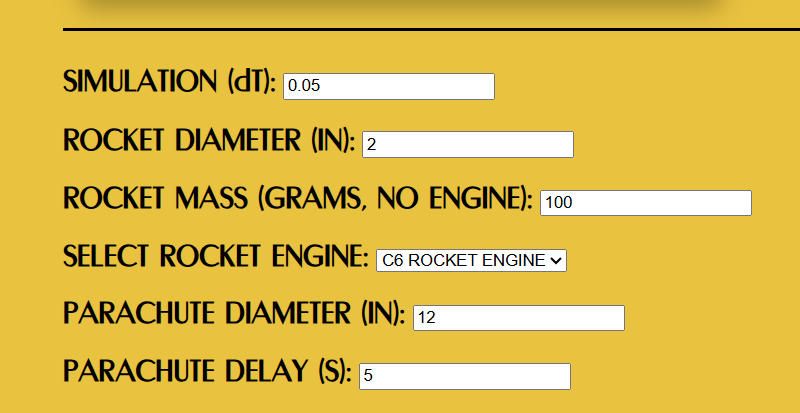
If you are building a simple model rocket performance simulator, keep the interface friendly. Ask for only the inputs needed at first: mass, diameter, drag coefficient, motor thrust, burn time, and delay. Then show clear outputs such as altitude, maximum speed, and time to apogee.
Graphs make the simulator much more useful. A velocity-versus-time graph shows when the rocket accelerates and slows. An altitude-versus-time graph shows the climb and descent. An acceleration graph helps users understand the motor’s effect during boost. Even simple charts can turn abstract numbers into a story.
Helpful warnings are also important. If the rocket’s predicted apogee is much higher than the available field can support, display a caution. If the time to apogee does not match the selected delay well, display a reminder to review the motor choice using trusted safety guidance and manufacturer recommendations. If the rocket mass is unusually high for the motor, flag it.
Common Mistakes Beginners Make With Simulations
Using Estimated Mass Instead of Actual Mass
The simulator is only as accurate as the inputs. Weighing the finished rocket gives better predictions than guessing from kit packaging. Paint, glue, repairs, and payloads all add mass.
Ignoring Drag Coefficient
Drag coefficient can feel like an annoying mystery number, but it matters. A rough estimate is fine for early learning, but refining it with flight data improves the simulator dramatically.
Forgetting Recovery Drift
Peak altitude is fun, but recovery is where the rocket becomes either reusable or “last seen heading east.” A good simulator should encourage thinking about descent time and wind drift.
Trusting One Simulation Too Much
Run multiple scenarios. Try heavier mass, higher drag, and windier conditions. A range of predictions is more useful than one perfect-looking number that depends on perfect conditions.
Experience Notes: What Building a Simple Simulator Teaches You
Working with a simple simulator for model rocket performance is a little like learning to cook with a thermometer. At first, it feels like extra work. You already know the rocket is supposed to go up, just as you already know dinner is supposed to get hot. But once you start measuring and predicting, you realize how much was previously hidden behind guesswork.
One of the first experiences many hobbyists have is discovering that mass is sneaky. A rocket that looked lightweight on the workbench may become noticeably heavier after paint, decals, extra glue, and a payload. The simulator reveals the consequence immediately. Add mass, and the altitude drops. Add enough mass, and acceleration becomes weaker. Suddenly, the phrase “lightweight construction” stops being a vague design tip and becomes a number on the screen.
Another memorable lesson is that drag is not just a textbook villain. It is personal. A beautifully smooth rocket and a rough, lumpy rocket may have the same motor, but the simulator shows how air resistance steals altitude. This makes finishing work more meaningful. Sanding, alignment, and clean construction are no longer just about looks. They are performance choices. The rocket does not care whether the paint job is Instagram-ready, but the airflow absolutely notices.
Simulators also teach patience. It is tempting to chase the highest possible altitude, especially when the screen makes motor comparisons easy. But the more simulations you run, the more you appreciate balanced performance. A flight that goes extremely high may drift too far. A powerful boost may demand better stability. A delay that looks close on paper may still deserve careful review. The simulator becomes less like a toy and more like a conversation with reality.
There is also a satisfying “aha” moment when predicted results start matching real flights. The first few simulations may be rough. Maybe the rocket flies lower than expected. Maybe the descent takes longer. Maybe the wind turns a tidy vertical plan into a long walk through grass. After recording actual altitude and conditions, you adjust the model. The next prediction gets closer. Then closer again. Eventually, the simulator feels less like a guessing machine and more like a notebook that learned math.
The most valuable experience, though, is confidence. A simple simulator helps you understand why a rocket should fly well, not merely hope that it will. It encourages better questions: Is the rocket heavy for this motor? Is the delay reasonable? Is the field large enough? Is drag being underestimated? Is the predicted altitude appropriate for the conditions? Those questions make model rocketry safer, smarter, and more rewarding.
And yes, the simulator also adds a special kind of fun. There is something deeply satisfying about changing one number and watching the flight profile respond. It is the hobby equivalent of asking, “What if?” without needing to rebuild the rocket every time. What if the rocket is 10 grams heavier? What if the drag is lower? What if the burn is longer? What if the parachute brings it down more slowly? Each answer builds intuition.
In the end, a simple model rocket performance simulator does not remove the wonder from launch day. It adds to it. When the countdown reaches zero and the rocket climbs into the sky, you are not just watching a small vehicle fly. You are watching your assumptions, calculations, design choices, and safety planning become motion. That is a pretty good payoff for a few numbers, a little physics, and a machine that politely reminds you that drag always gets a vote.
Conclusion
A simple simulator for model rocket performance is one of the best learning tools in the hobby. It turns flight into something you can explore before launch: thrust, weight, drag, mass, velocity, altitude, coast time, and recovery behavior. It helps beginners understand why rockets fly the way they do and gives experienced hobbyists a fast way to compare design choices.
The key is to keep the simulator honest. It should be simple enough to use, realistic enough to teach, and transparent about its assumptions. It should encourage safe decisions, not reckless ones. Whether you eventually move to OpenRocket, RockSim, or a custom spreadsheet, the basic lesson remains the same: good flights begin before launch day. They begin with thoughtful design, careful prediction, and respect for the physics that turns a small rocket into a very fast classroom.