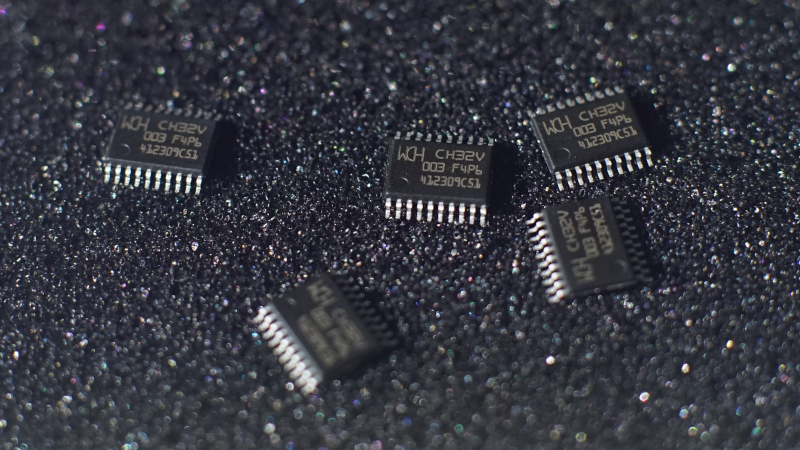
The CH32V003 is one of those microcontrollers that makes hardware people stop mid-coffee and ask, “Wait, how much?” It is a tiny RISC-V microcontroller from WCH that became famous for doing a lot with very little: a 32-bit core, useful peripherals, tiny packages, and a price that can feel almost suspiciously low. Naturally, the next question is not whether the chip is interesting. It is. The real question is whether you can actually buy one, program it, debug it, and build something useful before your patience files a formal complaint.
That is where the CH32V003 toolchain story gets fun. Or, depending on your operating system, your USB permissions, and whether your WCH-LinkE is in the correct mode, “fun” may arrive wearing a troubleshooting hat. The chip sits at the crossroads of low-cost embedded development, RISC-V experimentation, open-source tooling, and the classic microcontroller adventure known as “why won’t blinky blink?”
This guide explores what the CH32V003 is, why its toolchain matters, which development paths are available, and what real-world developers should expect when moving from curiosity to working firmware.
What Is the CH32V003?
The CH32V003 is a low-cost 32-bit RISC-V microcontroller built around WCH’s QingKe RISC-V2A core. It runs at up to 48 MHz and typically offers 16 KB of flash and 2 KB of SRAM. That may sound tiny if you live in the land of Linux-capable boards and memory measured in gigabytes, but in embedded systems, small is not automatically weak. Small can mean cheap, fast to boot, power efficient, and perfect for simple products that need just enough intelligence to do one job well.
The chip includes a surprisingly useful set of peripherals: GPIO, timers, USART, I2C, SPI, ADC, DMA, watchdog timers, low-power modes, and a one-wire serial debug interface. It is available in compact packages such as SOP-8, SOP-16, TSSOP-20, and QFN-20, making it attractive for tiny boards, sensor nodes, lighting controllers, simple motor projects, educational kits, and hardware experiments where cost matters.
In other words, the CH32V003 is not trying to be a Raspberry Pi. It is trying to be the little chip on the board that quietly handles a task, costs almost nothing, and does not need a dramatic cooling solution or a motivational speech.
Why the Toolchain Matters So Much
A microcontroller without a usable toolchain is like a sports car with no steering wheel: impressive in theory, but awkward in the driveway. A toolchain is the collection of software used to write, compile, flash, and debug firmware. For the CH32V003, that usually means a compiler, headers, startup files, linker scripts, peripheral definitions, flashing tools, and some way to talk to the chip through a programmer/debugger.
The challenge is that the CH32V003 is not just another ARM Cortex-M chip with a decade of polished tutorials behind it. It uses a WCH RISC-V core, a one-wire debug interface called SDI, and a programming ecosystem that has matured quickly but still rewards patience. The official path exists. The open-source path exists. Arduino-style support exists. PlatformIO support exists. The trick is choosing the right one for your project and temperament.
The Hardware Catch: You Probably Need a WCH-LinkE
Many CH32V003 development boards include USB-C connectors. Newcomers often assume that means they can plug in a cable and upload code like they would with a Raspberry Pi Pico or Arduino board. Sometimes that assumption walks directly into a wall. Unless the board already has a suitable bootloader, the USB connector may simply provide power or serial access. To flash the bare CH32V003 reliably, developers usually need a WCH-LinkE programmer/debugger.
This is an important detail because the older WCH-Link and the newer WCH-LinkE are not interchangeable for every WCH chip. The CH32V003 introduced a one-wire SDI debug interface, and WCH-LinkE is the practical programmer most developers reach for. It also needs to be in the correct RISC-V mode, and firmware updates may be necessary. This is embedded development’s way of reminding us that “cheap chip” does not always mean “zero setup.”
The good news is that the WCH-LinkE is also inexpensive compared with many professional debug probes. Once configured correctly, it can flash and debug CH32V003 projects, making it one of the best companion tools for anyone serious about experimenting with this microcontroller.
Main CH32V003 Toolchain Options
1. MounRiver Studio: The Official Route
MounRiver Studio is WCH’s official development environment. It is based on an Eclipse-style workflow and provides a fairly complete setup for WCH microcontrollers. For users who want the vendor-supported route, this is the most obvious starting point. It includes project templates, compiler support, debug configuration, and examples based on WCH’s ecosystem.
The advantage is convenience. You get a package designed around WCH chips, and many examples are written with the official libraries in mind. The downside is that some developers find full IDE workflows heavy, especially when they only want a minimal Makefile, a text editor, and a clean path from source code to binary. MounRiver Studio can feel like bringing a moving truck to deliver a sandwich, but if the sandwich is important and the truck works, nobody should complain too loudly.
2. ch32fun: The Lean Open-Source Route
For developers who prefer minimalism, ch32fun is one of the most exciting open-source options. It was created to make CH32V003 development lighter, faster, and less dependent on large vendor frameworks. The project provides tooling, headers, examples, and support for compiling with a RISC-V GCC toolchain. It also includes minichlink, a useful flashing and debugging utility for WCH-LinkE and related programmer setups.
The appeal of ch32fun is simple: it strips away the bulk. Instead of starting with a large hardware abstraction layer, developers can work closer to the registers and understand what the chip is doing. That makes it excellent for learning, optimization, and small firmware where every byte matters. With only 16 KB of flash and 2 KB of RAM, the CH32V003 rewards developers who know what is going into their binaries.
ch32fun is especially attractive for people who enjoy Makefiles, command-line tools, and direct control. It is not necessarily the most beginner-friendly route for someone who has never compiled firmware before, but it is powerful. Once it works, it feels refreshingly direct.
3. PlatformIO: The Modern Editor-Friendly Route
PlatformIO support for CH32V devices gives developers a more familiar workflow inside editors like Visual Studio Code. The Community-PIO-CH32V project aims to make WCH RISC-V development easier through PlatformIO’s project structure, board definitions, build options, upload tools, and debugging support.
This route is ideal for developers who like VS Code, dependency management, and repeatable project configuration. Instead of manually wiring together every compiler flag, linker script, and upload command, PlatformIO can organize much of the workflow. It also helps when you want multiple projects to share a predictable structure.
The caution is that community platforms may evolve quickly. Documentation, supported boards, framework options, and upload methods can change. That is not a dealbreaker, but it does mean you should read the current project notes rather than relying on a two-year-old tutorial from a forum post written by someone named “VoltageGoblin92.”
4. Arduino Core Support: The Friendly Route
OpenWCH provides Arduino core support for CH32 microcontrollers, making it possible to use the Arduino IDE workflow with supported WCH boards. This is the friendliest path for hobbyists who want familiar functions such as pinMode(), digitalWrite(), and Serial without immediately diving into startup assembly or linker scripts.
The Arduino route is convenient for quick experiments, educational projects, and simple firmware. It is not always the most efficient option for a tiny microcontroller, because abstraction has a cost. But for many projects, getting an LED blinking today is better than building the perfect register-level framework sometime next winter.
What You Can Actually Build With a CH32V003
The CH32V003 is a good fit for projects that need simple control logic, low cost, and small physical size. A few practical examples include LED controllers, small sensor readers, basic serial devices, simple motor control, battery-powered gadgets, keyboard accessories, timing circuits, and small automation boards.
Developers have also pushed the chip into more playful territory. Because it is cheap and fast enough for clever timing tricks, people have experimented with software-driven protocols, compact display drivers, addressable LED control, and creative uses that make the chip look far more capable than its memory size suggests. That is part of the charm: the CH32V003 invites you to ask, “Can this tiny thing do it?” and then rewards you when the answer is “somehow, yes.”
Common Setup Problems and How to Think About Them
The Programmer Is Not Detected
If the toolchain cannot find your WCH-LinkE, check the basics first: cable quality, USB permissions, driver installation, and programmer mode. On Linux, udev rules may be required. On Windows, driver behavior can vary depending on the tool. Also check whether the WCH-LinkE firmware needs an update. This step is not glamorous, but neither is debugging a problem caused by a charge-only USB cable.
The Board Has USB-C but Will Not Flash
A USB-C connector does not automatically mean the board supports USB firmware upload. Many boards expose USB for power only, or they require a bootloader that may not be installed. For a bare CH32V003, plan on using WCH-LinkE unless your specific board documentation says otherwise.
The Code Compiles but Does Nothing
This is where embedded development teaches humility. Confirm the clock settings, pin mapping, reset wiring, power supply voltage, and LED polarity. Check whether the GPIO pin you selected is actually connected to anything useful on your board. Many “compiler bugs” turn out to be “the LED is on the other pin” bugs wearing a fake mustache.
The Firmware Is Too Large
With 16 KB of flash and 2 KB of RAM, firmware size matters. Avoid unnecessary libraries, floating-point formatting, large buffers, and heavy abstractions if the project is tight. Minimal toolchains such as ch32fun can help because they encourage small binaries and direct hardware use.
Choosing the Best Toolchain for Your Skill Level
If you are new to microcontrollers, start with Arduino core support or a well-documented PlatformIO example. These routes reduce the number of moving pieces and let you focus on basic firmware behavior. Once you understand the chip, you can move closer to the metal.
If you already know embedded C and want control, ch32fun is hard to ignore. It offers a clean, minimal workflow and gives you more visibility into what is happening. For developers who care about small binaries, fast startup, and register-level learning, it may be the most satisfying option.
If you want official support and vendor examples, MounRiver Studio remains a logical choice. It may feel heavier, but it is designed for WCH’s ecosystem and can be a practical route for teams that prefer vendor-backed tooling.
Why the CH32V003 Became So Interesting
The CH32V003 matters because it changed expectations about what a very cheap microcontroller could offer. For years, ultra-low-cost chips often meant one-time programmable devices, limited documentation, unusual architectures, or awkward tooling. The CH32V003 brought a 32-bit RISC-V core into the conversation at a price point that made developers pay attention.
It also arrived during a broader shift toward RISC-V. Engineers, hobbyists, and educators are increasingly interested in open instruction set architectures, not just because of ideology but because of practical availability and experimentation. The CH32V003 gives people a tiny, inexpensive way to explore that world without buying a high-end development board.
The chip is not perfect. Documentation can feel scattered. Tooling can be confusing at first. Availability can vary. Some examples assume you already know more than you do. But the same could be said for many embedded platforms when they were young. What matters is that the ecosystem is active, creative, and improving.
Practical Advice Before You Buy
Before ordering CH32V003 boards or bare chips, make sure you also have the correct programmer. If the listing does not mention WCH-LinkE support, read carefully. If the board has USB-C, do not assume it can upload firmware through USB. Check the schematic if available. Look for boards with clear pin labels, exposed debug pins, and known examples.
For your first project, choose a simple development board rather than a bare SOP-8 chip. Yes, the tiny package is cute. No, it will not be cute when you are soldering under bad lighting while questioning your life choices. Start with a board that exposes power, ground, SDI, reset, and common GPIO pins. Once the toolchain works, then go smaller.
Also save a working blinky project. Treat it like a passport. Whenever a new setup fails, return to the known-good example and confirm that the programmer, board, and toolchain still work. This single habit can save hours of confusion.
Experience Notes: What It Feels Like to Work With the CH32V003 Toolchain
Working with the CH32V003 is a strange mix of delight and mild detective work. The delight comes from the economics. You look at the chip, look at the specifications, look at the price, and immediately start imagining absurdly cheap sensor nodes, disposable test fixtures, tiny LED widgets, or custom input devices. It feels like the kind of part that encourages experimentation because failure is financially survivable. If you destroy one, you are not ruined. You are merely annoyed.
The detective work begins when you set up the development environment. The first lesson is that the programmer matters. A correct WCH-LinkE in the correct mode feels boring in the best possible way. The wrong adapter, wrong mode, missing driver, or outdated firmware turns the process into a small mystery novel. The villain is usually not the compiler. It is usually a cable, permission setting, or assumption about how the board is wired.
Once the upload path works, the chip becomes much more enjoyable. A minimal C project builds quickly, flashes quickly, and gives you that classic embedded reward: a blinking LED that feels wildly more satisfying than it has any right to feel. With ch32fun, the experience can be especially crisp because there is less framework between you and the hardware. You write code, compile, flash, and observe. The feedback loop is short, and that is exactly what you want when learning a new microcontroller.
The memory limits are noticeable, but they are also educational. On larger chips, it is easy to be lazy. On the CH32V003, waste becomes visible. Large buffers, excessive abstraction, and careless library choices can quickly consume space. That constraint pushes you to write tighter firmware. It reminds you that embedded development is not just desktop programming with smaller pants. It is a discipline where every byte, pin, clock, and peripheral setting matters.
Another experience worth noting is that the community tooling often feels more approachable than expected. Projects like ch32fun and PlatformIO support show how fast open-source developers can turn an obscure low-cost chip into something usable. The ecosystem is still a little rough around the edges, but it is not empty. You can find examples, flashing tools, board definitions, and real discussions from people who have already hit the same problems you are about to hit.
The best mindset is to treat the CH32V003 as both a component and a learning platform. Do not expect the smoothness of a mainstream Arduino board on day one. Expect a few setup bumps. Expect to read pin diagrams. Expect to verify your programmer. Expect to learn something about linker scripts, startup files, or debug interfaces whether you planned to or not. In return, you get a fast little RISC-V microcontroller that can do useful work for a shockingly low price.
For product experiments, the CH32V003 is appealing because it allows aggressive cost reduction without giving up the comfort of a real 32-bit development model. For hobbyists, it is appealing because it feels like a tiny puzzle box. For educators, it can demonstrate embedded fundamentals without expensive hardware. And for anyone who enjoys making small computers do oddly specific things, it is simply fun.
Conclusion
The CH32V003 is not just another cheap microcontroller. It is a tiny RISC-V part that turned heads because it combines low price, useful peripherals, and a growing toolchain ecosystem. The main challenge is not the chip’s capability; it is getting the right setup. With a WCH-LinkE, a sensible development board, and the right toolchain choice, the CH32V003 becomes a surprisingly capable platform for learning, prototyping, and building compact embedded devices.
MounRiver Studio gives you the official route. ch32fun gives you a lean open-source workflow. PlatformIO brings a modern editor-friendly setup. Arduino core support lowers the entry barrier for hobbyists. Each path has trade-offs, but all of them prove the same point: this tiny chip is worth trying if you enjoy embedded systems and do not mind earning your first successful flash.
If you can get a CH32V003 to try it on, the toolchain is no longer just a curiosity. It is an invitation to build small, clever, inexpensive thingsand maybe laugh a little when your “ten-cent” microcontroller project somehow consumes an entire weekend.