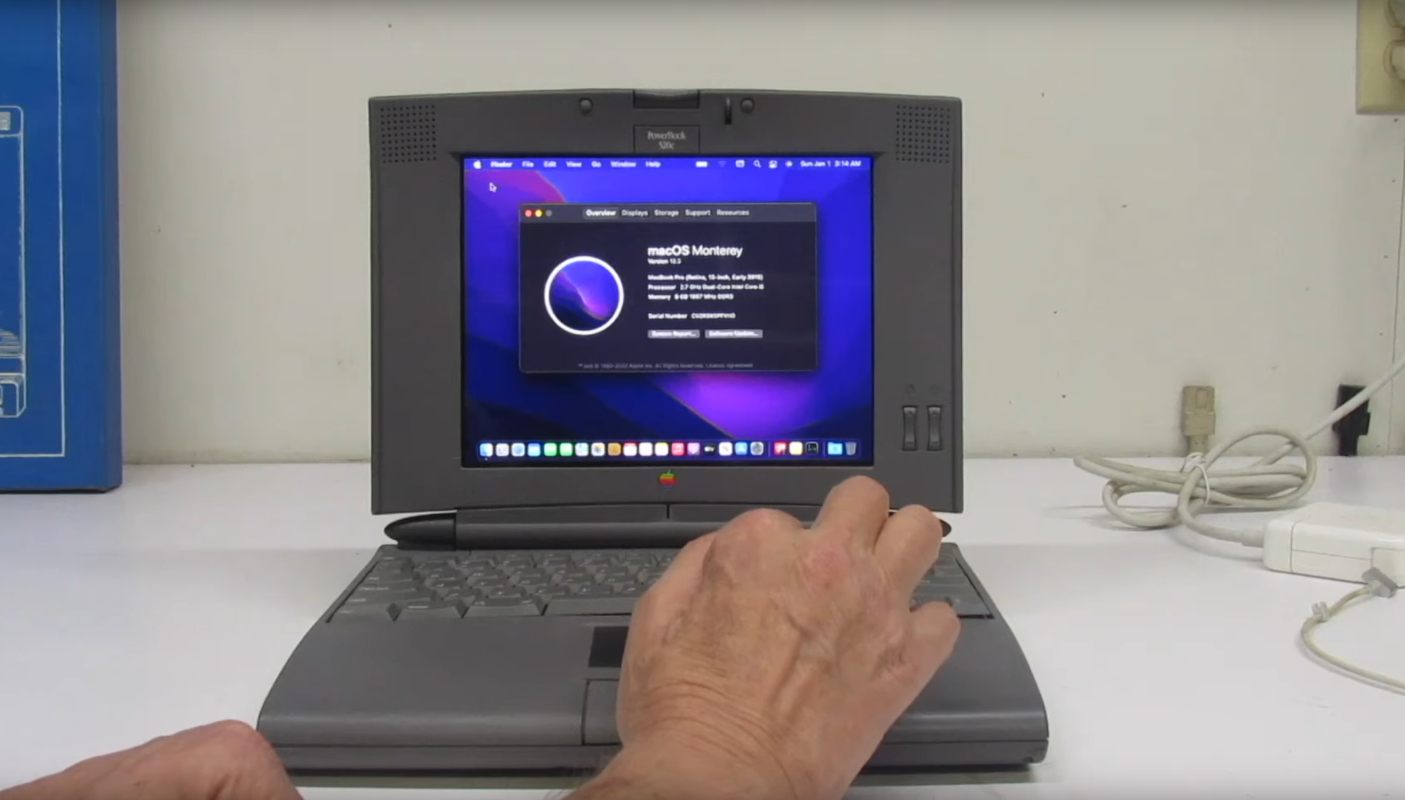
A 1990s PowerBook running macOS Monterey sounds like the kind of headline that escaped from a retro-computing dream journal. A beige-gray laptop from the dial-up era, booting a modern operating system with Safari, Shortcuts, Focus modes, iCloud features, and enough polish to make System 7 blush? That is not just a tech project. That is a tiny time machine with a very stubborn power button.
But here is the important twist: this is not a stock PowerBook 520c somehow muscling its way into modern Apple software through sheer vintage confidence. The project works because the original PowerBook shell was carefully transformed into a modern hybrid machine. The outside still carries the unmistakable look of Apple’s 1994 portable design, while the inside uses much newer hardware, including components from a 2015 MacBook Pro. In other words, the classic PowerBook did not learn Monterey by doing push-ups. It got a brain transplant.
That is exactly what makes the build fascinating. It sits at the intersection of retro Apple nostalgia, modern laptop usability, hardware hacking, repair culture, and the eternal maker question: “What if I put this thing inside that thing?” The result is a vintage Apple PowerBook that appears to belong in a 1990s office, yet behaves like a much more modern Mac.
What Is the “90s PowerBook Runs MacOS Monterey” Project?
The project centers around a 1994 Apple PowerBook 520c, a member of the PowerBook 500 series. In its original form, the PowerBook 520c was powered by a Motorola 68LC040 processor, came with only a few megabytes of RAM, used SCSI storage, and displayed its world through a 9.5-inch color dual-scan screen. By today’s standards, that is less “daily driver laptop” and more “museum piece with a handle.”
The modified machine keeps the personality of the PowerBook 520c but replaces nearly all of the original electronics. The donor hardware reportedly came from a broken 2015 MacBook Pro with a 2.7GHz Intel Core i5 processor. That gives the vintage enclosure enough modern horsepower to run macOS Monterey, browse the web, handle everyday apps, and behave like a real computer rather than a nostalgic desk ornament.
To make the build practical, the original display was replaced with a 9.7-inch Retina panel from an iPad 3. The keyboard and trackpad were retained, but they needed a translation layer to communicate with the modern MacBook logic board. A Teensy development board helped bridge that gap, letting old-school input hardware speak a language the newer internals could understand. The project also required display adapter hardware, custom wiring, case modifications, battery work, and a level of patience normally reserved for people who assemble furniture without looking at the instructions and somehow survive.
Why the PowerBook 520c Is Such a Perfect Retro Shell
The PowerBook 520c was not just another old laptop. Released in 1994, it represented an important moment in Apple portable design. The PowerBook 500 series helped popularize the trackpad, replacing the trackball used in earlier models. Today, that sounds obvious, but at the time it was a meaningful design shift. Modern laptops owe a surprising little thank-you note to machines like this.
The 520c also has a distinctive case shape: chunky, practical, and confident in a way that modern ultra-thin laptops are not. It has thick bezels, a deep keyboard deck, and a profile that says, “Yes, I am portable, but I also contain secrets.” That physical size makes it a friendly candidate for internal modification. A tiny modern board can disappear inside a shell that once housed much bulkier components.
There is also the emotional side. A 1990s PowerBook has character. It looks like the kind of computer that might be used to write a screenplay, manage a college newspaper, or connect to the internet while making sounds that frightened household pets. Putting Monterey inside it creates a delightful mismatch: the user sees retro Apple design, but the machine responds with modern macOS behavior.
Can a Real 1990s PowerBook Natively Run macOS Monterey?
No, not in any practical or official sense. A stock PowerBook 520c cannot natively run macOS Monterey. The original hardware is from a completely different era of computing. The 520c used a 68LC040 processor, while Monterey was built for much newer Intel-based Macs and Apple silicon Macs. The gap between those platforms is not a small compatibility issue. It is more like asking a cassette player to stream 4K video because both involve sound.
This distinction matters for readers searching for “PowerBook macOS Monterey” or “install Monterey on vintage Mac.” The headline is fun, but the technical reality is more specific: the PowerBook shell runs Monterey because modern MacBook Pro internals are doing the computing. The vintage case, keyboard, and trackpad provide the experience. The 2015 MacBook Pro hardware provides the operating system support.
That does not make the project less impressive. In fact, it makes it more interesting. Instead of relying on impossible software magic, the builder created a functional hybrid computer. It is part restoration, part fabrication, part electronics engineering, and part Apple fan art with screws.
The Hardware Swap: Old Soul, New Brain
The most important part of the build is the internal replacement. The donor MacBook Pro logic board gives the machine a modern CPU, modern memory, modern graphics support, and compatibility with macOS Monterey. Apple lists the Early 2015 13-inch Retina MacBook Pro as compatible with macOS Monterey, which explains why that donor hardware is such a logical choice.
Using a 2015 MacBook Pro also gives the project a sweet spot of usefulness. It is old enough to be relatively affordable as damaged or parts-only hardware, but new enough to run a modern macOS version smoothly for basic tasks. A 2.7GHz Intel Core i5 is not going to beat a new Apple silicon Mac in a benchmark race, but inside a 1994 PowerBook shell, it feels like installing a jet engine in a shopping cart. A very tasteful shopping cart, of course.
Display Upgrade: From 9.5-Inch Vintage LCD to Retina Sharpness
The original PowerBook 520c display was charming, but modern macOS would not be happy living on a tiny, low-resolution 1990s LCD. The project solved that by using a 9.7-inch Retina display from an iPad 3. This is one of the smartest parts of the build because it preserves the compact visual proportions of the old PowerBook while giving the user a crisp display suitable for modern software.
The screen swap is not as simple as sliding in a new panel and calling it a day. Retina panels need controller hardware, proper power handling, and careful physical fitting. The iPad display was slightly larger than the original 520c screen area, so the case needed trimming and adjustment. The final result is a display that looks modern while still framed by vintage plastic. It is like giving a classic car a digital dashboard without ruining the smell of the upholstery.
Keyboard and Trackpad: Keeping the Vintage Feel
One reason this project feels special is that it does not simply hide a complete modern laptop inside an empty case. The original PowerBook keyboard and trackpad remain part of the experience. That matters. The keyboard feel, the trackpad size, and the physical layout are what make the machine feel like a PowerBook rather than a MacBook wearing a Halloween costume.
To make those vintage input devices work with the modern internals, the project uses a Teensy microcontroller. The Teensy acts as a translator, converting old keyboard and trackpad signals into input the MacBook hardware can understand over a modern interface. This is the kind of behind-the-scenes work that casual viewers may never notice, but it is essential to making the machine feel integrated.
Why macOS Monterey Makes the Build More Than a Display Piece
macOS Monterey gives the project practical modern value. Monterey introduced features such as Shortcuts on the Mac, Focus modes, Safari Tab Groups, AirPlay to Mac, and Universal Control. Not every feature is equally important for this modified PowerBook, but the point is clear: the machine is not limited to retro software. It can run a relatively modern Apple desktop experience.
That changes the emotional impact. A restored 1994 PowerBook running its original software is wonderful, but it remains tied to vintage workflows. A PowerBook shell running Monterey can be used for web browsing, writing, basic productivity, media playback, and other everyday tasks. It becomes a conversation piece that can also open a document, join a Wi-Fi network, and maybe even make your coffee shop table look 37 percent cooler.
Is This a Hackintosh?
Not exactly. The word “Hackintosh” usually refers to installing macOS on non-Apple hardware. This build uses Apple donor hardware from a MacBook Pro, so it is better understood as a custom Mac transplant or retro MacBook Pro conversion. The operating system is running on Mac hardware that supports it, but the enclosure and user interface components come from a much older PowerBook.
This is also different from using OpenCore Legacy Patcher on an unsupported Intel Mac. OpenCore Legacy Patcher can help many older Intel Macs run newer macOS versions, but it does not support PowerPC or Apple silicon models, and it would not magically make a 68k PowerBook 520c compatible with Monterey. The project works because the internal computer is effectively a 2015 MacBook Pro, not because the original 1994 logic board suddenly became a modern Mac.
Why Projects Like This Matter
At first glance, a 90s PowerBook running macOS Monterey may look like a clever stunt. And yes, there is definitely some glorious stunt energy here. But projects like this also highlight bigger ideas in technology culture.
First, they challenge the idea that old hardware must become waste. The original PowerBook electronics may no longer be suitable for modern computing, but the case, keyboard, trackpad, and design language still have value. Reusing them turns e-waste into a custom machine with personality.
Second, the project celebrates repair and modification. Modern devices can feel sealed, glued, and discouraging to curious hands. A build like this reminds people that computers are physical objects, not magic rectangles. They can be opened, studied, adapted, and rebuilt.
Third, it preserves design history in a living way. A museum display can show what a PowerBook looked like, but a working hybrid lets people experience the form factor. The user can type on it, carry it, open the lid, and feel the difference between 1990s industrial design and today’s minimal aluminum slabs.
The Challenges Behind the Build
Projects like this are never just “put newer parts in old case.” The builder has to solve several problems at once. The display must fit and connect correctly. The keyboard must be decoded. The trackpad has to behave. The battery system needs careful planning. Ports must be placed where they are useful without destroying the look of the case. Cooling matters too, because a MacBook Pro logic board was designed for a different internal layout.
Then there is the physical fit. Old laptops were spacious compared with today’s machines, but that space was not designed for modern boards, modern batteries, or new display drivers. Mounting points rarely line up. Cables may be too short, too stiff, or too awkwardly positioned. Even small details, like where the power button sits or how the lid closes, can become mini engineering puzzles.
That is why the finished machine is more than a novelty. It represents dozens of hidden decisions. Every clean edge and working key is evidence of trial, adjustment, and probably at least one moment where the builder stared into the middle distance and questioned every life choice that led to a tiny connector refusing to cooperate.
Performance: What Can This Monterey PowerBook Actually Do?
Because the machine uses 2015 MacBook Pro internals, its performance is closer to an older Retina MacBook Pro than a true 1994 PowerBook. That means it should handle everyday tasks such as writing, light browsing, email, music playback, basic photo management, and lightweight productivity work. It is not meant to compete with a new MacBook Air or MacBook Pro, but that is not the point.
The magic is contextual. A 2015 Intel MacBook Pro running Monterey is normal. Put those same internals inside a PowerBook 520c shell, and suddenly every Finder window feels like a small act of rebellion. The performance is useful enough to make the machine more than decoration, while the design makes ordinary tasks feel entertaining.
What This Build Says About Apple Design
The project also creates an accidental conversation between two Apple eras. The PowerBook 520c came from a time when Apple laptops were thick, modular, and visually expressive. The 2015 MacBook Pro came from the Retina era: thinner, sharper, more integrated, and far more powerful. Combining them shows how much portable computing has changed.
The 1994 shell brings charm, tactility, and repair-friendly spaciousness. The 2015 internals bring speed, efficiency, and software compatibility. Together, they create something Apple would almost certainly never sell, which is part of the appeal. It is too weird for a product lineup, too labor-intensive for mass production, and too delightful to ignore.
Should You Try Building One?
For most people, this is better as inspiration than a weekend beginner project. A successful build requires electronics knowledge, comfort with disassembly, soldering or wiring skill, access to donor parts, patience with microcontroller programming, and the ability to modify plastic without turning a rare vintage case into sad confetti.
That said, the idea can scale. Beginners can start with safer retro projects, such as restoring a vintage Mac, replacing storage in an older laptop, cleaning and preserving a classic keyboard, or experimenting with emulation on modern hardware. More advanced makers might attempt display conversions, USB keyboard controllers, or full internal swaps.
The key lesson is not “everyone should gut a PowerBook.” The lesson is that old technology can be reimagined. With enough care, an obsolete machine can become something useful, beautiful, and deeply personal.
Experience Notes: Living With a 90s PowerBook That Runs macOS Monterey
Using a machine like this would be a wonderfully strange experience. The first surprise would be the visual contradiction. You open a thick 1990s PowerBook lid expecting pixelated icons, gray windows, and the cozy pace of classic Mac OS. Instead, Monterey appears with its modern dock, translucent interface, current app design, and familiar Apple polish. Your brain needs a second to catch up. It is like seeing a rotary phone receive a FaceTime call.
Typing would be the next big moment. Modern laptops often chase thinness, which can make keyboards feel short, flat, and businesslike. A vintage PowerBook keyboard has a different personality. The keys have more visual presence, the deck feels deeper, and the layout reminds you that laptops used to be designed as portable workstations rather than metal envelopes with screens. Writing on it would feel oddly ceremonial, especially if you were drafting an article, coding a small project, or answering email while people nearby tried to figure out whether you were using a prop from an old movie.
The Retina display would probably be the most delightful upgrade. A crisp modern screen inside a vintage bezel creates a visual remix that makes macOS Monterey feel both familiar and new. Safari tabs, Finder windows, and text documents would look sharp, but the surrounding case would constantly remind you that this machine began life in an era when 320MB of storage was respectable. That contrast is the whole charm.
There would also be practical quirks. The machine would not feel like a modern MacBook in terms of weight, thinness, battery expectations, or convenience. It would be thicker, more delicate, and more attention-grabbing. You would not toss it casually into a backpack with gym shoes and a water bottle. This is a laptop you carry like it has a story, because it does. Every port, cable, and modified internal bracket represents a decision.
As a daily writing machine, it could be surprisingly fun. A 2015 MacBook Pro platform is still capable enough for focused work, especially if the goal is drafting, browsing, researching, and managing files. The vintage body may even reduce distraction. You would not open this machine to doom-scroll casually. You would open it because you want to do something specific and enjoy the weird pleasure of using a computer that looks older than some internet memes but behaves like a modern Mac.
The best part is the emotional reaction it creates. Tech often moves so quickly that old devices become invisible. A project like this slows everything down. It makes you notice the hinge, the keyboard, the shape of the palm rest, the size of the bezel, and the history of portable computing. It reminds you that computers are not just spec sheets. They are objects people touch, carry, repair, remember, and sometimes resurrect in ridiculous, brilliant ways.
In that sense, the 90s PowerBook running macOS Monterey is more than a modified laptop. It is a love letter to Apple history, a practical maker experiment, and a joke with excellent engineering behind it. It proves that nostalgia does not have to sit on a shelf. Sometimes, with enough skill and a few carefully chosen parts, nostalgia can boot up, connect to Wi-Fi, and run Monterey.
Conclusion
The story of a 90s PowerBook running macOS Monterey is not about an untouched 1994 laptop defeating time. It is about a clever hardware transplant that blends vintage Apple design with modern Mac capability. By combining a PowerBook 520c shell, 2015 MacBook Pro internals, an iPad Retina display, and custom input hardware, the project turns a classic portable into a usable modern machine.
For retro-computing fans, it is a reminder that old devices still have creative potential. For Apple enthusiasts, it is a playful bridge between the 68k PowerBook era and the Retina MacBook Pro era. For makers, it is proof that the best projects often begin with a slightly unreasonable question: “Could this work?” In this case, the answer is yesand it looks fantastic.