In The Sims, time is not just money. Time is toddlers becoming teens while you were busy choosing wallpaper, beloved Sims turning gray before their grilled cheese aspiration is complete, and your caan. The good news? Aging in The Sims is not a runaway train. It is more like a mischievous llama: chaotic, but manageable once you know where the buttons are.
This guide focuses mainly on The Sims 4, because it is the version most players are actively playing today, but many of the ideas apply across the franchise: pause aging through settings, extend life with in-game rewards or supernatural routes, and use cheats or mods when you want total story control. Whether you are protecting a favorite Sim, running a rotational save, building a legacy challenge, or simply refusing to let your celebrity vampire barista become an elder before brunch, these three methods will help you prevent aging in The Sims without turning your save file into emotional confetti.
Why Prevent Aging in The Sims?
Aging is one of the core systems that makes The Sims feel alive. Babies grow, children head to school, adults chase careers, and elders begin telling the same story four times at Winterfest. For many players, that life cycle is exactly the point. But for storytellers, builders, challenge players, and rotational household fans, automatic aging can sometimes move too fast.
Maybe you created a young adult Sim with a five-season character arc and the game is already tapping its watch. Maybe you want to play several households in one world, but you do not want your inactive families aging while you are away. Or maybe you spent two hours sculpting the perfect face in Create-a-Sim and are emotionally unprepared for wrinkles. No judgment. We have all protected a digital person from time like a tiny pixel wizard.
The best way to stop aging depends on how you play. If you want a clean, no-cheat solution, use the game settings. If you enjoy earning rewards, use potions and life-extension items. If you want absolute control, cheats and carefully chosen mods can give you the power of a benevolent, slightly nosy universe.
Method 1: Turn Off Auto Aging in Game Options
The simplest and most reliable way to prevent aging in The Sims 4 is to turn off automatic aging in the gameplay settings. This is the best choice if you want your Sims to stay the same age until you personally decide otherwise. It is also the cleanest option because it does not require cheats, mods, expansion packs, or suspicious glowing beverages.
How to Turn Off Aging in The Sims 4
To stop Sims from aging automatically, open your save file and go to Game Options. From there, choose Gameplay. You will see aging options for played households and unplayed households. These settings determine who ages while time passes in your world.
For maximum control, set Auto Age (Played Sims) to No. This stops households you have played from aging automatically. Then uncheck or turn off Auto Age (Unplayed Sims) so townies and households you have not controlled do not age in the background. Finally, choose a Sim Lifespan setting. If you do not want to fully stop aging but want to slow it down, select Long. If you want true pause-button energy, turn auto aging off entirely.
Best Settings for Rotational Gameplay
Rotational gameplay means playing multiple households in one save. For example, you might spend one Sim week with the Goth family, then move to the Pancakes, then check in on your own chaotic household where someone keeps setting the kitchen on fire. Without the right aging settings, one family can grow older while another is still waiting for you to return. That can make stories feel uneven.
A smart rotational setup is to set Auto Age (Played Sims) to Only Active Household. This allows the household you are currently playing to age while other played households stay paused. Then you can decide whether unplayed Sims should age in the background. If you want the whole world to move forward, leave unplayed aging on. If you want a more controlled, dollhouse-style save, turn it off.
This method is perfect for storytellers because birthdays become intentional events. A child ages up when the story is ready, not because you spent too long redesigning the bathroom. You can still age Sims manually using a birthday cake. Bake a cake, add birthday candles, and choose the Sim who should blow them out. It is simple, dramatic, and far less stressful than realizing your favorite Sim became an elder while you were checking neighborhood stories.
Pros and Cons of Turning Off Aging
The biggest advantage is control. Your Sims stay exactly where you want them in life. Careers, relationships, skills, aspirations, and family drama can unfold at your pace. The downside is that the world may start to feel frozen if you never manually age anyone. Children may stay children forever, townies may remain suspiciously youthful, and your save can develop what scientists call “everyone is 28 forever syndrome.”
To avoid that, use a manual aging schedule. For example, you might age up children after completing certain milestones, age up adults after career promotions, or age up entire neighborhoods at the end of each in-game season. This keeps your world alive while still protecting your favorite Sims from accidental time theft.
Method 2: Use In-Game Rewards, Potions, and Supernatural Options
If you do not want to disable aging for everyone, you can prevent or delay aging for specific Sims using in-game rewards and special life states. This method is excellent when you want the rest of the world to continue aging naturally but need one important Sim to stay young longer. Perhaps they are your founder, your main character, your celebrity chef, or just the Sim whose cheekbones you refuse to surrender to time.
Use the Potion of Youth
In The Sims 4, the Reward Store includes the Potion of Youth, which costs 1,500 Satisfaction Points. Your Sim earns Satisfaction Points by completing aspiration goals and wants. When the Sim drinks the potion, it resets their current age stage back to the beginning. That means a Young Adult remains a Young Adult, an Adult remains an Adult, and an Elder remains an Elder. It does not usually move a Sim back to a previous life stage.
The best time to use the Potion of Youth is right before a Sim is about to age up. If your adult Sim is one day away from becoming an elder, the potion gives you the biggest value because it sends them back to the start of adulthood. If they drink it on the first day of adulthood, you are basically buying a very expensive smoothie with feelings.
To earn Satisfaction Points faster, focus on completing aspiration milestones. Choose aspirations that fit your Sim’s lifestyle. A creative Sim can work through painting, writing, or musical goals. A family Sim can complete parenting or relationship-based milestones. A knowledge-focused Sim can build skills quickly and rack up points without turning life into a spreadsheetunless you like spreadsheets, in which case, congratulations, you are already playing the game within the game.
Try Occult Life States
Expansion packs add more ways to bend aging rules. Vampires, introduced in the Vampires game pack, are one of the most famous anti-aging routes. Once a Sim becomes a vampire, they do not age like ordinary Sims. This is a great option for players who want a permanently youthful character with dramatic lighting, mysterious powers, and a minor sunlight problem.
Spellcasters from Realm of Magic can also pursue magical solutions. Depending on gameplay choices and potion access, magic can help extend life or prevent death by old age. Werewolves and other occult systems may also offer special longevity-related abilities through pack-specific progression. These routes are more flavorful than simply turning off aging, because they become part of the story. Your Sim is not young forever because you clicked a menu; they are young forever because they made a magical decision and now everyone at family dinner has questions.
Use Life Extension Without Freezing the Whole World
The main benefit of potions and supernatural options is selectivity. You can keep one Sim young while siblings, neighbors, rivals, and exes continue aging normally. This is useful for legacy saves where you want a founder to remain present longer, or for storytelling saves where a main character needs time to complete a major arc.
The downside is maintenance. Potion of Youth must be purchased again and again if you want long-term youth. Occult life states may come with gameplay trade-offs. Vampires must manage thirst and sunlight. Spellcasters may need to learn recipes, gather ingredients, or deal with magical consequences. Still, for many players, these trade-offs are part of the fun. Eternal youth should come with at least a little weirdness. Otherwise, where is the drama?
Method 3: Use Cheats or Mods for Full Control
Sometimes you do not want gentle guidance. You want control. You want to edit ages, freeze households, restore a Sim, or fix a birthday mistake without begging the Reward Store for mercy. That is where cheats and mods come in. This method is best for players who are comfortable customizing their game and who understand that cheats can affect achievements on some platforms.
Use CAS Full Edit Mode
One of the most useful age-control tools in The Sims 4 is cas.fulleditmode. To use it on PC or Mac, open the cheat console with Ctrl + Shift + C. Type testingcheats true and press Enter. Then type cas.fulleditmode and press Enter again. After that, Shift-click the Sim and choose Modify in CAS. In full Create-a-Sim mode, you can change age categories and edit many details that are normally locked after creation.
Console players can also open the cheat console using the controller shoulder buttons, though button combinations and cheat behavior can vary by platform. It is always smart to save before using major cheats. Think of it as wearing a seatbelt before driving a rocket-powered llama.
CAS full edit mode is especially helpful when you accidentally aged up the wrong Sim, created a parent who looks the same age as their teen, or need to correct a story timeline. However, it is more of a correction tool than a natural anti-aging system. If you want long-term age management, combine it with aging settings.
Use Death and Need Cheats Carefully
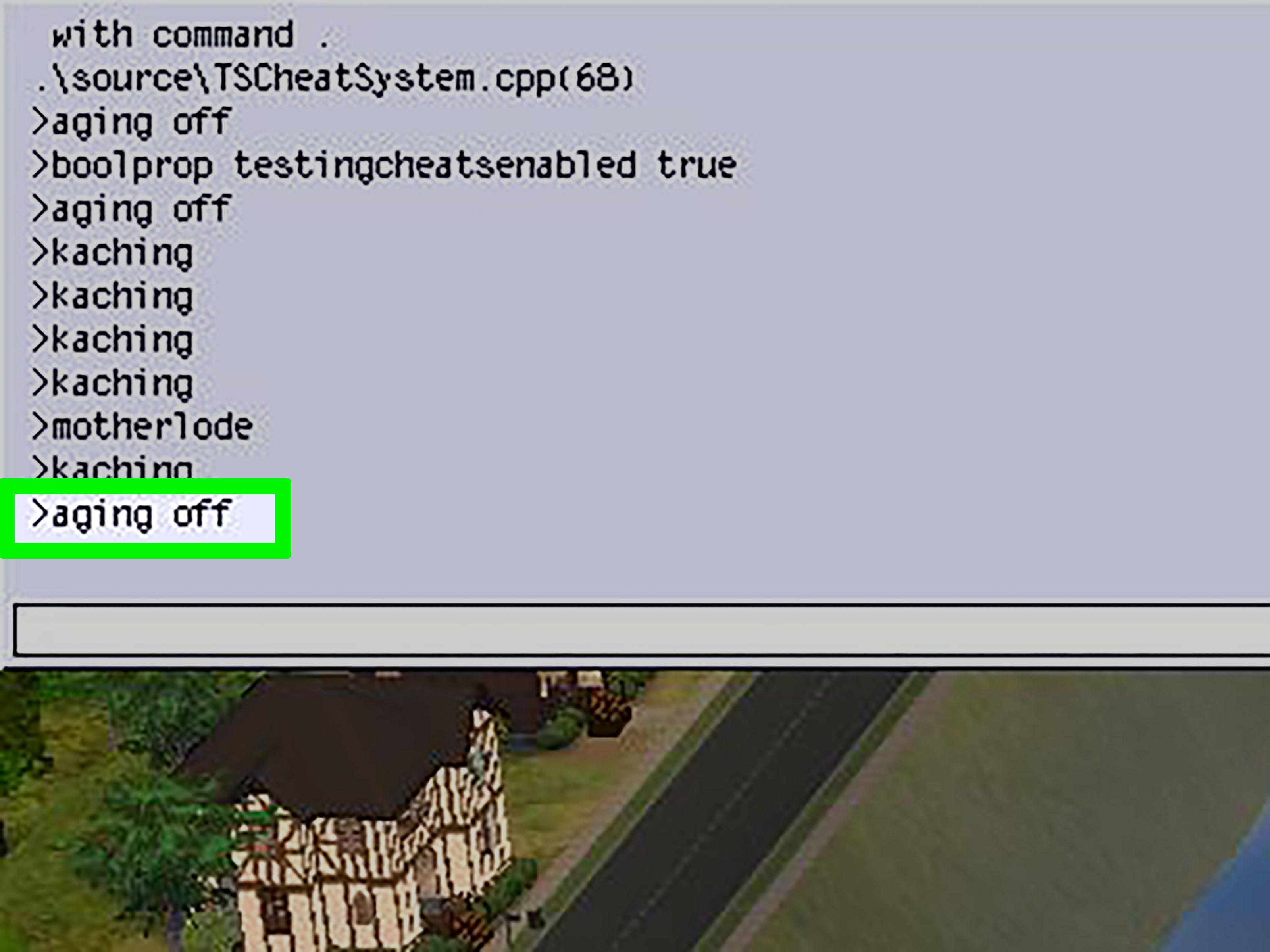
Some players use cheats to prevent death or keep Sims stable. Cheats can disable need decay, change household conditions, or help restore control after a gameplay disaster. These are not always direct aging solutions, but they can support an anti-aging storytelling setup. For example, if you are filming scenes, writing a machinima story, or creating screenshots, disabling needs can keep Sims from wandering off to nap in a bush while you are trying to stage an emotional goodbye.
Still, cheats should be used carefully. Save before experimenting. Keep a backup save if you are working on a long legacy or an important story file. Cheats are powerful, but one typo can turn a peaceful family evening into a technical support subplot.
Consider Mods Like MCCC
For PC and Mac players, mods can provide deeper aging control than the base game. One of the best-known tools is MC Command Center, often called MCCC. It allows players to customize many systems, including age spans, story progression, household settings, pregnancy, population, and more. With the right configuration, you can decide exactly how long each life stage lasts or manage aging differently across households.
Mods are not available in the same way on console, and they require maintenance after game updates. If you use mods, download them only from trusted creators, read installation instructions, and update them regularly. Broken mods can cause strange behavior, missing menus, or Sims standing around like they just forgot why they entered the kitchenwhich, to be fair, is also realistic.
Which Aging Prevention Method Is Best?
The best method depends on your play style. For most players, turning off auto aging is the safest and easiest solution. It is built into the game, works without cheats, and gives you broad control. For players who want story-friendly immortality, potions and occult life states are more immersive. For advanced players, cheats and mods offer the most precision.
If you are new to The Sims, start with game settings. If you are running a legacy family, use a mix of long lifespan, birthday cakes, and occasional Potion of Youth. If you are building a cinematic story save, use aging off plus CAS full edit mode. If you are a rotational player with many households, use “Only Active Household” for played Sims and decide whether townies should age based on your story needs.
Common Mistakes to Avoid
Forgetting About Unplayed Sims
Many players turn off aging for their active household but forget unplayed Sims. Then they return to another family and discover everyone has aged, moved on, or become emotionally inconvenient. Always check both played and unplayed aging settings.
Using Potion of Youth Too Early
The Potion of Youth works best near the end of a life stage. Drinking it too early wastes potential days. Wait until the age bar is nearly full before using it.
Relying on One Save File
Before major cheats, mods, or age edits, make a backup save. Use “Save As” and create a duplicate. Future you will be grateful, especially if present you is experimenting at 2 a.m. with a vampire toddler household and questionable confidence.
Personal Gameplay Experiences: What Actually Feels Best
After playing saves with aging on, aging off, long lifespan, potions, and full rotational control, the most enjoyable setup often depends on the emotional purpose of the save. In a legacy challenge, aging gives the game momentum. It creates urgency. Your founder cannot master every skill, marry three soulmates, raise eight children, and become a global celebrity unless you plan carefully. That pressure can be fun. It makes birthdays feel important instead of decorative. However, it can also feel rushed when you become attached to a Sim who still has unfinished goals.
In storytelling saves, aging off feels much better. When you are creating a specific narrative, automatic birthdays can interrupt the pacing. Imagine planning a high school romance arc only for one Sim to become a young adult while the other is still studying for exams. Awkward? Yes. Legally concerning? Also yes. Turning off aging allows the story to breathe. You can decide when the school year ends, when the family grows, and when the dramatic haircut happens after the breakup.
For rotational gameplay, the best experience is usually a hybrid. Setting played households to age only when active keeps the timeline fair. Each family gets its turn. Nobody loses five years because you spent a week helping another household open a bakery. Meanwhile, unplayed Sims can either age normally for realism or stay frozen for control. If you enjoy a living world, let unplayed Sims age. If you are curating every household like a tiny neighborhood museum, turn it off.
The Potion of Youth is satisfying when used sparingly. It feels like an earned reward, especially for Sims who complete aspirations naturally. A Sim who works hard, fulfills goals, and buys a youth potion has a nice story logic: they earned more time. But using potions constantly can become repetitive. At that point, aging settings are cleaner.
Occult immortality is the most entertaining option for players who like drama. Vampires are not just young forever; they change the entire mood of a save. Suddenly your Sim is avoiding sunlight, building powers, and making suspiciously intense eye contact at parties. Spellcaster solutions also add flavor, especially for magical families. Instead of simply preventing aging, you create a reason for it inside the world.
Cheats are best as repair tools. They are perfect when the game ages someone unexpectedly or when you realize a Sim’s age does not fit the story. But for everyday play, relying only on cheats can make the save feel less grounded. The sweetest spot is control plus consequence: use settings to prevent unwanted aging, use potions or occult paths for special Sims, and use cheats only when the game needs a gentle correction from the sky.
Conclusion
Preventing aging in The Sims is not about avoiding gameplay; it is about choosing the kind of gameplay you want. Some players love the natural rhythm of birthdays, generations, and emotional chaos. Others want time to slow down while they build stories, finish aspirations, or protect one perfect Sim from the cruel march of calendar math.
The three best ways to prevent aging in The Sims are simple: turn off auto aging in Game Options, use in-game rewards or supernatural life states, and apply cheats or mods when you need advanced control. Used wisely, these tools let you create a world that moves at your pace. Your Sims can grow up when the story is ready, stay young when the drama demands it, and avoid becoming elders just because you spent three in-game days choosing kitchen cabinets.
Note: Game menus, pack features, and cheat behavior can vary slightly by platform, installed expansions, and updates. Always save before changing aging settings, using cheats, or installing mods.