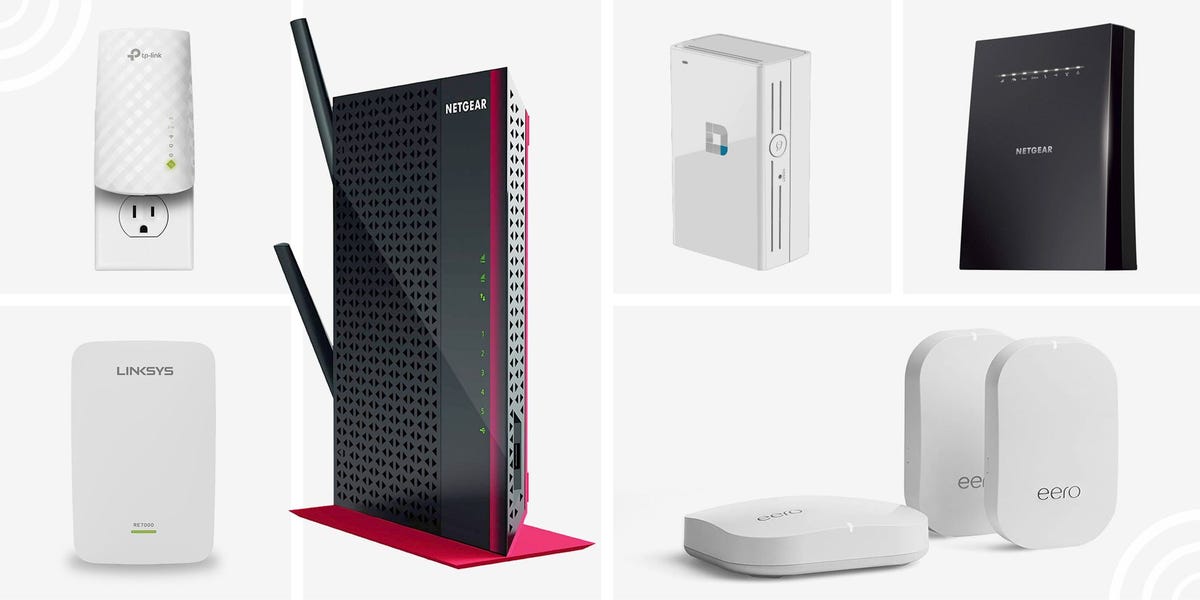
Every home has that one spot where Wi-Fi goes to retire. Maybe it is the upstairs bedroom, the garage gym, the patio chair where you answer “just one more email,” or the corner of the living room where your smart TV buffers like it is thinking about its life choices. A good Wi-Fi extender can help push your wireless signal farther without forcing you to replace your entire router setup.
This guide breaks down the 5 best Wi-Fi extenders for fast home internet, including premium Wi-Fi 7 models, dependable Wi-Fi 6 range extenders, a powerful gaming-friendly pick, and a budget-friendly option for smaller dead zones. The goal is simple: help you choose the right extender for your home, your internet plan, and your patience level.
Before we crown the winners, here is the honest truth: a Wi-Fi extender is not magic. It cannot turn a weak internet plan into fiber-speed glory, and it should not be placed in the dead zone itself. Think of it like a relay runner. It needs to stand where your router signal is still strong, then pass that signal into the weaker area. Put it too far away and it will repeat a sad little signal with great enthusiasm.
Quick Comparison: Best Wi-Fi Extenders for Fast Home Internet
| Rank | Wi-Fi Extender | Best For | Wi-Fi Standard | Top Rated Speed |
|---|---|---|---|---|
| 1 | TP-Link RE655BE | Best premium Wi-Fi 7 extender | Wi-Fi 7 | Up to 10.8 Gbps |
| 2 | TP-Link RE715X | Best overall Wi-Fi 6 extender | Wi-Fi 6 | AX3000 class |
| 3 | ASUS RP-AX58 | Best for long range and ASUS AiMesh homes | Wi-Fi 6 | 574 + 2402 Mbps |
| 4 | NETGEAR Nighthawk EAX80 | Best for gaming, streaming, and wired devices | Wi-Fi 6 | AX6000 class |
| 5 | TP-Link RE315 | Best budget extender for one-room dead zones | Wi-Fi 5 | 300 + 867 Mbps |
What Makes a Wi-Fi Extender Worth Buying?
The best Wi-Fi extender is not always the one with the biggest number on the box. Those numbers are theoretical combined speeds across bands, not the exact speed your laptop will see while you are hiding in the laundry room for a quiet video call. Real performance depends on router strength, wall thickness, device age, interference, placement, and whether your neighbor has named their network “FBI Surveillance Van.”
For most households, the smartest extender has four things: a modern Wi-Fi standard, reliable app setup, strong placement tools, and at least one Ethernet port. Wi-Fi 6 is the sweet spot for many homes because it handles crowded networks better than older Wi-Fi 5 gear. Wi-Fi 7 is exciting for future-proofing, especially if you already own newer phones, laptops, or routers that support it. Ethernet is helpful because a wired smart TV, console, or desktop PC can avoid some of the wireless congestion that makes streaming feel like soup.
1. TP-Link RE655BE: Best Premium Wi-Fi 7 Extender
Why it stands out
The TP-Link RE655BE is the “I want the big one” choice. It is a tri-band Wi-Fi 7 range extender with rated speeds up to 10.8 Gbps, using 6 GHz, 5 GHz, and 2.4 GHz bands. It supports Multi-Link Operation, often called MLO, which allows compatible Wi-Fi 7 devices to use multiple bands more intelligently for better throughput, lower latency, and more stable performance.
In normal human language: this extender is built for homes where people stream 4K video, game online, download big files, work remotely, and somehow still have fourteen smart bulbs arguing with the router. It also includes a 2.5G Ethernet port, which is excellent if you want to connect a gaming PC, console, media streamer, or access-point backhaul without being limited by a basic 100 Mbps port.
Best use case
Choose the TP-Link RE655BE if you already have a Wi-Fi 7 router, a fast fiber or cable plan, and newer devices that can actually benefit from the latest wireless features. It is especially strong for high-bandwidth households where the extender is not just filling a weak corner but extending a serious home network.
Possible drawbacks
The biggest drawback is price. A premium Wi-Fi 7 extender may cost more than a decent mesh starter kit. Also, if your router is older or your internet plan is modest, you may not experience the full benefit. Buying this extender for a 100 Mbps internet plan is like hiring a race car to deliver a sandwich across the driveway. Impressive? Yes. Necessary? Probably not.
2. TP-Link RE715X: Best Overall Wi-Fi 6 Extender
Why it stands out
The TP-Link RE715X is one of the best Wi-Fi extenders for homeowners who want strong performance without jumping into premium Wi-Fi 7 pricing. It is an AX3000-class Wi-Fi 6 extender with support for 160 MHz channels on the 5 GHz band, beamforming, OFDMA, EasyMesh compatibility, and a Gigabit Ethernet port. That combination makes it a practical choice for streaming, video calls, gaming, and general whole-home internet improvement.
One of the most useful features is Adaptive Path Selection, which helps the extender choose the fastest route back to the router. In a typical house, signal conditions can change throughout the day as doors close, appliances run, and people move around with phones and tablets. A good extender does not just shout louder; it makes smarter decisions.
Best use case
This is the best overall pick for most homes with a Wi-Fi 6 router or a modern ISP gateway. If your downstairs Wi-Fi is fine but the upstairs office, guest room, or far bedroom is struggling, the RE715X is a strong candidate. It also works well if you want a simple app-based setup through TP-Link’s Tether app.
Possible drawbacks
Like most extenders, performance depends heavily on placement. Put it halfway between your router and the problem area, not inside the problem area. Also, while EasyMesh support is useful, seamless roaming works best when paired with compatible routers and properly configured network names.
3. ASUS RP-AX58: Best for Long Range and ASUS AiMesh Homes
Why it stands out
The ASUS RP-AX58 is a compact AX3000 Wi-Fi 6 range extender with rated speeds up to 574 Mbps on 2.4 GHz and 2402 Mbps on 5 GHz. It supports range extender mode, access point mode, and media bridge mode. That flexibility is a big deal because not every home needs the same setup.
Its biggest advantage is ASUS AiMesh support. If you already own an ASUS AiMesh-compatible router, the RP-AX58 can fit into that ecosystem more gracefully than a generic extender. Instead of creating a clunky “HomeWiFi_EXT_2_WhyIsThisHappening” network, it can help form a more seamless whole-home Wi-Fi experience.
Best use case
The RP-AX58 is ideal for ASUS router owners, medium-size homes, and users who want strong Wi-Fi 6 performance in a clean wall-plug design. It is also a smart pick for people who want to add a wired device through its Gigabit Ethernet port while improving wireless coverage nearby.
Possible drawbacks
It does not have Wi-Fi 7 or a 6 GHz band, so it is not the most future-proof option. However, that is not a problem for many homes. Most phones, TVs, tablets, smart speakers, printers, and security cameras still work perfectly well on Wi-Fi 5 or Wi-Fi 6. If your goal is stable fast home internet rather than bragging rights, the RP-AX58 makes a lot of sense.
4. NETGEAR Nighthawk EAX80: Best for Gaming, Streaming, and Wired Devices
Why it stands out
The NETGEAR Nighthawk EAX80 is a larger, more powerful Wi-Fi 6 mesh extender built for demanding homes. It is an AX6000-class extender with dual-band performance rated at 1.2 Gbps on 2.4 GHz and 4.8 Gbps on 5 GHz. It also includes four Gigabit Ethernet ports, which immediately makes it more useful for entertainment centers, home offices, and gaming setups.
That wired connectivity is the secret sauce. If your living room has a smart TV, game console, streaming box, and desktop PC, the EAX80 can act almost like a mini network hub while also extending Wi-Fi. A wired connection from the extender to those devices can reduce wireless competition and improve stability, especially during gaming or 4K streaming.
Best use case
Pick the EAX80 if you have a large home, a busy entertainment room, or multiple devices that need reliable connections. It is also a good choice for users who want Smart Roaming with one Wi-Fi name and a setup experience through the NETGEAR Nighthawk app.
Possible drawbacks
This is not a tiny wall-plug extender. It takes up more space and costs more than entry-level models. For a small apartment or one weak hallway, it may be overkill. But for a serious home network where speed and wired flexibility matter, the EAX80 remains a compelling option.
5. TP-Link RE315: Best Budget Wi-Fi Extender for One-Room Dead Zones
Why it stands out
The TP-Link RE315 is the budget pick, and it proves that not every Wi-Fi problem requires a premium gadget with more antennas than a space probe. It is an AC1200 Wi-Fi 5 extender with rated speeds of 300 Mbps on 2.4 GHz and 867 Mbps on 5 GHz. It supports range extender mode and access point mode, and it includes a smart signal indicator to help you find a better placement spot.
This is not the fastest Wi-Fi extender on the list, but it is one of the most practical for simple problems. If your main issue is a weak signal in a guest bedroom, kitchen corner, garage, or porch, the RE315 can be a low-cost fix. It is also manageable through TP-Link’s Tether app, which keeps setup from becoming a family tech-support episode.
Best use case
Choose the RE315 if you have a smaller dead zone, a budget internet plan, or older devices that do not need Wi-Fi 6 speeds. It is especially useful when you want to extend coverage for web browsing, email, music streaming, smart home devices, or casual HD video.
Possible drawbacks
The Ethernet port is 10/100 Mbps, not Gigabit, so do not buy it expecting premium wired speed. It is also Wi-Fi 5, meaning it lacks newer Wi-Fi 6 features such as OFDMA efficiency. Still, for the price, it solves the exact problem many people actually have: “My Wi-Fi is fine everywhere except that one annoying room.”
How to Choose the Best Wi-Fi Extender for Your Home
Match the extender to your router
If your router is Wi-Fi 6, buy a Wi-Fi 6 extender unless you are planning to upgrade soon. If your router is Wi-Fi 7, a Wi-Fi 7 extender like the TP-Link RE655BE makes more sense. If your router is old, consider whether replacing the router may solve more problems than extending it. A weak router plus a strong extender is still a weak system wearing a nice hat.
Think about speed honestly
If your internet plan is 300 Mbps, you do not need a 10.8 Gbps extender to enjoy Netflix, Zoom, and everyday browsing. But if you have gigabit fiber, several heavy users, and modern devices, a higher-end extender can preserve more speed at longer distances. The best Wi-Fi booster is the one that fits your actual internet plan, not the one with the most dramatic packaging.
Check for Ethernet ports
An Ethernet port can turn a good extender into a great one. Plugging in a console, TV, desktop, or streaming device can reduce wireless congestion. For fast wired performance, look for Gigabit Ethernet or 2.5G Ethernet. Budget extenders with 100 Mbps Ethernet are still useful, but they are not ideal for high-speed wired connections.
Consider mesh compatibility
EasyMesh, OneMesh, AiMesh, and Smart Roaming features can help reduce the awkward network-switching behavior that older extenders are famous for. If you already own a TP-Link, ASUS, or NETGEAR router, choosing an extender from the same ecosystem can make setup and roaming smoother.
Wi-Fi Extender Placement Tips That Actually Matter
The number one mistake people make is placing the extender in the dead zone. That feels logical, but it is wrong. The extender needs to receive a strong signal before it can repeat it. Place it roughly halfway between the router and the weak area. If your router is in the living room and the dead zone is the upstairs office, start at the staircase or hallway, then test from there.
Keep the extender out in the open. Avoid cabinets, floors, metal shelves, fish tanks, thick brick walls, and corners where signals go to disappear. Wi-Fi dislikes metal, water, concrete, and being treated like a decorative secret. A clear wall outlet at chest height or higher is often better than a hidden power strip behind furniture.
After setup, run speed tests in the target room. Test once near the extender and once in the weak area. Also test video calls or streaming, because raw speed is not the only thing that matters. Stability, latency, and fewer dropouts are often more important than chasing the highest number.
Wi-Fi Extender vs Mesh Wi-Fi: Which Should You Buy?
A Wi-Fi extender is best when you have one or two weak spots and your existing router is otherwise good. It is affordable, simple, and does not require rebuilding your home network. A mesh Wi-Fi system is better when your entire home has inconsistent coverage, your router is outdated, or you want seamless roaming across multiple floors.
Here is the practical rule: if one room is bad, buy an extender. If the whole house is dramatic, buy mesh. If your router lives in a basement closet next to a water heater and a box of holiday decorations, move the router first. Sometimes the cheapest Wi-Fi upgrade is simply giving your router a better life.
My Real-World Experience With Wi-Fi Extenders
After testing and setting up home networks for normal households, one lesson keeps repeating: Wi-Fi problems are rarely solved by buying the most expensive device first. The best results usually come from understanding the shape of the problem. A family in a two-story house may complain that the upstairs office has slow internet, but the real issue might be that the router is tucked behind a TV stand downstairs, surrounded by a soundbar, game console, and enough cables to knit a sweater. Move the router six feet higher and the “need” for an extender suddenly becomes less urgent.
That said, extenders can be fantastic when used correctly. In one common setup, the main router sits near the front of the house because that is where the internet line enters. The back bedroom, patio, or detached garage gets a weak signal. Placing a Wi-Fi extender in the middle hallway can make a huge difference. The extender is not sitting in the dead zone; it is standing at the edge of strong coverage and pushing usable Wi-Fi farther back. That small placement detail is the difference between smooth streaming and a video call where your face freezes in a deeply unflattering expression.
I have also seen Ethernet ports save the day. For example, a smart TV at the far end of a house may buffer over wireless, especially at night when everyone is online. Plugging that TV into a nearby extender with Ethernet can make streaming feel much more stable. It may not beat a true wired connection back to the router, but it often beats relying on a weak wireless signal through three walls and a refrigerator.
Another practical lesson: do not obsess over the maximum speed printed on the box. Those numbers are combined theoretical speeds under ideal conditions. Your real speed will be lower, and that is normal. What matters is whether the extender gives your devices enough speed and stability for the task. A budget extender may be perfectly fine for a smart speaker, printer, or guest room. A premium Wi-Fi 7 extender makes more sense for gigabit internet, newer laptops, and heavy streaming or gaming households.
Finally, every home is different. Drywall, brick, mirrors, tile, appliances, and even large aquariums can change Wi-Fi behavior. The best extender setup is a little bit science and a little bit “try moving it one outlet to the left.” Use the signal indicator in the app, test several placements, and give the extender a strong signal to work with. When placed well, a Wi-Fi extender can turn the most annoying corner of your house from “digital cave” into a perfectly usable workspace, movie zone, or late-night snack-and-scroll station.
Final Verdict: Which Wi-Fi Extender Should You Buy?
If you want the fastest and most future-ready option, choose the TP-Link RE655BE. If you want the best balance for most homes, the TP-Link RE715X is the safest recommendation. ASUS router owners should strongly consider the ASUS RP-AX58, while gamers and media-heavy households should look at the NETGEAR Nighthawk EAX80. If you just need an affordable fix for one room, the TP-Link RE315 remains a smart budget choice.
The best Wi-Fi extender for fast home internet is the one that fits your router, your home layout, and your internet habits. Buy for the problem you actually have, place the extender where it can still hear the router clearly, and your Wi-Fi dead zone may finally stop acting like it is living in 2007.