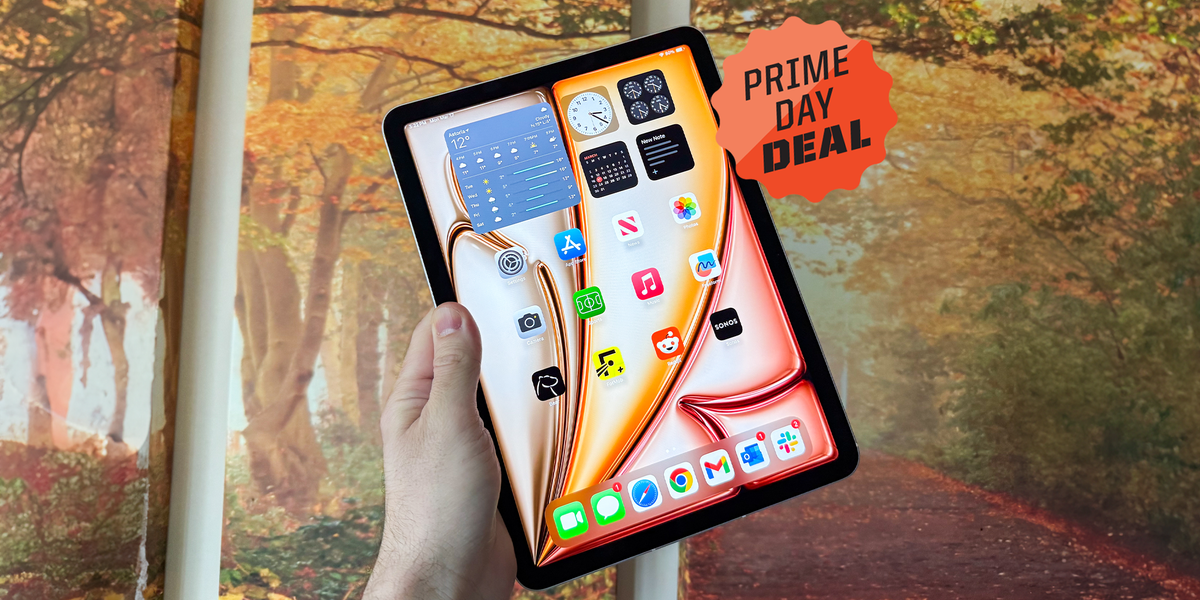
The iPad Air has always lived in the sweet spot of Apple’s tablet lineup: more muscle than the regular iPad, less financial drama than the iPad Pro, and just enough “I could totally use this for productivity” energy to make your laptop feel mildly threatened. Now the Apple iPad Air with the M3 chip is showing up in Amazon post-Prime-style deal territory with discounts that have reached around 25% off on select configurations, and yes, that is the kind of price drop that makes even cautious shoppers pause mid-scroll.
At its regular launch price, the 11-inch iPad Air M3 started at $599, while the larger 13-inch model started at $799. When the 11-inch model drops to around $449, that is a $150 discount and roughly 25% off the original price. For a tablet with Apple’s desktop-class M3 chip, a Liquid Retina display, Apple Pencil Pro support, Magic Keyboard compatibility, and enough performance for school, work, streaming, sketching, editing, and “accidentally watching three hours of YouTube reviews,” the deal deserves a closer look.
There is one important detail to clear up first: the M3 iPad Air launched in 2025, and Apple has since introduced a newer iPad Air with the M4 chip in 2026. That means the M3 model may no longer be the newest iPad Air in the lineup, but it remains one of the strongest value buys when the discount is deep enough. In plain English: the M4 is newer, but the M3 on sale may be the smarter cart decision for many buyers.
Why This Amazon iPad Air M3 Deal Is Getting Attention
Apple products do not usually behave like bargain-bin gadgets. They do not wake up one morning and decide, “Let’s be 25% off for fun.” So when a current-generation or recently replaced Apple tablet gets a serious markdown, shoppers pay attention. The iPad Air M3 has repeatedly appeared in major retail deal coverage because it hits a rare combination: strong hardware, a premium design, long software support expectations, and a price that brings it closer to the regular iPad than the iPad Pro.
The most talked-about deal has been the 11-inch iPad Air M3 with 128GB storage and Wi-Fi dropping from $599 to about $449. That price matters because it narrows the gap between the standard iPad and the Air. The regular iPad is great for casual use, but the Air brings a laminated display, more powerful chip, better accessory support, and a more future-ready experience for heavier users.
The Big Deal Math
Here is the simple version: a $150 discount on a $599 iPad Air equals about 25% off. That is not a tiny “free shipping if Mercury is in retrograde” discount. It is a real markdown. For students, creators, remote workers, travelers, and families looking for a shared tablet, that difference could cover part of an Apple Pencil, a protective case, a keyboard, or several emotionally necessary coffees.
Amazon pricing can change fast, and availability may vary by color, storage size, and model. Sometimes the lowest price appears only on one color. Sometimes a coupon needs to be applied. Sometimes the deal vanishes while you are still deciding whether you are a “Space Gray person” or a “Starlight person.” That is the glamorous chaos of online shopping.
What Makes the iPad Air M3 Worth Buying?
The heart of this iPad Air is Apple’s M3 chip. This is not a small tablet processor politely asking apps to behave. It is a desktop-class Apple silicon chip designed to handle demanding workflows, multitasking, creative apps, and advanced graphics better than most people expect from a device this thin.
Apple positioned the M3 iPad Air as a major jump over older models, especially for people coming from an iPad Air with M1 or A14 Bionic. The M3 chip improves performance for everyday tasks, gaming, graphics-heavy apps, photo editing, video workflows, and Apple Intelligence features. For the average user, that means apps open quickly, split-screen multitasking feels smooth, and the tablet has enough headroom to age gracefully.
Performance That Feels Overqualifiedin a Good Way
For note-taking, browsing, email, Netflix, and light productivity, the M3 chip is more power than you strictly need. But that is part of the appeal. Buying a discounted M3 iPad Air is like buying a commuter car and discovering it has sports-car lungs. You may not need all that performance every day, but it is nice when you edit 4K video, manage large Procreate files, play demanding games, or run multiple apps without the iPad wheezing like it just climbed stairs.
This is especially useful for students and professionals who want a tablet that can last several years. A cheaper tablet may be fine today, but the iPad Air M3 gives you more breathing room for future iPadOS updates, heavier apps, and new AI-powered features.
Display, Design, and Everyday Comfort
The iPad Air M3 comes in 11-inch and 13-inch sizes. The 11-inch version is the portable champion. It is easy to carry, comfortable to hold, and perfect for backpacks, couch browsing, coffee shop note-taking, and travel. The 13-inch model gives you more screen space for multitasking, drawing, document editing, and watching movies without squinting like you are decoding ancient tablets.
The Liquid Retina display is sharp, bright, and color-rich. It does not have the OLED display or 120Hz ProMotion refresh rate found on the iPad Pro, and that is one of the clearest differences between the Air and Pro. But for most people, the Air’s screen looks excellent for reading, streaming, drawing, editing photos, and working in productivity apps.
11-Inch vs. 13-Inch: Which One Should You Choose?
Choose the 11-inch iPad Air M3 if portability matters most. It is better for students walking around campus, commuters, travelers, and anyone who wants a tablet that feels light in the hand. It is also the model most likely to deliver the headline-grabbing low price.
Choose the 13-inch iPad Air M3 if you want a more laptop-like workspace. The bigger screen is better for split-screen apps, digital art, spreadsheet work, reading PDFs, video editing timelines, and using the Magic Keyboard. If the 13-inch model gets a deep discount, it can be one of the best large-screen iPad values available.
Apple Pencil Pro and Magic Keyboard Support
One major reason to choose the iPad Air over the standard iPad is accessory support. The iPad Air M3 works with Apple Pencil Pro and Apple Pencil USB-C. For artists, designers, students, teachers, and note-takers, Apple Pencil Pro support is a serious advantage. It adds advanced features like squeeze gestures, barrel roll, haptic feedback, and more precise creative control in supported apps.
The iPad Air M3 also supports the Magic Keyboard for iPad Air. This accessory adds a trackpad, keyboard, function row, and a more laptop-like experience. Is it cheap? Absolutely not. Apple accessories sometimes make your wallet look at you like, “We need to talk.” But if you plan to use the iPad Air for writing, email, documents, research, or schoolwork, a keyboard case can transform the device from “nice tablet” into “surprisingly capable work machine.”
Who Benefits Most From These Accessories?
Students can use Apple Pencil Pro for handwritten notes, diagrams, math work, and PDF markup. Creators can sketch, edit images, storyboard videos, and design graphics. Writers and office users benefit from the Magic Keyboard because typing long documents on glass is possible, but so is eating soup with a fork. Technically doable, not ideal.
How the iPad Air M3 Compares With the Regular iPad
The regular iPad is still the better budget pick for casual users. If your main activities are streaming, light browsing, video calls, and simple games, the base iPad may be enough. But the iPad Air M3 is the better choice for anyone who wants more performance, a nicer display experience, stronger accessory support, and better long-term flexibility.
The laminated display on the iPad Air makes writing and drawing feel more direct because there is less visible gap between the glass and the pixels. That may sound like a tiny detail until you use Apple Pencil regularly. Then it becomes one of those features you do not want to give up.
The M3 chip also gives the Air a major performance advantage. If you edit photos, use creative apps, multitask, or want a tablet that feels fast for years, the discounted iPad Air M3 becomes a better investment than buying the cheapest possible iPad today and replacing it sooner.
How the iPad Air M3 Compares With the iPad Pro
The iPad Pro is the luxury choice. It offers a more advanced display, ProMotion, Face ID, higher-end configurations, and the most premium Apple tablet experience. But it also costs much more. For many users, the iPad Pro is like buying a race car to drive to the grocery store. Fun? Definitely. Necessary? Not always.
The iPad Air M3 gives most people the performance they need without the Pro price. It is excellent for students, writers, artists, casual video editors, business users, and families. Unless you specifically need the iPad Pro’s display technology, ProMotion refresh rate, or highest-end performance, the iPad Air M3 at 25% off is arguably the more sensible buy.
What About the Newer iPad Air M4?
The newer iPad Air M4 is faster and more current, and buyers who want the latest model may naturally lean toward it. But the key question is not simply “Which one is newer?” The better question is “Which one gives me the best value for my actual use?”
If the M4 model is full price and the M3 model is heavily discounted, the M3 can be the smarter pick. The M3 chip is still extremely capable, and most users will not feel limited by it in everyday tasks. Unless your work depends on maximum speed, advanced creative workflows, or keeping the newest device for as long as possible, the discounted M3 Air may deliver the better price-to-performance ratio.
Buy the M4 If…
Buy the newer M4 iPad Air if you want the latest chip, plan to keep your tablet for many years, need the strongest available performance in the Air lineup, or simply dislike buying previous-generation tech. That is fair. Some people want the newest model, and some people still have emotional flashbacks from buying a device one week before the new one launched.
Buy the M3 Deal If…
Buy the iPad Air M3 deal if the price is meaningfully lower, especially around $449 for the 11-inch model. It is the better value for students, families, casual creators, note-takers, remote workers, and anyone upgrading from an older iPad. At 25% off, the M3 Air stops looking like last year’s tablet and starts looking like this year’s smart purchase.
Best Uses for the iPad Air M3
For Students
The iPad Air M3 is an excellent student tablet. It handles note-taking apps, PDFs, online classes, research tabs, presentations, and split-screen study sessions with ease. Pair it with Apple Pencil Pro and it becomes a digital notebook. Add a keyboard and it can handle essays, emails, and class projects. The 11-inch model is easier to carry, while the 13-inch model is better for students who want more space for textbooks and multitasking.
For Creators
Artists, photographers, and content creators get a lot from the M3 chip. Apps like Procreate, Lightroom, Affinity Designer, LumaFusion, and CapCut can benefit from the extra performance. The iPad Air is not a full Mac replacement for every workflow, but it is powerful enough for serious creative work, especially when paired with the Pencil Pro.
For Work and Productivity
For email, documents, spreadsheets, video calls, project management apps, and cloud-based workflows, the iPad Air M3 is fast and flexible. The landscape front camera is useful for video calls, and the Magic Keyboard makes typing more comfortable. It may not replace a laptop for everyone, but for many lightweight work setups, it can handle a surprising amount.
For Entertainment
The iPad Air M3 is also a fantastic entertainment device. The display is sharp, the speakers are good, and streaming apps look great. The 13-inch model is especially enjoyable for movies and shows. It is basically a portable TV that can also edit photos, take notes, and make your old tablet look like it needs a nap.
Potential Downsides Before You Buy
No deal is perfect, even when the discount looks beautiful enough to deserve a tiny frame. The iPad Air M3 lacks ProMotion, so the display is limited compared with the iPad Pro’s smoother 120Hz experience. It also uses Touch ID instead of Face ID. Some people prefer Touch ID, but others may miss the convenience of facial unlocking.
Storage is another key point. The 128GB model is fine for many users, especially if you rely on cloud storage. But if you plan to download lots of games, save large video files, store offline movies, or work with creative projects, consider 256GB or more. A cheap iPad with too little storage can become expensive in annoyance.
Finally, accessories add cost. Apple Pencil Pro and Magic Keyboard are excellent, but they can quickly raise the total price. Before buying, think about the full setup you want, not just the tablet price. A $449 iPad Air can turn into a much bigger purchase once you add a keyboard, Pencil, case, screen protector, and that one extra cable you swear you will not lose this time.
Buying Tips for the Amazon iPad Air M3 Deal
Before checking out, confirm the model year, chip, storage, screen size, and connectivity. Make sure the listing says M3, not M2 or another model. Check whether the deal is for Wi-Fi only or Wi-Fi + Cellular. Cellular models cost more but are useful if you need internet access away from Wi-Fi.
Also check the seller. For the smoothest buying experience, look for listings sold by Amazon or a trusted authorized retailer. Review the return policy, delivery date, and warranty details. If a coupon appears on the product page, make sure it is selected before checkout. Amazon deals sometimes hide their best price behind a tiny checkbox, because apparently shopping needed a mini treasure hunt.
Is the iPad Air M3 25% Off Worth It?
Yes, for most buyers, the iPad Air M3 at around 25% off is a strong deal. It offers premium performance, a great display, excellent accessory support, and enough power for years of everyday use. It is especially attractive for students, creators, professionals, and families who want more than the regular iPad without paying iPad Pro prices.
The only shoppers who should hesitate are those who absolutely need the latest M4 model, want ProMotion, need the best possible display, or prefer a laptop for traditional desktop workflows. For everyone else, the discounted M3 iPad Air is one of those rare Apple deals that actually feels like a dealnot just a $12 discount wearing a party hat.
Extra Experience: What It Feels Like to Use an iPad Air M3 Bought on Deal
Buying the iPad Air M3 at a discount changes the entire experience. At full price, you may judge every feature more harshly. You notice that it does not have ProMotion. You think about the iPad Pro. You wonder whether the keyboard costs too much. You start comparing specs like you are preparing for a courtroom argument. But when the price drops by 25%, the iPad Air M3 suddenly feels less like a compromise and more like a clever little victory.
In daily use, the biggest impression is speed. The tablet wakes quickly, apps feel responsive, and multitasking is smooth. You can keep notes open on one side, a browser on the other, and a video floating in the corner without the iPad acting offended. For students, that means lecture notes, slides, research, and messages can all live together comfortably. For work users, it means jumping between email, documents, calendar, and video calls without feeling like the device is holding you back.
The 11-inch model feels especially practical. It is light enough to carry around the house, bring to class, use in bed, or toss into a bag. The 13-inch model feels more serious, almost like a slim laptop screen waiting for a keyboard. If you draw, edit documents, or use split-screen often, the bigger version feels luxurious. If you travel or commute, the smaller model is easier to love every day.
Apple Pencil Pro is where the iPad Air becomes more personal. Writing notes feels natural, sketching feels fluid, and marking up PDFs is far better than printing pages like it is 2009. For students, it can replace stacks of notebooks. For creative users, it becomes a portable sketchbook. For business users, it makes signing documents and annotating plans simple. The Pencil is not cheap, but if you use it often, it quickly becomes one of those accessories that feels obvious in hindsight.
The Magic Keyboard experience is more mixed, mostly because of the price. It turns the iPad Air into a compact productivity machine, but the cost may make budget-minded buyers blink twice. A third-party keyboard case can be a smarter choice for casual typing. Still, the official Magic Keyboard feels polished, stable, and convenient. If you plan to write long emails, school papers, blog posts, or reports, a real keyboard makes a huge difference.
Battery life depends heavily on how you use the iPad. Streaming video and browsing are comfortable, but heavy creative apps, high brightness, gaming, and multitasking can drain the battery faster. For most users, it should get through a normal day of mixed use, but power users may want a charger nearby. That is not unusual for a thin, powerful tablet, but it is worth knowing before you expect MacBook-level endurance.
The best part of buying the iPad Air M3 on an Amazon post-Prime deal is the feeling that you did not overpay for performance. It is fast enough to feel premium, portable enough to use constantly, and flexible enough to serve as a notebook, media screen, sketchpad, travel computer, and casual work device. At 25% off, it becomes one of the easiest iPad recommendations for people who want power without going full Pro.
Conclusion
The “Latest iPad Air M3 Chip 25% OffAmazon Post-Prime Deal” headline works because the discount hits the exact point where the iPad Air M3 becomes hard to ignore. It is powerful, polished, portable, and compatible with Apple’s best tablet accessories. While the newer M4 iPad Air now exists, the discounted M3 model still offers excellent performance for most real-world users.
For students, creators, workers, and everyday users, this is a deal worth watching closely. Just confirm the current Amazon price, model, storage, seller, and coupon status before buying. Apple deals move fast, and the best ones have a funny habit of disappearing right after you finally make up your mind.
Note: Amazon prices, coupons, stock, and color availability can change at any time. Always verify the live product listing, return policy, warranty information, and final checkout price before purchasing.