For years, Canva was the friendly design tool that helped non-designers make graphics without suffering through a seven-hour tutorial and a mild identity crisis. Now, with its latest AI update cycle, Canva is trying to become something bigger: a full creative workspace where brainstorming, editing, writing, chart-building, app-making, and publishing can all happen in one place. That is a bold swing, and surprisingly, it is not just corporate confetti.
The new Canva AI update really does unlock more design freedom, especially for people who want speed without giving up control. Instead of forcing users to start from a blank page or bounce between different apps, Canva is building an experience where prompts can become drafts, drafts can become polished designs, and polished designs can become videos, presentations, charts, web pages, or marketing assets without a dramatic software migration.
In other words, Canva is no longer just saying, “Here is a template, good luck.” It is saying, “Here is a starting point, an assistant, a visual editor, a spreadsheet, a mini app builder, and a few AI shortcuts so your deadline does not eat you alive.” That shift matters for creators, small businesses, teachers, marketers, freelancers, and teams that care more about getting strong work out the door than winning a medal for using the most intimidating software on Earth.
What changed in Canva’s latest AI update?
The biggest change is that Canva’s AI tools are no longer scattered like socks after laundry day. They are becoming part of a more unified system. Canva’s recent update introduced or expanded several major features that work together rather than acting like random gadgets tossed into a drawer.
1. Canva AI became a real creative assistant
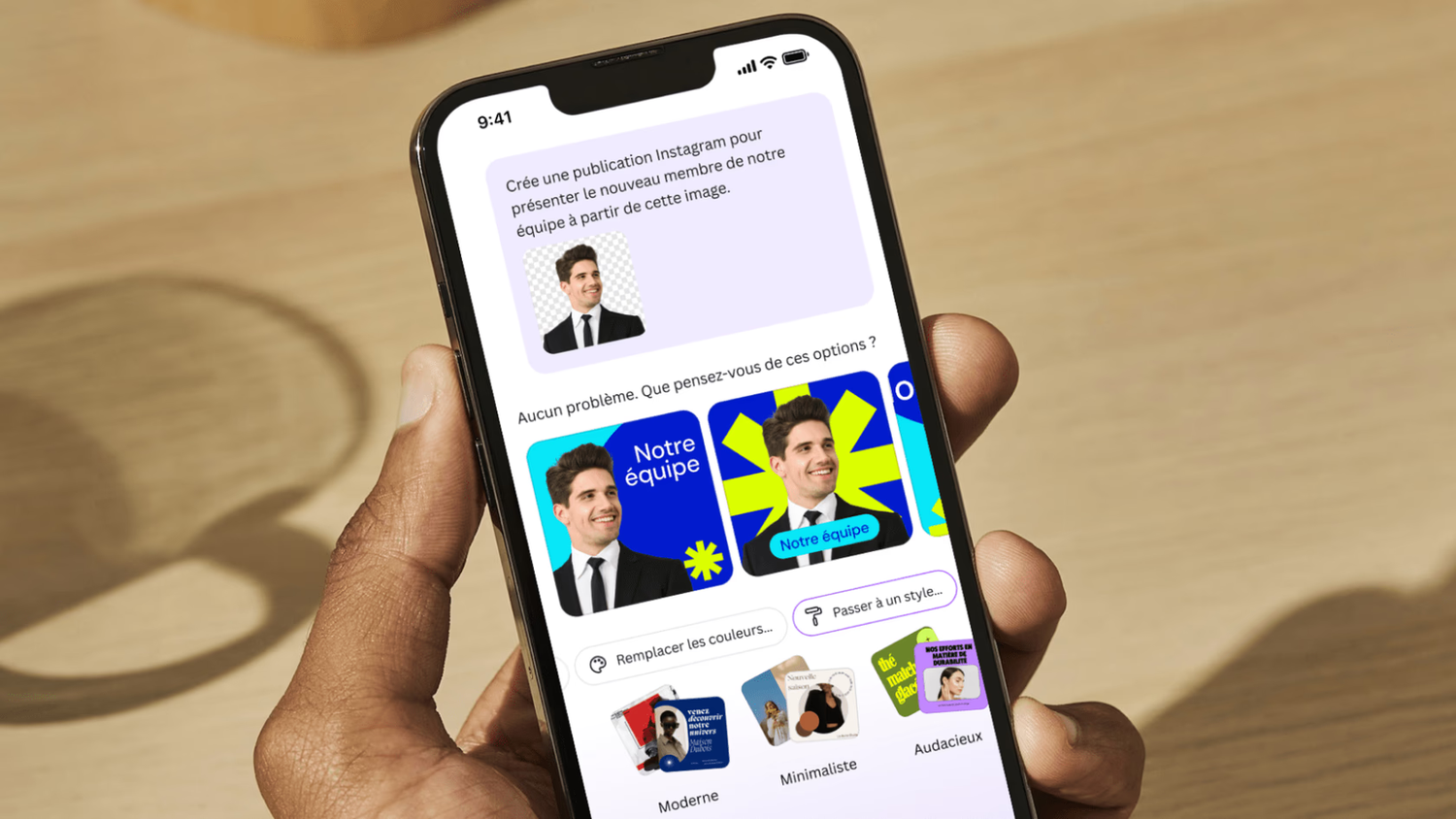
Canva AI is designed to act more like a conversational helper than a one-trick generator. You can use it to brainstorm ideas, write copy, generate design directions, create documents, produce images, and start layouts from prompts. That matters because the hardest part of design is often not the final polish. It is getting moving in the first place.
If you have ever stared at a blank page waiting for brilliance to arrive like a delayed flight, this is where Canva AI helps most. It gives you a rough first version fast. That first version may not be perfect, but perfection is overrated when you are still stuck at zero.
2. Canva Code widened the definition of “design”
One of the most interesting additions is Canva Code, which lets users generate interactive elements with prompts. That means design is no longer limited to static visuals. A creator can build a calculator, quiz, interactive map, or lightweight web experience and drop it into a broader project without leaving Canva.
This is a major leap in design freedom because it lets non-coders experiment with interactive content. No, it does not suddenly turn every small business owner into a senior software engineer. But it does lower the barrier between “I have an idea” and “I can publish something functional.” That is a big deal.
3. Canva Sheets made data less painful to look at
Canva’s AI update also expanded into spreadsheets with Canva Sheets, plus tools such as Magic Insights, Magic Formulas, and Magic Charts. That may not sound glamorous, but it is actually one of the smartest parts of the update. Most teams do not create visuals in one place and data in another because they love chaos. They do it because software has trained them to.
Canva is trying to connect those two worlds. Instead of building a spreadsheet in one app, exporting data into another, then formatting charts until your coffee goes cold, users can organize information, generate formulas in plain language, summarize results, and turn data into visuals inside the same environment.
That gives marketers, educators, consultants, and operations teams more freedom to tell visual stories with actual numbers behind them. It also removes some of the friction that makes people avoid data work until the last possible second.
4. The photo and video workflow got smarter
Canva’s AI photo editing tools are part of the freedom story too. Features like Magic Edit, image generation, background creation, and AI-assisted cleanup make it easier to refine visuals without manually rebuilding everything. In simple terms, you can change, replace, retouch, or expand parts of an image faster than before.
On the video side, Canva has pushed further with AI-assisted creation and editing, including short AI video generation, beat syncing, and a more user-friendly video editor. That makes Canva feel less like a static design platform and more like a content production studio for people who do not want to wrestle with traditional editing software before lunch.
5. Canva is moving toward editable AI output, not just generated output
Perhaps the most important long-term change is Canva’s push toward AI that understands design structure. Later updates described a design-focused model that can generate editable designs with layers and objects rather than just spitting out flat images. This may sound technical, but the real-world impact is simple: users want AI to help them start faster, not trap them inside a finished result they cannot meaningfully edit.
That is where Canva’s strategy gets especially interesting. True creative freedom is not just the ability to generate something quickly. It is the ability to keep shaping it after the AI is done.
Why this update feels like real design freedom
Plenty of software companies have added AI features. Some of them feel useful. Some of them feel like a chatbot was duct-taped to the side of the product five minutes before launch. Canva’s update feels different because it changes workflow, not just features.
Freedom from the blank page
The first kind of freedom Canva unlocks is creative momentum. Users can start with a prompt, a reference image, a spreadsheet, a draft document, or a rough concept. That means the platform supports different types of brains and working styles. Some people think in headlines. Others think in layouts. Others need to dump ideas into a document before anything visual makes sense. Canva now supports more of those paths.
Freedom from app-hopping
Another major benefit is reduced switching. One of the quiet productivity killers in modern creative work is tool-hopping. You brainstorm in one place, draft in another, design somewhere else, edit the photo in a fourth app, then build a chart in a spreadsheet that looks like it was designed by a hostile committee.
Canva’s AI update tries to pull those steps closer together. That does not just save time. It protects flow. And in creative work, flow is precious. Once it breaks, suddenly you are checking email, reorganizing your desk, and wondering whether it is too early for a snack.
Freedom to iterate instead of restart
Older design workflows often punished experimentation. If you wanted to try a new direction, you risked wrecking the original. AI inside Canva now makes iteration easier. You can generate a first pass, refine the copy, swap the visual style, test a new format, or convert data into a chart without rebuilding everything from scratch.
That is especially useful for client work and team collaboration, where “Can we see one more version?” is basically a guaranteed sentence.
Freedom for non-designers to make polished work
This update also expands who gets to make strong-looking content. Small business owners, teachers, nonprofit teams, creators, and side hustlers often need professional visuals but do not have a designer sitting two desks away waiting for inspiration. Canva’s AI tools help close that gap.
That does not mean expertise disappears. Good taste still matters. Editing still matters. Judgment still matters. But the floor has risen. More people can now produce decent-to-strong work faster, and that changes the economics of content creation.
Specific examples of how the Canva AI update helps in real life
Small business marketing
A local bakery launching a spring menu can use Canva AI to draft social post copy, create a flyer, generate a promotional image, build a quick email header, and produce a short teaser video. Before, that might have required multiple tools or a freelancer budget. Now, one person can create a more complete campaign in less time.
Education and training
A teacher can turn class notes into slides, build an infographic, summarize spreadsheet data, and create a quick quiz or interactive classroom resource. The point is not just speed. It is consistency. When tools live together, the final material feels more unified.
Freelance design and consulting
A freelancer can use Canva Sheets to organize research, Magic Insights to surface patterns, Canva AI to draft concepts, and Canva Code to add a lightweight interactive element to a presentation or landing page mockup. That expands the value they can offer without dramatically increasing production complexity.
Content creators
A creator working on short-form content can move from script idea to thumbnail, social carousel, and simple AI-assisted video clips in one system. That matters because creators rarely need one isolated asset. They need a package of assets that all feel on-brand and ready to publish.
Marketing teams
For teams, the update points toward a more centralized workflow. With newer additions like email design, forms, improved video tools, and marketing-focused features, Canva is clearly aiming to be more than a design app. It wants to be the creative control room.
What the Canva AI update still does not solve
Now for the necessary reality check, because no AI article should sound like it was written by a parade balloon.
AI output still needs a human brain
Canva AI can get you started fast, but fast is not the same as finished. Generated copy can sound generic. Generated visuals can feel close-but-not-quite. Some video and image tools are excellent for speed, but not always perfect for precision. You still need to review, edit, simplify, and sharpen the result.
Some of the best features live behind paid plans
Freedom is wonderful, but premium freedom is apparently even more wonderful. Several of Canva’s most powerful AI features are tied to paid access or higher usage allowances. That is not unusual in software, but it does mean the full “all-in-one” dream may feel more complete for paying users than for casual free users.
There is a risk of sameness
AI tools can speed up ideation, but they can also flatten originality if users accept the first suggestion every time. If everyone relies on the same prompts, the same templates, and the same safe choices, the internet gets more polished and less memorable. Canva gives you better starting points, but it is still your job to add point of view.
Creative concerns around AI are still real
The design industry has raised valid concerns about how generative AI tools are built, trained, and used. Canva has continued expanding AI anyway, which reflects where the industry is going, but the wider debates around ethics, originality, consent, and creative labor have not magically disappeared just because the interface looks friendly.
Not every workflow belongs in one platform
Canva is becoming more powerful, but that does not mean it replaces every specialized tool for every professional. Advanced designers, motion editors, and developers may still prefer dedicated software for deep control. Canva’s strength is accessibility and speed. Its challenge is proving that convenience can coexist with creative depth.
The bigger picture: Canva is redefining what “design software” means
The most important part of this update is not any single feature. It is Canva’s broader vision. The company is steadily shifting from a template-based design tool into a platform where visual work, written work, data work, interactive work, and marketing work can meet in one workflow.
That is why the update feels meaningful. It is not just about adding AI because every tech company now feels spiritually obligated to do so. It is about changing the shape of creative work itself. In Canva’s new model, design is not the final step after planning, writing, or data analysis. Design is woven through the entire process.
For everyday users, that translates into something delightfully practical: fewer bottlenecks, more experimentation, and less friction between idea and output. For teams, it means creative work can move faster and look more connected. For businesses, it means more content can be produced internally. For the broader market, it means the line between designer and non-designer keeps getting blurrier.
And that is the real freedom Canva is unlocking. Not total automation. Not perfect one-click genius. Just more ways for more people to make better things with less friction. Honestly, that is already a pretty big upgrade.
Experiences related to Canva AI Update Unlocks New Design Freedom
What does this shift feel like in actual use? For many people, the experience is less about one flashy feature and more about a strange but welcome reduction in creative dread. The old rhythm of digital creation often went like this: have idea, open tool, get overwhelmed, search for template, edit for far too long, abandon project, promise to “circle back tomorrow,” and never emotionally recover. Canva’s AI update changes that rhythm by making the first step easier and the next five steps less annoying.
For a solo creator, the experience often starts with relief. Instead of needing the perfect headline, image, layout, and color direction before beginning, they can now start with a rough prompt and let Canva offer a few lanes to choose from. That changes the emotional temperature of the work. The project stops feeling like a performance test and starts feeling like a collaboration. Even when the AI misses the mark, it usually gives the user something to react to, and that is often all creativity needs: a spark, a nudge, a slightly weird first draft that gets the wheels turning.
For marketers, the experience is often about momentum. A campaign no longer has to begin in a doc, shift to a design file, then move into a separate presentation and another editing platform. A user can sketch the campaign idea, create the supporting visuals, translate numbers into charts, and build spin-off assets for social, email, and internal presentations without constantly switching contexts. That makes work feel less fragmented. The brain likes that. The deadline likes that even more.
For teachers and trainers, the update can feel like a time-saving assistant that does not mind repetitive tasks. A lesson can become a slide deck, a worksheet can become a handout, a spreadsheet can become a chart, and a rough classroom idea can become a visual resource quickly enough to actually use it this week instead of next semester. That is not glamorous, but it is powerful. Practical freedom is still freedom.
For freelancers, the experience can be surprisingly strategic. Canva AI helps with the speed clients expect, while the editable environment still leaves room for human judgment. A freelancer can pitch faster, mock up more concepts, and produce more polished supporting materials without inflating timelines. The AI does not replace taste, positioning, or storytelling, but it can absolutely replace several rounds of tedious setup work. And nobody writes poetry about setup work.
There is also a more subtle experience many users describe indirectly: confidence. When a platform helps people make something that looks cleaner, sharper, and more complete than they thought they could make on their own, they become more willing to try again. They publish more. They test more ideas. They experiment with formats they used to avoid. That is where Canva’s AI update may have its biggest impact. It does not just help people design faster. It helps more people feel like they are allowed to design at all.
Of course, the experience is not perfect. Some outputs still need serious editing, some premium walls can be annoying, and some AI-generated ideas are about as original as office coffee. But even with those flaws, the overall experience is hard to ignore: creative work feels more open, less technical, and a lot less brittle. That is why this update lands. It gives people more room to start, change course, and keep going, which is often the difference between a project that ships and a project that dies as a noble draft in a forgotten folder.
Conclusion
Canva’s latest AI update is not just another feature dump with shiny launch-day language. It marks a bigger shift in how everyday design work gets done. By connecting prompts, documents, visuals, data, interactivity, and publishing inside one workflow, Canva is giving users more room to create without so many technical roadblocks.
The best part is not that AI can generate something quickly. It is that users can keep shaping it afterward. That mix of speed and editability is what makes the update feel genuinely useful. Canva AI will not replace creative judgment, originality, or human taste. But it does make the path from idea to polished output much smoother, and for many users, that is exactly the kind of design freedom they have been waiting for.