Note: This article explains what X, formerly Twitter, currently shows users about post views, profile visibility, analytics, and privacy. It is written for informational and SEO publishing purposes only.
Let’s begin with the answer everyone came for: No, you cannot see exactly who views your tweets on Twitter/X. You can see view counts, impressions, likes, replies, reposts, bookmarks, follows, and other engagement signals depending on the post and your account tools. But X does not hand you a neat little list titled “People Who Secretly Looked at Your Tweet While Pretending They Were Busy.”
That may be disappointing if you posted something dramatic, poetic, mysterious, or suspiciously directed at “someone” and then wondered who saw it. But from a privacy standpoint, it makes sense. X is designed around public conversations, fast scrolling, algorithmic feeds, and broad visibilitynot viewer-by-viewer tracking for regular users.
Still, there is plenty you can learn from X analytics. You may not know exactly who viewed your post, but you can understand how many times it was seen, how people interacted with it, and whether your content is quietly winning hearts or disappearing into the digital couch cushions.
Can You See Who Viewed Your Tweets?
No. X does not show a list of individual accounts that viewed your posts. If someone scrolls past your tweet, opens it, reads it, pauses on it, or silently judges your grammar, you will not receive their username in a viewer list.
What X does show is the view count, which reflects how many times a post has been viewed. This number appears near the analytics icon on many posts and can help creators understand the reach of their content. However, a view count is not the same thing as a viewer list.
Think of it like putting a flyer on a busy bulletin board. You may know that hundreds of people walked past it, and a few may have taken a photo, laughed, or whispered, “That’s oddly specific.” But unless they interact directly, you do not know exactly who they were.
What Does a Twitter/X View Count Actually Mean?
A view count shows the total number of times a post has been viewed. The important word here is times, not people. If one person sees your post more than once, that can contribute more than one view. If someone sees it on desktop and later again on mobile, the count may rise again.
This is why a post with 5,000 views does not necessarily mean 5,000 unique humans sat down with a cup of coffee and carefully absorbed your wisdom. Some views may come from repeat exposure, timeline scrolling, search results, profile visits, or reposted versions of the conversation.
View counts are useful, but they should be treated as a reach signal, not a guestbook. They tell you that your post traveled. They do not tell you exactly who packed its suitcase.
Can You See Who Viewed Your X Profile?
No, X does not provide a feature that shows who viewed your profile. You may see profile-related analytics in some tools, such as profile visits or audience growth trends, but you cannot open a dashboard and see a list of people who checked your bio, header photo, pinned post, or old tweets from 2017.
This is one of the most common myths about Twitter/X. Many users search for “who viewed my Twitter profile” because other social platforms have trained people to expect deeper visibility. But X keeps profile viewing private. Unless a visitor interacts with your content by following, replying, liking, reposting, quoting, or messaging you, their visit remains invisible to you.
What Can You Actually See on X?
While you cannot see individual viewers, you can still access several useful performance signals. These numbers are especially helpful for creators, brands, journalists, small businesses, and anyone who wants to know whether their posts are reaching people or simply floating through the internet like a lonely balloon.
1. Views
Views show how many times your post was displayed or viewed. This is often the first number users notice because it appears publicly on many posts. It can help you compare reach between posts and spot topics that attract more attention.
2. Impressions
Impressions generally refer to the number of times your content appeared on screens. In marketing terms, impressions are a visibility metric. They are useful for understanding exposure, but they do not prove that someone read every word, clicked your link, or emotionally bonded with your punctuation choices.
3. Engagements
Engagements include actions people take on your post, such as likes, replies, reposts, link clicks, media views, profile clicks, and other interactions. Engagements usually matter more than views because they show active interest.
4. Engagement Rate
Engagement rate compares engagement actions against impressions or views. A post with 200 views and 40 interactions may be more effective than a post with 20,000 views and three bored likes from bots and your cousin.
5. Replies, Reposts, Quotes, and Likes
These visible interactions are the closest thing to knowing who noticed your content. If someone likes, replies, reposts, or quotes your post, you can usually see that interaction. However, viewing alone remains private.
6. Follower Growth
If a post performs well and people follow you afterward, that is a strong clue that the content resonated. You may not know every viewer, but you can connect strong posts with audience growth over time.
Can Third-Party Apps Show Who Viewed Your Tweets?
No legitimate third-party app can reveal exactly who viewed your tweets or X profile. Be careful with tools that promise “secret profile viewers,” “Twitter stalker trackers,” or “see who checks your account.” Those claims are usually misleading, unsafe, or designed to collect your login information.
Third-party analytics tools can be useful for scheduling posts, tracking engagement, comparing performance, monitoring mentions, or building reports. But they cannot magically access private viewer data that X itself does not provide to users.
If a website asks for your X password in exchange for a viewer list, consider that a giant red flag waving from the top of the internet’s sketchiest carnival tent. Use trusted OAuth login when connecting tools, review app permissions, and revoke access for apps you no longer use.
Why Doesn’t X Show Individual Tweet Viewers?
There are several practical reasons X does not show individual viewers.
Privacy
People browse X in many ways. They may read news, follow public conversations, research brands, compare opinions, or casually scroll during a lunch break. Showing every viewer could make normal browsing feel uncomfortable and overly exposed.
Scale
X handles enormous amounts of real-time activity. Tracking and displaying every individual viewer for every post would be technically complicated, messy, and probably less useful than people imagine.
User Behavior
If users knew every profile visit or post view was visible, they might browse less freely. Public social platforms depend on discovery, reading, lurking, and passive consumption. Yes, lurking sounds suspicious, but online it often just means “reading without typing.”
Cleaner Analytics
For creators and businesses, aggregate metrics are usually more actionable than individual viewer lists. Knowing that your post earned strong engagement among a topic audience is more useful than knowing that “@RandomGuy472” saw it at 2:13 p.m. and did absolutely nothing.
Are Tweet Views Anonymous?
For regular users, yes, tweet viewing is effectively anonymous. The author of a post cannot see that you viewed it unless you interact in a visible way. Reading, scrolling, opening a post, or visiting a profile does not automatically notify the account owner.
However, anonymous does not mean invisible to the platform itself. Like most major social networks, X can use platform activity for ranking, safety, personalization, advertising, and analytics. The key distinction is this: the platform may process activity data, but regular users do not receive a personal viewer list.
Can People Tell If You Screenshot Their Tweets?
No, X does not notify users when someone screenshots a tweet. If you take a screenshot of a public post, the author will not receive an alert. That said, screenshots can spread quickly, so it is wise to treat public posts as truly public. The internet has a long memory and a messy filing system.
Can People Tell If You Bookmark Their Tweets?
No, users cannot see who bookmarked their posts. Authors may see bookmark counts in some analytics contexts, but the identities of people who saved the post are private. This is helpful for users who want to save useful threads, funny posts, research notes, recipes, or extremely specific memes without announcing it to the world.
Can People See If You Visit Their Profile Often?
No. X does not show users how often you visit their profile. There is no official “frequent visitor” list. If you look at someone’s profile five times in one week, they will not receive a badge saying, “Congratulations, you have acquired a dedicated observer.”
But remember: if you accidentally like an old post from three years ago, that is different. Visible interactions can reveal your presence. Silent viewing does not.
Public vs. Protected Posts: Who Can See Your Tweets?
By default, X posts are public. That means they can be seen by your followers, discovered through search, viewed from your profile, embedded elsewhere, and sometimes found by people who are not logged in, depending on availability and platform settings.
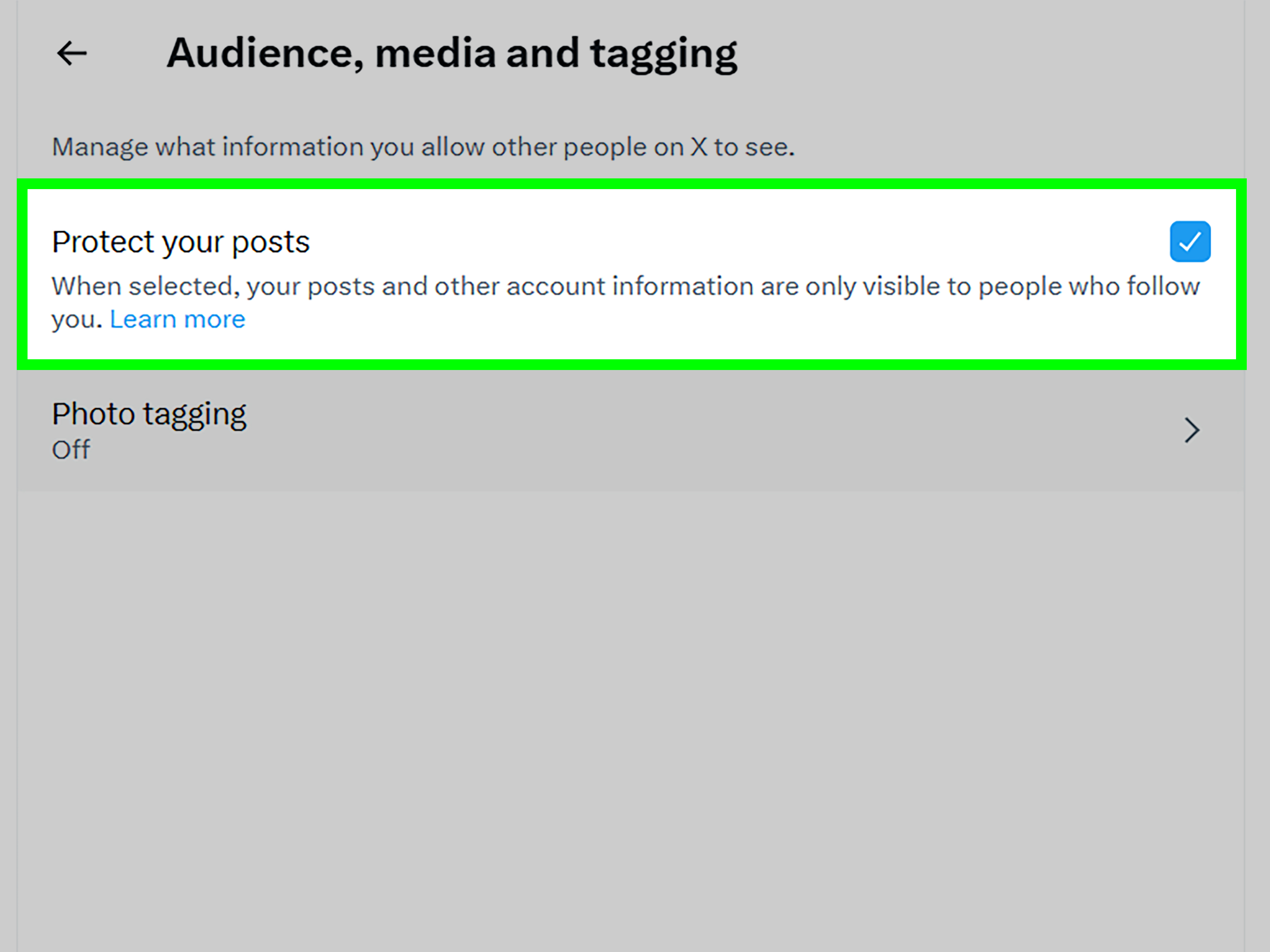
If you protect your posts, only approved followers can see them. Protected posts give you more control over your audience, but they do not create a viewer list. You still cannot see exactly which approved follower viewed a particular post.
Protected posts are useful if you want a smaller, more controlled audience. They are less ideal if your goal is public growth, brand visibility, search discovery, or viral reach.
What About X Premium and Analytics?
X Premium and business tools may offer additional features, depending on the current product lineup and account eligibility. These can include enhanced visibility, creator tools, monetization features, or analytics improvements. However, premium access does not change the basic answer: you still cannot see a full list of individual users who viewed your tweets.
Advanced analytics can help you understand performance trends. They may show impressions, engagements, profile visits, clicks, video metrics, and audience-related insights. But they do not turn X into a surveillance dashboard for post viewers.
How to Use X Analytics Without Obsessing Over Viewers
Instead of asking, “Who viewed my tweet?” a better question is, “What did this post teach me?” That shift is healthier and far more useful for growth.
Compare Topics
Look at which topics earn more views and engagements. A small business might discover that behind-the-scenes posts perform better than polished announcements. A creator might find that short opinion posts beat long threads. A blogger might notice that practical tips attract more profile visits than jokestragic, but possible.
Track Formats
Compare text posts, images, videos, polls, threads, and link posts. Different formats attract different behaviors. A funny one-liner may get likes. A tutorial thread may get bookmarks. A controversial take may get replies, some of which may make you want to go live in a cabin with no Wi-Fi.
Watch Engagement Quality
Not all engagement is equal. A thoughtful reply, profile click, or link click can be more valuable than a passive view. If your goal is business growth, newsletter sign-ups, community building, or authority, focus on meaningful actions.
Study Timing
Posting time can influence visibility. Test different days and hours, then compare results over several weeks. Do not judge your entire strategy from one post that flopped because everyone was busy watching a major event, arguing about a celebrity, or pretending to understand macroeconomics.
Common Myths About Seeing Tweet Viewers
Myth 1: “If I have X Premium, I can see who viewed my tweets.”
False. Premium features may change analytics access or visibility tools, but they do not provide a viewer-by-viewer list.
Myth 2: “Third-party apps can reveal secret viewers.”
False. Apps that claim this should be treated with caution. They may be engagement bait, scams, or risky permission traps.
Myth 3: “If someone views my profile, I get notified.”
False. X does not notify users about profile visits.
Myth 4: “View count equals unique people.”
False. Views are counted as total views, and repeat views may contribute to the number.
Myth 5: “If someone bookmarks my tweet, I can see their name.”
False. Bookmark identities are private.
Practical Examples
Example 1: The Viral Joke
You post, “My coffee has seen more of my personality than my coworkers have.” It gets 80,000 views, 3,000 likes, and 400 reposts. You cannot see everyone who viewed it, but you can see that humor worked. If you are growing a personal brand, that is a clue to post more relatable jokes with a similar rhythm.
Example 2: The Business Tip
You run a small design agency and post a thread about improving landing page conversions. It gets only 2,000 views but earns 120 bookmarks, 35 profile clicks, and several serious replies. That may be more valuable than a viral joke because the audience showed intent.
Example 3: The Silent Audience
You post a personal reflection. It gets 10,000 views but only 12 likes. That does not automatically mean people hated it. Some content is quietly consumed. Sensitive, thoughtful, or professional posts often get fewer public reactions because users may not want to signal interest publicly.
How to Increase Tweet Views the Smart Way
If your real goal is not viewer identity but better reach, there are smarter ways to approach X growth.
Write Strong First Lines
The first line matters. X moves fast, and people decide quickly whether to stop scrolling. Start with a clear idea, bold claim, useful promise, or relatable observation.
Post Consistently
Consistency helps the algorithm and your audience understand what you are about. You do not need to post 47 times a day like a caffeinated news robot. But showing up regularly gives your content more chances to be seen.
Engage Before and After Posting
Reply to others, join relevant conversations, and respond to comments on your posts. X rewards conversation. Also, it is called social media, not “drop a link and vanish media.”
Use Visuals When Helpful
Images, charts, screenshots, and short videos can increase stopping power. Use visuals when they add clarity, proof, humor, or emotion.
Avoid Clickbait That Breaks Trust
Curiosity is good. Fake drama is not. If every post sounds like “I discovered the one secret billionaires fear,” people will eventually treat your content like expired yogurt: technically visible, emotionally avoided.
Safety Tips for Twitter/X Privacy
If you worry about who sees your posts, adjust your privacy habits instead of chasing viewer lists.
Protect Your Posts
Use protected posts if you want only approved followers to see your updates. This is the strongest built-in option for limiting your audience.
Review Followers
If your account is protected, approve followers carefully. If your account is public, remember that almost anyone may be able to view your public content.
Remove Sensitive Details
Avoid posting private information such as your address, school, workplace details, travel plans, financial information, or personal documents.
Revoke Suspicious App Access
Check connected apps and remove anything you do not recognize. Be cautious with tools promising secret analytics, instant followers, or profile viewer lists.
Use Two-Factor Authentication
Protect your account with a strong password and two-factor authentication. Analytics are useful, but account security is the real main character.
Real-World Experiences: What People Usually Learn After Chasing Tweet Viewers
Many users start by asking whether they can see who views their tweets because they are curious about one specific person. Maybe it is an ex, a competitor, a hiring manager, a customer, a classmate, or someone who mysteriously watches everything but never likes anything. The human brain loves patterns, especially when social media gives us just enough numbers to become amateur detectives.
The first common experience is disappointment. A user sees 12,000 views on a post and thinks, “Great, now show me the names.” But X does not work that way. The number creates curiosity without satisfying it. That can feel annoying, but it also protects the viewer’s privacy. Without that privacy, people might be afraid to browse, research, learn, or quietly read public conversations.
The second experience is overthinking. Someone posts a clever update, gets many views but few likes, and assumes the audience disliked it. In reality, many people consume content passively. They may laugh and keep scrolling. They may read it during a meeting and avoid interacting. They may be logged out, distracted, or saving their energy for an argument about whether pineapple belongs on pizza. Low engagement does not always mean low impact.
The third experience is learning that visible interactions matter more than invisible viewers. If a post gets replies from thoughtful people, profile visits from potential clients, or bookmarks from users who want to return later, that is valuable. A creator does not need a list of every silent viewer to understand that the content worked. The better move is to study patterns: Which posts get saves? Which ones get replies? Which ones bring followers? Which ones attract the right audience rather than the biggest crowd?
The fourth experience is realizing that third-party “viewer tracker” tools are not worth the risk. Many users eventually learn that tools promising secret profile viewers are usually selling fantasy, not data. At best, they provide vague engagement estimates. At worst, they ask for permissions that can put an account at risk. A good rule is simple: if the official platform does not provide individual viewer data, an outside tool probably cannot provide it honestly.
The fifth experience is healthier posting. Once users stop worrying about exactly who viewed their tweets, they often create better content. They write for the audience they want to serve, not for the one person they hope is watching. Brands focus on useful posts. Creators focus on voice and consistency. Professionals focus on credibility. Everyday users focus on sharing thoughts without turning every view count into a courtroom drama.
In practice, the best X strategy is not viewer surveillance. It is pattern recognition. Look at your best-performing posts. Notice the topics, timing, tone, format, and conversation quality. Then make more content that gives people a reason to stop, think, laugh, reply, save, or follow. You may never know every person who saw your tweet, but you can absolutely learn what makes people care.
Final Answer: Can You See Who Views Your Tweets on Twitter/X?
No, you cannot see exactly who views your tweets on Twitter/X. You can see view counts and various analytics, but individual viewers remain private unless they interact with your post in a visible way. You also cannot see who viewed your X profile, who screenshotted your post, or who bookmarked it.
The smartest way to use X analytics is to focus on trends instead of names. Views show reach. Engagements show action. Replies show conversation. Bookmarks suggest usefulness. Follower growth shows long-term interest. Together, these clues tell a much better story than a viewer list ever could.
So the next time your post gets a mysterious spike in views, resist the urge to become Sherlock Holmes with Wi-Fi. Study the metrics, protect your privacy, avoid shady apps, and keep posting content worth seeing.