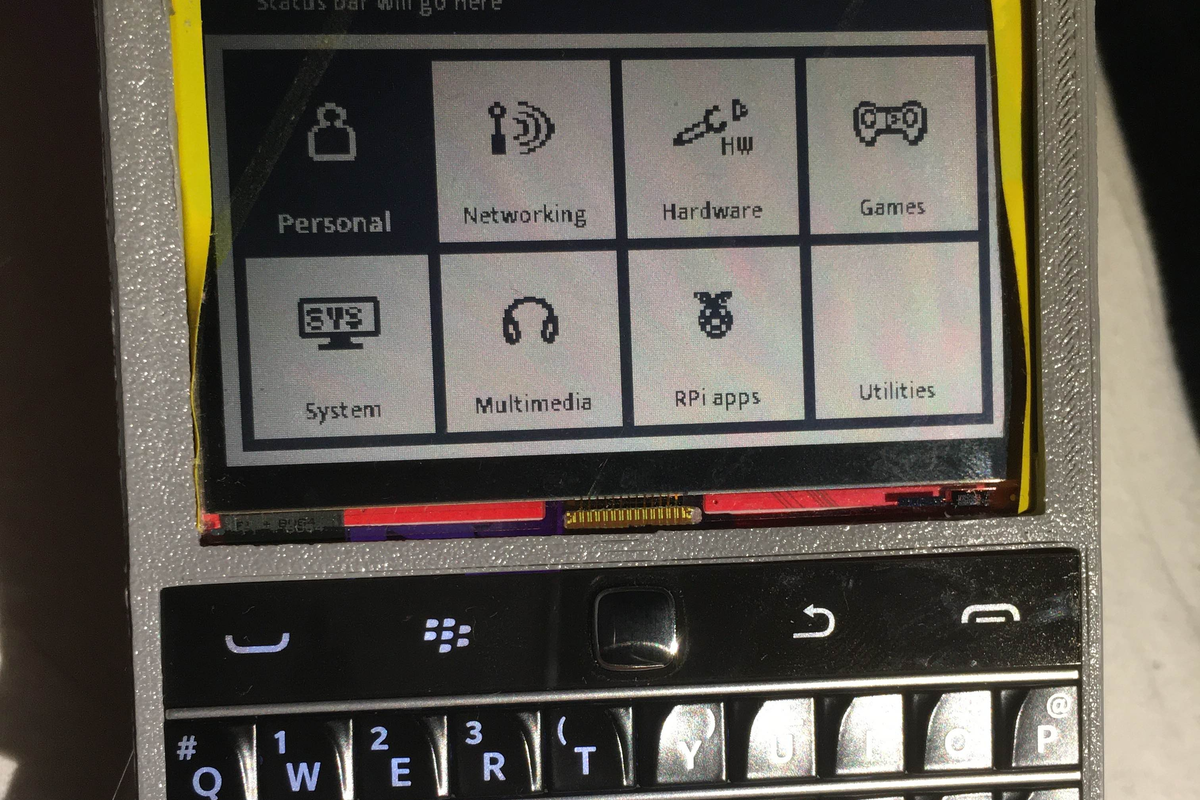
Every embedded Linux project has a dramatic moment. The board boots, the LEDs blink, the script runs, and then someone asks the terrifying question: “What is its IP address?” Suddenly, your elegant Raspberry Pi, pocket router, robot controller, or sensor box becomes a tiny black hole of mystery. You know it is alive, but it refuses to speak unless you bring a keyboard, monitor, Ethernet cable, USB serial adapter, emotional support beverage, and possibly a small goat for luck.
That is exactly the kind of problem ZPUI was built to solve. ZPUI, short for Zippy UI, is a small-screen Linux control interface and lightweight UI framework designed for devices that need practical local control without a full desktop environment. Think of it as a tiny embedded GUI for Linux boards: not flashy, not bloated, not trying to become a tablet. It is more like the helpful front-panel display on a serious server, except affordable enough for hobby projects and flexible enough for creative hardware builds.
With a compact OLED or LCD screen and a few buttons, ZPUI can give your project a direct way to show system information, run scripts, manage services, connect to networks, shut down safely, and host small custom applications. In a world where everything wants a touchscreen, an app, and a cloud account, ZPUI politely raises its five buttons and says, “What if we just made the device usable?”
What Is ZPUI?
ZPUI is a Python-based user interface framework for small-screen Linux devices. It grew from earlier work around pyLCI, the Linux Control Interface, and later became part of the ZeroPhone ecosystem, an open-source Raspberry Pi Zero-based phone project. Over time, ZPUI moved beyond the phone idea and became useful for a broader class of single-board computers, embedded Linux gadgets, portable terminals, workshop devices, and headless systems.
The core idea is simple: if you can physically reach your Linux device, you should be able to control it without hunting for a monitor or guessing network settings. ZPUI gives you a local interface that can live directly on the project. It is especially attractive for Raspberry Pi boards, compact Linux computers, portable hacking tools, routers, home automation boxes, and devices tucked into awkward places where plugging in a full setup feels like yoga for cables.
Why Tiny Embedded GUIs Matter
Embedded Linux projects often start with enthusiasm and end with “I cannot SSH into it.” Headless systems are convenient until networking breaks, Wi-Fi credentials are wrong, the IP address changes, the SSH service fails, or the device is installed in a ceiling, cabinet, vehicle, robot chassis, classroom, or mysterious plastic enclosure that only opens when you remove eight screws.
A tiny embedded GUI solves a very specific pain point: local access. It does not replace SSH, dashboards, web panels, or desktop software. Instead, it becomes the emergency door. When your main access path fails, ZPUI can still show useful status and let you perform essential actions.
For example, imagine a Raspberry Pi running a camera trap in a shed. You do not want to connect a monitor every time you need to confirm storage space or restart a service. A small OLED screen showing network status, disk space, battery condition, and a menu option to restart the capture script is far more practical. It is not glamorous, but neither is crawling under a desk with a flashlight in your teeth.
How ZPUI Works in Plain English
ZPUI sits between your hardware inputs, your small display, and your Linux system. It receives button events, displays menus or custom screens, and lets applications interact with the user through a consistent interface. A typical setup might include a 128×64 OLED screen, five directional buttons, and a Raspberry Pi or other Linux-capable board.
The classic five-button layout is easy to understand: up, down, left, right, and enter. That may sound primitive compared with a touchscreen, but it is often exactly what embedded projects need. Buttons are durable, cheap, easy to mount, and friendly to gloved hands. They also do not require a backlit glass rectangle that consumes half your enclosure budget and attracts fingerprints like a museum exhibit.
Input: Buttons, Keypads, and HID Devices
ZPUI can work with different input methods, including GPIO-connected buttons, input expanders, and HID-style devices. This makes it flexible for both quick breadboard experiments and cleaner finished hardware. A project can start with loose buttons on jumper wires and later become a tidy front panel with a custom PCB.
Output: Small Screens That Say Just Enough
On the display side, ZPUI is built around small screens, including common OLED and LCD modules. A 128×64 monochrome display is enough for menus, status messages, simple dialogs, and compact custom apps. Larger screens, such as 320×240 or 400×240 displays, can support richer layouts while still staying light compared with a full graphical desktop.
What Can You Do With ZPUI?
The most obvious use is system control. A ZPUI-powered device can show its IP address, help manage Wi-Fi, run predefined scripts, restart system services, reboot, power down, display storage information, or provide project-specific commands. These are small tasks, but they matter enormously when the device is deployed somewhere inconvenient.
ZPUI also supports third-party applications, which means it can become more than a status panel. You can build custom apps for your own hardware. A weather station could show sensor readings and calibration options. A portable network tool could let you choose scripts from a menu. A home automation controller could expose quick toggles. A robot could provide a safety menu, mode selection, and diagnostic messages.
Example: Raspberry Pi Network Helper
A practical beginner project would be a Raspberry Pi network helper. The main screen shows hostname, IP address, Wi-Fi network, CPU temperature, and disk usage. The menu includes options to restart networking, scan available Wi-Fi, launch a diagnostic script, reboot safely, and shut down. Suddenly, the Pi stops being a silent little slab and becomes a device you can actually talk to.
Example: Portable Hardware Hacking Tool
In a portable hardware hacking kit, ZPUI can act as the front panel for scripts. Instead of SSHing into the device to run commands, you can select “Dump SPI Flash,” “Start Serial Logger,” “Mount USB Drive,” or “Power Off.” This is the kind of interface that looks humble until you use it in the field and realize it has saved you twenty minutes and three new gray hairs.
Example: Workshop Classroom Setup
Anyone who has taught a Raspberry Pi workshop knows the ritual: dozens of boards, dozens of students, and everyone asking which device is theirs on the network. With a tiny display, each board can show its identity and connection status. ZPUI makes that idea more powerful by adding menus and actions, not just passive information.
ZPUI vs. a Full Desktop GUI
ZPUI is not trying to replace GNOME, KDE, or any full desktop environment. That would be like using a bicycle bell as a church organ. Instead, ZPUI focuses on the tasks that matter when a small Linux device needs local control. It is closer to a front-panel interface than a general-purpose desktop.
A full desktop GUI needs a larger display, more memory, more storage, a pointing device, and a user who wants windows, icons, and menus. ZPUI needs a small screen and a few buttons. That makes it useful for devices where space, power, simplicity, and reliability matter more than visual sparkle.
ZPUI vs. LVGL, Qt, and Other Embedded GUI Options
If you are building a commercial touchscreen product, libraries like LVGL or frameworks like Qt may be better fits. LVGL is popular for embedded graphics and supports modern interface elements, animations, touch input, and microcontroller-friendly designs. Qt can support sophisticated cross-platform interfaces. These tools are excellent, but they solve a different problem.
ZPUI shines when the device is Linux-based, the screen is small, the input is button-driven, and the interface is mostly about control, status, and utility. It is not the prettiest embedded GUI on the block, and it does not need to be. Its charm is that it gives your Linux device a practical local face without forcing you to build a whole interface stack from scratch.
Why Python Matters Here
ZPUI being written in Python is a major advantage for many makers and developers. Python is familiar, readable, and widely used on Raspberry Pi and other Linux boards. You can write a small app without diving into a complex C graphics stack. You can also integrate shell commands, system tools, sensors, files, and Python libraries with relatively little ceremony.
Of course, Python is not magic fairy dust. On very low-power hardware, drawing operations, fonts, and frequent screen refreshes can become expensive. A tiny embedded GUI should be designed with restraint. Refresh only when needed. Cache images when possible. Keep text readable. Avoid animations unless they genuinely help. Remember, the goal is a useful control panel, not a tiny movie theater for ants.
Design Principles for a Good ZPUI Interface
Good small-screen design is not the same as shrinking a desktop app until it cries. A tiny display forces discipline. Each screen should answer one question or support one decision. The user should never need to decode a wall of abbreviations that looks like a router sneezed.
Keep Menus Short
A five-button interface works best when menus are shallow and predictable. Group actions logically: Status, Network, Storage, Services, Scripts, Power. Avoid burying common actions four levels deep unless you enjoy watching people press “down” like they are trying to win an arcade game.
Make Dangerous Actions Deliberate
Rebooting, shutting down, wiping logs, formatting storage, or disabling networking should require confirmation. A tiny GUI must protect users from accidental button presses. “Are you sure?” is not annoying when the alternative is shutting down the device during a demo.
Prioritize Recovery
The best ZPUI menus are the ones you need when everything else is broken. Show the IP address. Show Wi-Fi status. Provide restart options. Offer a safe shutdown. Include logs or error summaries if possible. Design for the day when future-you is tired, the board is misbehaving, and the only tool nearby is a paperclip.
Where ZPUI Fits Best
ZPUI is a strong fit for embedded Linux systems that need local, low-friction control. It is especially useful for Raspberry Pi projects, portable Linux gadgets, home automation controllers, small servers, workshop kits, hardware testing rigs, network appliances, and experimental handhelds.
It is less suitable for projects that need polished consumer graphics, heavy touch interaction, complex charts, video, or a rich app ecosystem. If your project needs a beautiful animated dashboard, use a graphics-first framework. If your project needs a reliable local control panel with buttons and a small display, ZPUI deserves a serious look.
Getting Started Conceptually
A typical ZPUI journey starts with choosing a Linux board, selecting a small display, wiring or attaching buttons, installing the software, configuring the input and output devices, and testing with the emulator or actual hardware. The emulator is especially useful because it lets you develop apps without constantly touching the device. That is good news for anyone whose “temporary” breadboard has become a fragile sculpture held together by jumper wires and optimism.
Once the base interface is working, start with practical menus. Add a status page. Add safe power controls. Add one or two scripts. Then build project-specific features. The best first version is not fancy; it is reliable. Fancy can wait. Reliable gets invited back.
Common Mistakes to Avoid
Trying to Display Too Much
A tiny screen is not a spreadsheet. Do not cram every metric onto one page. Rotate status screens, use short labels, and show only the information needed for immediate action.
Ignoring Hardware Ergonomics
Button placement matters. If up and down are confusing, the software will feel broken even when the code is fine. Label buttons clearly, use consistent navigation, and test the device while holding it the way users actually will.
Forgetting Safe Shutdown
Many Linux-based embedded projects depend on storage that does not enjoy surprise power loss. A safe shutdown menu item is one of the simplest and most valuable features you can add.
Real-World Experience: What Building With ZPUI Feels Like
Working with a tiny embedded GUI changes how you think about a project. At first, you may treat the display as a bonus: a cute little rectangle that shows an IP address and makes the enclosure look more “finished.” Then the first real deployment happens. The board is across the room, inside a box, attached to a battery, or connected to a network that behaves like it was configured by a raccoon. Suddenly, that little screen becomes the most important part of the system.
The biggest lesson is that local feedback reduces anxiety. When a device has no display, every failure feels invisible. Did it boot? Is Wi-Fi connected? Did the script crash? Is the storage full? Is the CPU overheating? Without a local interface, the answers require another computer, network access, and patience. With ZPUI, the device can explain itself. Even a simple “Network: disconnected” message is better than silent betrayal.
Another experience that stands out is how valuable physical buttons are. Touchscreens are fashionable, but buttons are honest. They click, they survive dust, and they work when the device is mounted at an awkward angle. A five-button layout also forces better interface decisions. You stop inventing unnecessary screens because every extra menu item has a cost. This constraint can make the final product cleaner.
ZPUI also encourages building tools for the person who will maintain the device, not just the person who wrote the code. A developer might be comfortable typing commands over SSH, but a workshop assistant, family member, field technician, or future version of you may not remember the exact command to restart a service. A menu item labeled “Restart Sensor App” is easier than a sticky note with a command that wraps across three lines.
There is also a pleasant psychological effect. A project with a local UI feels more like a device and less like a loose computer doing a trick. That matters. When users can see status and control basic functions, they trust the hardware more. The project becomes approachable. It stops being a mysterious Linux box and starts being an appliance with manners.
The tradeoff is that tiny interfaces demand patience. Fonts may need tweaking. Long text will be chopped. Refresh behavior needs testing. Some screens that look fine in an emulator feel cramped on real hardware. But that process is useful. It reveals what your project actually needs to communicate. In many cases, the final UI becomes simpler than the first draft, and that is a win.
The best practical advice is to start with the boring features first: IP address, service status, logs, restart, shutdown, and one custom action. Once those work, add personality. A tiny embedded GUI does not need to be dull, but it should be dependable before it becomes charming. Let it be the front-panel friend your Linux board always deserved.
Conclusion: Small Screen, Big Relief
ZPUI could be your tiny embedded GUI because it solves a problem that many Linux hardware projects quietly share: local control. It gives small devices a practical interface without requiring a monitor, keyboard, full desktop, or web dashboard. For makers, hackers, educators, and developers working with Raspberry Pi boards and other embedded Linux systems, that can be the difference between a project that is clever and a project that is usable.
It is not the right tool for every embedded interface. It will not replace polished touchscreen frameworks or heavyweight GUI platforms. But if your device needs menus, status screens, safe shutdown, script launching, network tools, and simple custom apps on a small display, ZPUI has the right kind of modest superpower. It makes your project talk back, and sometimes that is exactly what saves the day.