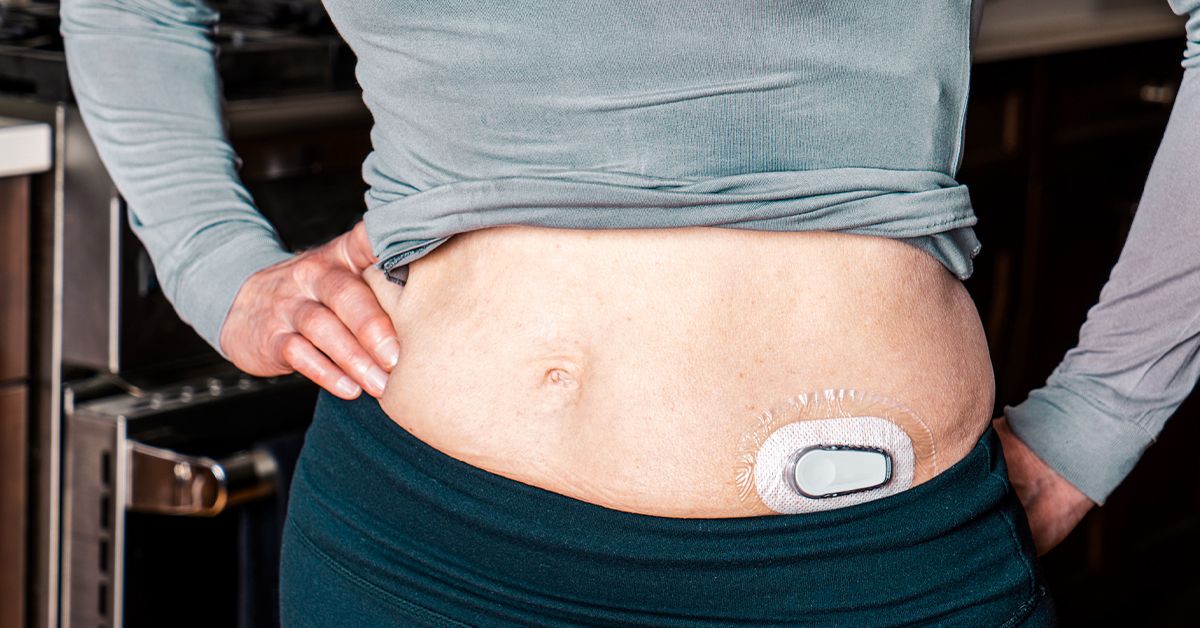
Imagine getting a tiny “weather report” for your glucose all day longcomplete with trend arrows that say,
“Storm’s coming,” “Clear skies,” or “Uh-oh, drop ahead.” That’s a CGM in a nutshell: a wearable device that checks
glucose frequently and shows you patterns, not just single snapshots.
This article explains what a continuous glucose monitor (CGM) is, how it works, why it’s become such a big deal
in diabetes care (and beyond), and how to choose the right option for your goals, budget, and lifestyle.
It’s general informationnot personal medical adviceso use it to get smarter conversations going with your clinician.
What a CGM is (and what it isn’t)
A continuous glucose monitor is a system that measures glucose frequently throughout the day and night.
Instead of relying only on fingerstick checks (which show one moment in time), a CGM gives you a moving picture:
your current value, where you’ve been, and where you’re heading.
The three basic parts
- Sensor: a tiny filament under the skin that detects glucose.
- Transmitter: sends readings from the sensor (sometimes built into the sensor).
- Receiver/app: shows data on a dedicated reader, smartphone app, or both.
It measures interstitial glucose, not “straight-from-the-vein” blood glucose
CGMs typically read glucose in interstitial fluid (the fluid between cells). Because glucose moves from the bloodstream
into that fluid, CGM readings can lag behind a fingerstick by a few minutesespecially when glucose is rising or falling fast
(after a meal, during exercise, or when treating a low).
So why does it still matter if there’s a lag?
Because what you gain is the trend. A CGM doesn’t just say “120.” It can say “120 and rising quickly,” which is a very different situation
than “120 and dropping.” That’s why CGM data is often described as “actionable”it helps you make decisions with context.
Why CGMs changed the game
For many people with diabetes, CGMs can reduce guesswork. For clinicians, CGMs add rich metrics that A1C alone can’t show.
For caregivers, CGMs can offer peace of mind through alerts and data sharing.
Time in Range: the metric that feels like real life
One of the most useful CGM concepts is Time in Range (TIR): the percentage of time your glucose stays in your target range
(commonly 70–180 mg/dL for many non-pregnant adults, with individual targets varying).
It’s easier to improve something you can actually seelike watching your “in-range minutes” add up over the week.
Trend arrows and alerts: fewer surprises
CGMs can provide trend arrows and optional alerts for highs and lows. That can be especially valuable overnight,
when fingersticks are… let’s call them “less popular.”
Patterns you can’t unsee (in a good way)
CGMs often highlight patterns such as:
post-meal spikes, late-afternoon dips, overnight highs, or “mystery lows” after certain workouts.
Once you spot patterns, you can work with your care team to adjust meals, activity timing, and medications.
How CGMs actually work day to day
Most CGMs provide a reading every few minutes. You’ll typically see:
a glucose number, a trend arrow, and a small graph of recent history.
Many systems also create standardized reports (often an “AGP” style summary) that help clinicians review trends quickly.
When fingersticks still matter
Even with modern CGMs, fingerstick checks can still be important in certain situations, such as:
when symptoms don’t match the reading, when a sensor is new or acting weird,
or when you suspect a compression low (lying on the sensor can sometimes push readings down).
Your clinician’s advice and the CGM’s labeling should guide how you use readings for treatment decisions.
Types of CGMs you’ll hear about
Real-time CGM (rtCGM)
Real-time CGMs automatically send readings to your phone/receiver throughout the day.
They’re often chosen by people who want frequent updates, strong alerting options, and (in many cases)
compatibility with certain insulin pumps and automated insulin delivery systems.
Intermittently scanned CGM (isCGM or “flash”)
Intermittently scanned systems store readings, and you view them by scanning the sensor with a phone/reader.
Many newer versions also offer optional alarms, but the “scan to see details” experience is still a key difference.
People often like these systems for simplicity and longer wear times (depending on the model).
Implantable CGM
An implantable CGM uses a sensor placed under the skin in a minor procedure and can last much longer than typical
wearable sensors. This option can appeal to people who want fewer sensor changes, though it comes with procedure-based logistics
and availability considerations.
Over-the-counter (OTC) glucose biosensors / consumer CGM
In the U.S., there are now OTC CGM-style systems designed for adults not using insulinoften marketed for understanding how
food, exercise, stress, and sleep affect glucose. These can be useful for education and behavior change,
but they’re not a substitute for clinical diabetes management if you need insulin dosing support or robust hypoglycemia safety features.
Picking a CGM: a practical checklist (without the spreadsheet headache)
The “best CGM” is the one you’ll actually wear and use. Start by matching the device to your real life, not your fantasy life
(the version of you who meal-preps perfectly and never forgets to charge anything).
1) What’s your main goal?
- Insulin dosing and tight safety needs: prioritize strong alerts, reliability, and any pump/pen integrations you use.
- Reducing lows: look for customizable low alerts, urgent-low features, and easy data sharing with family or caregivers.
- Learning patterns (meals/exercise): prioritize comfort, easy app insights, and reports you understand without a PhD.
- Budget-first choice: prioritize coverage, predictable refill costs, and what your pharmacy can actually keep in stock.
2) Alerts: do you want a smoke alarm or a gentle doorbell?
Alerts can be life-saving, annoying, or both (depending on the day).
If you’re prone to lows, sleep through alarms, drive often, or have hypoglycemia unawareness,
stronger alerting tends to matter more.
If you’re using CGM mainly for lifestyle insights, you may prefer fewer alarms and more “check when you want” behavior.
3) Wear time, comfort, and sensor placement
Sensors are commonly worn on the upper arm, abdomen, or other approved sites.
Differences that matter more than marketing:
adhesive comfort, skin sensitivity, how the insertion feels,
and whether the sensor survives your showers, workouts, and “oops, I walked into a doorframe” moments.
If you have sensitive skin, ask about barrier wipes, overpatches, and rotation strategies.
A CGM you rip off every three days because your skin hates it is not “the best”it’s a very expensive sticker.
4) Phone compatibility and your tech ecosystem
Many CGMs rely on a smartphone app. Before choosing, confirm:
your phone model is supported, you’re comfortable with Bluetooth, and you like the app interface.
If you want a dedicated reader (or need one for coverage rules), factor that in too.
5) Integration with insulin pumps or automated insulin delivery
If you use an insulin pumpor plan tocompatibility can be a deciding factor.
Some CGMs integrate tightly with certain pumps for features like automated insulin adjustments.
Choosing a CGM that “plays nicely” with your therapy setup can simplify life.
6) Accuracy, trust, and real-world quirks
Accuracy is often summarized by a statistic called MARD, but you don’t need to memorize numbers to choose well.
What matters day to day is whether readings feel consistent and whether the system handles fast changes smoothly.
Remember: all CGMs can be thrown off by rapid glucose swings, compression lows, hydration changes, or sensor site issues.
A smart habit is building “trust rules” for yourself, like:
If I feel low but the CGM says I’m fine, I confirm. If the CGM screams low and I feel normal, I recheck and look for compression or sensor error.
This keeps you safe without turning you into a full-time glucose detective.
7) Cost and coverage: the not-fun part that matters a lot
In the U.S., CGM costs vary widely based on private insurance, Medicare, Medicaid, and employer plans.
Coverage rules have expanded in recent yearsespecially for people treated with insulin and for some people with a history of problematic hypoglycemia.
Still, you may run into prior authorizations, documentation requirements, or differences between pharmacy vs durable medical equipment (DME) billing.
Practical tips:
- Ask your clinician’s office which brands your plan commonly approves (they know the paperwork battlefield).
- Call your insurer and ask: “Is CGM covered under pharmacy benefits or DME?”
- Estimate monthly cost (sensors + transmitters/readers if needed), not just the “first month” price.
- Check refill logistics: a great CGM doesn’t help if your local pharmacy can’t keep it stocked.
A quick, simplified comparison (features that actually affect your life)
Models and approvals change over time, so think of this as a “what to compare” table rather than a forever truth carved in stone.
| Category | How you see readings | Best for | Trade-offs to know |
|---|---|---|---|
| Real-time CGM (rtCGM) | Automatic updates to phone/receiver | People who want alerts, frequent data, and often pump integration | Can feel “chatty”; may require more settings and notifications management |
| Intermittently scanned (isCGM/flash) | Scan to view details (some have optional alarms) | People who prefer simplicity and checking on demand | If you don’t scan regularly, you may miss some context (depends on system) |
| Implantable CGM | Ongoing readings via external transmitter/app | People who want fewer sensor changes | Requires a procedure and may have different calibration/availability considerations |
| OTC consumer CGM/biosensor | App-based insights for day-to-day patterns | Adults not on insulin who want lifestyle feedback | Not designed for insulin dosing support; may lack strong low-glucose safety features |
How to start strong: your first-week CGM “onboarding plan”
The first week with a CGM can feel like moving from a flip phone to a smartphone: exciting, slightly overwhelming,
and suddenly you have opinions about settings you didn’t know existed.
Pick calm alert settings first
If your CGM has alerts, start with thresholds your clinician recommends. Avoid setting a dozen alarms on day one.
Too many alerts can lead to alarm fatigue, which is the opposite of helpful.
Learn the graph before you micromanage it
Your goal is spotting patterns, not “perfect lines.” Look for repeat situations:
breakfast spikes, post-workout dips, stress-related rises, or overnight drift.
Use notes like a scientist (but a lazy one)
If your app lets you log meals, workouts, or meds, do it selectively.
You don’t need a food diary noveljust enough to connect “that pasta” to “that spike.”
Know the “check anyway” moments
Confirm with a fingerstick (or follow your clinician’s instructions) when:
readings don’t match symptoms, glucose is changing rapidly, or you suspect a sensor issue.
CGM is powerful, but it’s still a sensor sitting in your skin, not a mind-reader.
Common CGM myths (and the truth that saves you stress)
Myth: “CGM numbers should match fingersticks exactly.”
Reality: They’re measuring different fluids, and timing matters. During rapid changes, a CGM can legitimately be “behind.”
Look at the trend arrow and the graph before you accuse your device of betrayal.
Myth: “If the CGM says I’m low, I must treat immediately.”
Reality: Treating lows is seriousbut confirmation matters when symptoms don’t match.
Compression lows and sensor glitches happen. If you feel fine and the reading seems off, confirm according to your care plan.
Myth: “My smartwatch can measure glucose without a sensor.”
Reality: Be extremely cautious. In the U.S., the FDA has warned consumers not to use smartwatches or smart rings that claim
to measure blood glucose noninvasively. Legitimate CGM data may be displayed on wearables via approved systems,
but the watch/ring itself is not magically reading your glucose without a sensor.
Myth: “CGMs never have safety issues.”
Reality: Like all medical devices, issues can occur. Manufacturers and regulators sometimes issue medical device corrections
for specific lots or models. It’s worth registering your device and paying attention to official notices, especially if you see readings
that don’t make sense.
Questions to ask your clinician before you choose
- What target range should I use, and what time-in-range goal makes sense for me?
- Do I need real-time alerts for safety (especially overnight or while driving)?
- How should I confirm readings when symptoms don’t match the CGM?
- Which CGMs does my insurance typically cover, and under pharmacy or DME?
- If I use (or might use) a pump, which CGMs integrate with my setup?
- What’s the plan for using CGM data in visitsreports, pattern review, medication adjustments?
Real-life CGM experiences: what it’s actually like (the extra )
People often expect a CGM to feel like a strict hall monitor: “No cookies for you.” In real life, it’s more like a brutally honest friend
who texts you the truth with timestamps. The first few days can be a mix of empowerment and mild disbeliefbecause suddenly you can
see how your body responds to everyday choices you never thought twice about.
A common experience: the “same breakfast, different day” surprise. Someone eats their usual cereal on Monday and sees a sharp spike.
On Wednesday they eat it againafter a better night’s sleep and a walkand the curve is smoother. The lesson isn’t “never eat cereal.”
It’s that sleep, stress, movement, and timing can change the glucose story. That kind of feedback can be more motivating than any generic advice,
because it’s personal data, not a lecture.
Then there’s the workout plot twist. Many people assume exercise always lowers glucose. Sometimes it doesespecially steady cardio.
But intense workouts, competitive sports, or even a tough strength session can raise glucose temporarily because stress hormones show up to help
you perform. A CGM doesn’t judge; it just shows the curve. Over time, users often learn to plan: maybe a small snack before a long run,
or watching trend arrows after a high-intensity interval workout instead of panic-correcting a temporary rise.
The overnight graph is where a lot of “aha” moments happen. People discover dawn-related rises, late-night snack effects, or dips they never knew existed.
For some, alarms bring reassurance; for others, the first night is basically a documentary called “Humans vs. Notifications.”
Many users eventually find a sweet spot: alert thresholds that catch real problems without turning sleep into a customer-service shift.
Social situations can feel different too. Instead of guessing at a restaurant, someone checks their trend arrow before ordering dessert.
Not to “be perfect,” but to decide: “Do I want this now, or do I want this and a walk after?” That shiftfrom fear to strategyshows up often.
People also report that sharing data with a partner or parent can be comforting, as long as everyone agrees on boundaries. (Helpful support looks like
“I’m here if you need me,” not “I saw your spikeexplain yourself.”)
Finally, there’s a subtle mindset change: CGM users frequently stop thinking of glucose as a single number and start thinking in patterns and trends.
A “good day” becomes less about perfection and more about steady time in range, fewer scary lows, and quicker recovery when things go off track.
In other words, the CGM doesn’t just measure glucoseit often helps people measure progress in a way that feels real, human, and doable.
Conclusion
A CGM can be one of the most practical tools for understanding glucose in real timeespecially when safety, insulin decisions, or stubborn patterns
are part of the picture. When picking one, focus on your goals (alerts vs simplicity), comfort, phone/pump compatibility, and the reality of coverage and costs.
Bring your CGM data to appointments, ask targeted questions, and use trendsnot single pointsto guide decisions with your care team.