TV ambient lighting used to be the kind of home theater upgrade people added after buying the huge screen, the soundbar, the popcorn machine, and possibly a recliner that looked like it had a law degree. Today, it has become one of the smartest ways to make movies, games, sports, and late-night streaming feel more comfortable, more cinematic, and more immersive without replacing the television itself.
The idea is simple: place controlled light behind or around the TV so the room does not fall into total darkness while the screen blasts bright scenes into your eyes. But modern TV ambient lighting is no longer just a sticky LED strip glowing blue because “blue looks futuristic.” The best systems now use accurate white bias lighting, HDMI signal syncing, camera-based color tracking, addressable RGBIC LEDs, smart home controls, and room-aware brightness adjustment. In plain English, the humble backlight grew up, got Wi-Fi, and started taking performance seriously.
Whether you are building a movie cave, upgrading a gaming setup, or trying to stop your eyes from staging a protest after three episodes of prestige drama, ambient lighting can make a real difference. The trick is choosing the right type, setting it correctly, and not turning your living room into a disco unless the movie actually deserves it.
What Is TV Ambient Lighting?
TV ambient lighting refers to light placed around a television to improve the viewing environment. The most common version is bias lighting: a soft glow behind the TV, usually reflected off the wall. This reduces the harsh contrast between a bright screen and a dark room, helping the image feel easier on the eyes.
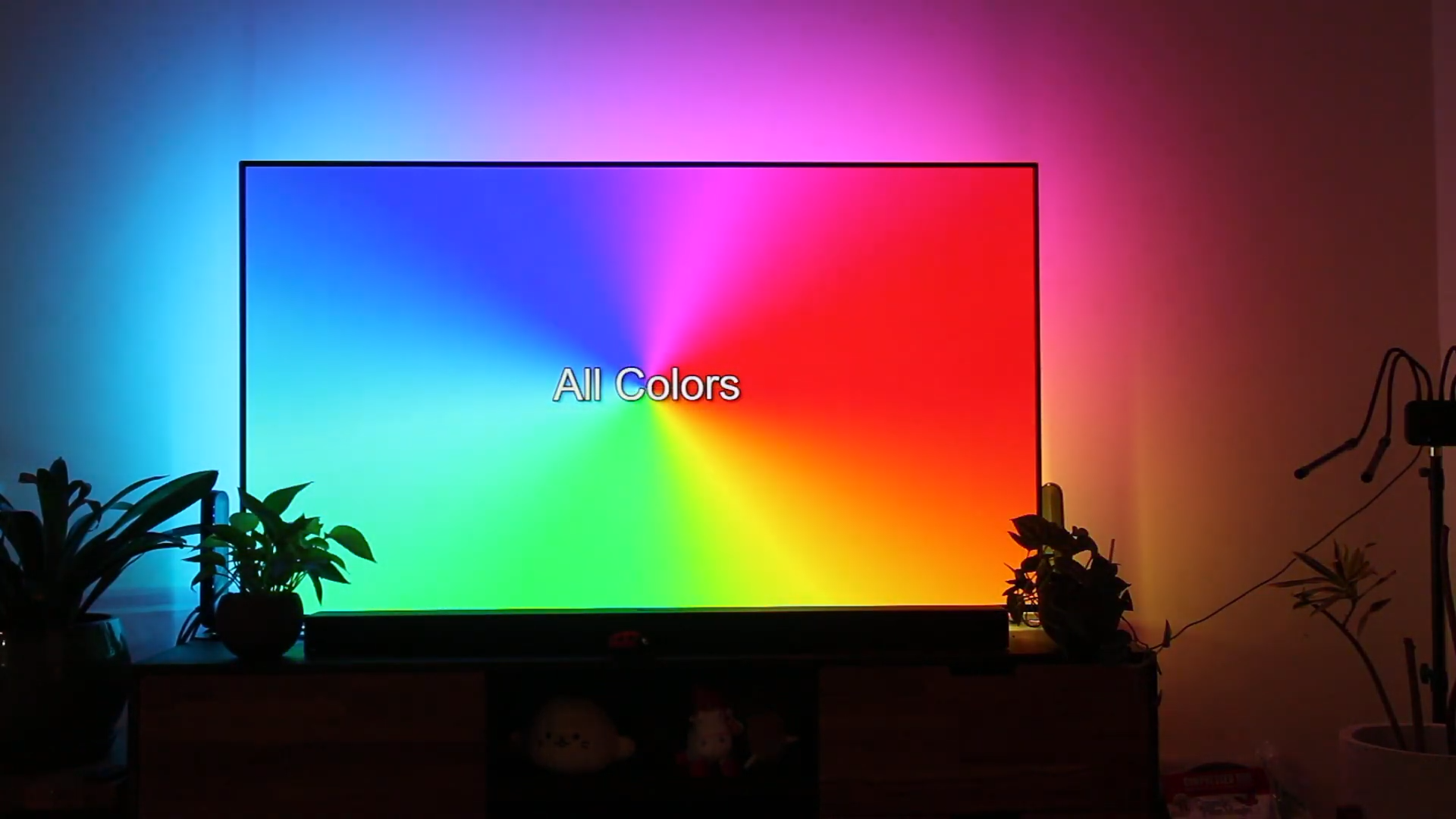
Another popular version is dynamic ambient lighting, where the lights change color to match what is happening on screen. If a scene shows a bright orange sunset, the wall behind the TV glows warm orange. If a spaceship jumps through a blue nebula, your wall may briefly believe it works for NASA. These systems are designed to extend the image beyond the screen and create a more immersive viewing experience.
Both approaches can be useful, but they serve different goals. Accurate bias lighting is about comfort, perceived contrast, and color consistency. Dynamic lighting is about excitement, immersion, and entertainment. The best setup depends on whether you want reference-style picture quality, dramatic movie-night energy, or a flexible system that can do both.
Why Ambient Lighting Improves TV Performance
It Reduces Eye Strain
Watching a bright TV in a pitch-black room forces your eyes to constantly adapt as scenes shift from dark shadows to bright explosions, white subtitles, or a sports broadcast that looks like it was filmed inside a lighthouse. Bias lighting gives your eyes a stable reference level, reducing the jump between the screen and the surrounding room.
This does not mean ambient lighting magically cures all viewing fatigue. Poor picture settings, excessive brightness, glare, and marathon screen time still matter. But a soft, properly placed backlight can make long viewing sessions feel more relaxed.
It Improves Perceived Contrast
Ambient light behind the TV can make blacks appear deeper and highlights feel more balanced because your eyes are not adapting to a completely dark room. This is especially helpful with LED and Mini-LED TVs, where local dimming can create halos or blooming in difficult scenes. A little controlled light behind the screen can make those artifacts less noticeable.
OLED TVs already deliver excellent black levels, but bias lighting can still help because the benefit is not only about the panel. It is also about how human vision responds to the room. Even the best OLED can feel intense in total darkness if the screen is very bright and the surrounding wall is a black hole with furniture.
It Makes HDR More Comfortable
High dynamic range content can look spectacular, but HDR also brings very bright highlights. Fireworks, sunlight, metal reflections, and sci-fi laser beams can pop beautifully, yet they may feel harsh in a completely dark room. Ambient lighting helps your eyes handle that range more comfortably, especially when the lighting is subtle and neutral.
Bias Lighting vs. RGB Ambient Lighting
Many people use the terms “bias lighting” and “ambient lighting” interchangeably, but there is an important difference.
Bias lighting is usually a fixed white light placed behind the display. For serious viewing, the preferred target is D65, often described as roughly 6500K, because it aligns with the standard white point used for video displays. The goal is not to paint the wall purple during a cooking show. The goal is to support accurate viewing.
RGB ambient lighting uses colored LEDs to create mood or sync with screen content. This can be fantastic for gaming, music videos, animation, sports intros, and action movies. It is less ideal when you are trying to judge accurate color, because strong colored light in the room can influence how your eyes perceive the TV image.
The practical answer? Use white D65-style bias lighting when you care about accuracy. Use RGB screen-sync lighting when you care about fun. Use both if you are fancy, organized, and brave enough to own more lighting scenes than socks.
The Main Types of TV Ambient Lighting Systems
1. Simple LED Bias Light Strips
This is the easiest and often the most affordable option. A light strip attaches to the back of the TV and plugs into USB power or a wall adapter. Better kits include dimming controls, accurate color temperature, strong adhesive, and flicker-free performance.
For performance-focused viewing, choose a neutral white strip designed for display bias lighting. Look for D65 or 6500K labeling, high color rendering quality, and adjustable brightness. The light should reflect off the wall behind the TV, not shine directly into your eyes like a tiny interrogation lamp.
2. Camera-Based Screen Sync Backlights
Camera-based systems use a small camera mounted above or below the TV to “watch” the screen and translate colors into LED effects. Popular examples include kits from brands like Govee and Nanoleaf. These systems are attractive because they can work with built-in TV apps, streaming services, consoles, Blu-ray players, and anything else displayed on the screen.
The tradeoff is that setup can be more sensitive. Camera placement, screen reflections, calibration points, glossy panels, and room lighting can affect accuracy. Some people also dislike the look of a camera sitting on top of the TV, which is fair. Not everyone wants their television wearing a little hat.
3. HDMI Sync Boxes
HDMI sync boxes read the video signal directly from connected sources such as game consoles, streaming boxes, and media players. Because they analyze the signal rather than watching the screen with a camera, they can deliver faster and cleaner color matching. Premium systems now support features such as HDMI 2.1, 4K at 120Hz, 8K at 60Hz, HDR formats, variable refresh rate, and auto low latency mode.
The main limitation is that HDMI sync boxes usually cannot read content from native TV apps. If you watch Netflix, Disney+, YouTube, or Prime Video through the smart TV operating system itself, the sync box may not see that signal. In that case, you may need an external streaming device connected through the box.
4. Smart Bulbs, Light Bars, and Room Expansion
Some ecosystems let you expand beyond a TV strip. You can add light bars beside the TV, smart bulbs in lamps, floor lights, wall panels, or ceiling accents. When configured carefully, the entire room responds to what you are watching.
This can be amazing, but moderation matters. A little synchronized glow can feel cinematic. Too many lights reacting at full intensity can make a quiet drama feel like a haunted arcade. Start with the TV backlight, then add room lights slowly.
What Makes Ambient Lighting “Awesome Performance”?
Accurate Color
For white bias lighting, accuracy means staying close to D65 and avoiding obvious blue, green, or yellow casts. Cheap LED strips may claim “white” while producing a color that looks like it came from a refrigerator in a science fiction movie. If accurate picture quality matters, use a bias light designed for video viewing.
For RGB systems, performance means matching screen colors without lag, weird oversaturation, or random color jumps. Good algorithms smooth transitions while still reacting quickly to fast scenes.
Low Latency
Latency is crucial for gaming and action content. If the lights change a half-second after the explosion, your brain notices. HDMI-based systems often perform well here because they read the signal directly. Camera-based systems can also be responsive, but they depend more on calibration and processing.
Brightness Control
More brightness is not always better. Proper bias lighting is usually subtle, often set around a small fraction of the display’s peak brightness. The light should support the image, not compete with it. If the wall behind the TV is brighter than the movie, your lighting system has become the main character, and the TV deserves an apology.
Addressable LEDs
Addressable light strips can show multiple colors along different sections of the strip at once. This is what allows the left side of the wall to glow blue while the right side glows red during a split-color scene. Higher LED density and more color zones can improve smoothness and precision.
Smart Integration
Modern TV ambient lighting often supports apps, voice assistants, schedules, scenes, and smart home platforms. This makes it easier to switch between “movie mode,” “game mode,” “soft evening bias light,” and “friends are coming over, please make my apartment look intentional.”
Best Use Cases for TV Ambient Lighting
Movies and Streaming
For films, ambient lighting can make a room feel more theatrical. A D65 bias light is excellent for serious viewing because it helps preserve color perception. Dynamic RGB lighting can be fun for animation, fantasy, science fiction, and action movies, where color extension adds drama without feeling too distracting.
Console and PC Gaming
Gaming is where dynamic ambient lighting often shines brightest. Racing games, neon cyberpunk cities, fantasy forests, sports arenas, and first-person adventures can all feel more expansive when the lighting responds to the scene. For PlayStation 5, Xbox Series X, or a gaming PC, check that any HDMI sync box supports the resolution and refresh rate you actually use, especially 4K at 120Hz, HDR, VRR, and ALLM.
Sports
Sports viewing benefits from clean, moderate lighting. A soft backlight can reduce glare and make long games more comfortable. Dynamic lighting can work for big events, but subtle settings are best. Nobody needs the living room flashing wildly every time a golf broadcast cuts to a sand trap.
Everyday TV
For news, sitcoms, documentaries, and casual YouTube sessions, a simple warm-neutral or D65-style glow is usually enough. The goal is comfort. Save the rainbow thunderstorm mode for concerts, games, and dramatic movie nights.
Installation Tips for Better Results
Place the Light Behind the TV
The light should bounce off the wall behind the display. Avoid placing LEDs where they shine forward into your eyes or reflect directly on the screen. A clean glow around the edges is the goal.
Clean the TV Before Applying Strips
Dust is the natural enemy of adhesive strips. Wipe the back of the TV with a safe, dry or lightly damp cloth and let it dry fully before applying the strip. Take your time around corners so the strip does not peel later.
Match the Kit to Your TV Size
TV backlight kits are usually designed for specific screen ranges such as 55–65 inches or 75–85 inches. A strip that is too short leaves dark gaps; a strip that is too long may bunch up unless it is designed to be trimmed. Always check whether the strip is cuttable before grabbing scissors with heroic confidence.
Calibrate Camera Systems Carefully
If your system uses a camera, follow the calibration process closely. Place markers correctly, avoid bright reflections, and test several scenes. If colors look wrong, recalibrate before blaming the entire concept of electricity.
Use Subtle Settings First
Start with lower brightness and medium sensitivity. Increase intensity gradually. The most common beginner mistake is setting the lights too bright, too saturated, and too fast. Great ambient lighting feels like an extension of the screen, not a carnival ride hiding behind your OLED.
Common Mistakes to Avoid
Using the wrong white point: If you want accurate bias lighting, avoid random colored whites. Choose D65 or a trusted 6500K display-focused product.
Overpowering the TV: Ambient lighting should support the picture. If it dominates the room, reduce brightness.
Ignoring wall color: A neutral wall gives better results. Strongly colored walls can tint reflected light and reduce color accuracy.
Forgetting HDMI limitations: Before buying a sync box, confirm HDMI version, supported refresh rates, HDR compatibility, and whether it works with your preferred content sources.
Expecting one mode to fit everything: Movie night, gaming, sports, and casual TV may need different brightness and sync settings.
Buying Guide: How to Choose the Right TV Ambient Lighting
Choose a D65 Bias Light If You Want Accuracy
If your priority is film accuracy, reduced eye strain, and clean picture perception, choose a high-quality D65 bias lighting strip. It is usually the simplest, least distracting, and most reliable option.
Choose a Camera Kit If You Use Built-In TV Apps
If most of your viewing happens through native TV apps, a camera-based kit may be more practical than an HDMI sync box. It sees whatever appears on screen, regardless of the source.
Choose an HDMI Sync Box for Gaming Performance
If you use external consoles or streaming boxes and want fast, accurate color syncing, an HDMI sync box is often the premium route. Just make sure it supports your gaming features, especially 4K 120Hz and VRR if those matter to you.
Choose an Ecosystem If You Want Room-Wide Effects
If you already own smart lights from a brand like Philips Hue, Govee, Nanoleaf, or WiZ, staying inside that ecosystem may simplify control. You can coordinate the TV strip with light bars, bulbs, wall panels, and scenes.
Experience Notes: Living With TV Ambient Lighting
After using different styles of TV ambient lighting, the biggest lesson is that the best setup is rarely the brightest one. At first, it is tempting to crank everything up because the effect looks impressive in photos. The wall glows, the room changes color, and suddenly your TV area looks like a product demo at a technology expo. Fun? Absolutely. Comfortable for a two-hour movie? Not always.
The most satisfying everyday setup is usually softer. A neutral white bias light behind the TV creates a calm viewing environment that works for almost everything. It makes dark scenes easier to watch, reduces the shock of bright subtitles, and gives the room a finished look. It is the lighting equivalent of good background music: you notice it most when it is missing.
Dynamic lighting is more emotional. When it works well, it can make games and movies feel bigger than the screen. A racing game feels faster when the room flashes with passing city lights. A nature documentary feels richer when forest greens and ocean blues softly spill onto the wall. A superhero movie becomes more theatrical when energy blasts and sunset skies push color beyond the frame. This is where ambient lighting earns the “awesome” part of its reputation.
However, dynamic lighting also teaches patience. Some scenes look better with restrained effects. Dialogue-heavy shows do not need aggressive color changes every two seconds. If a character is quietly discussing their life choices in a dim kitchen, the wall does not need to perform a light show worthy of a stadium concert. Lower brightness, smoother transitions, and moderate saturation usually feel more premium.
Gaming is where performance differences become obvious. Low latency matters. Fast color response makes explosions, speed boosts, spell effects, and neon environments feel connected to the screen. Delayed lighting, on the other hand, feels like someone is narrating the visuals late. For serious gaming, HDMI-based systems with modern pass-through support are worth considering, especially for players using high refresh rates and HDR.
Installation also matters more than expected. A neatly placed strip creates an even halo. A rushed installation creates bright corners, dark gaps, and adhesive drama. The back of the TV may not be glamorous, but it deserves respect. Clean the surface, plan the cable route, avoid blocking vents, and test the strip before final placement. Future you will be grateful, and future you is already dealing with enough cables.
The wall behind the TV can change the result too. White or neutral gray walls reflect light cleanly. Dark walls create a subtler effect. Colored walls can shift the appearance of the glow. If your wall is bright red, even the most accurate white light may come back with a personality. That is not necessarily bad for mood lighting, but it is not ideal for color-critical viewing.
The best experience comes from creating scenes. A “Movie” scene might use low D65 bias lighting. A “Game” scene might use dynamic sync at medium brightness. A “Sports” scene might use a steady white glow. A “Party” scene can unleash the colors and pretend your living room has a DJ budget. Switching scenes keeps the lighting useful instead of forcing one dramatic mode onto every situation.
In the end, TV ambient lighting works because it upgrades the environment around the screen. It does not replace good picture settings, a quality panel, or proper viewing distance. But it makes the entire setup feel more intentional. It can be practical, stylish, comfortable, and wildly fun when used well. The secret is balance: enough light to support the image, enough color to add excitement, and enough restraint to remember that the TV is still the star of the show.
Conclusion
TV ambient lighting built for awesome performance is not about throwing random LEDs behind a screen and hoping the room looks expensive. It is about matching the lighting style to your viewing goals. For accuracy and comfort, D65 bias lighting is the dependable champion. For immersive entertainment, dynamic RGB systems and HDMI sync boxes bring movies and games beyond the edges of the screen. For everyday life, smart controls and custom scenes make the setup easy to enjoy without constant tweaking.
The best ambient lighting setup should reduce eye strain, improve perceived contrast, support HDR comfort, match your sources, and look clean in the room. Start subtle, calibrate carefully, and choose equipment that fits how you actually watch TV. Do that, and your screen will not just look better. Your whole room will feel like it finally joined the performance.