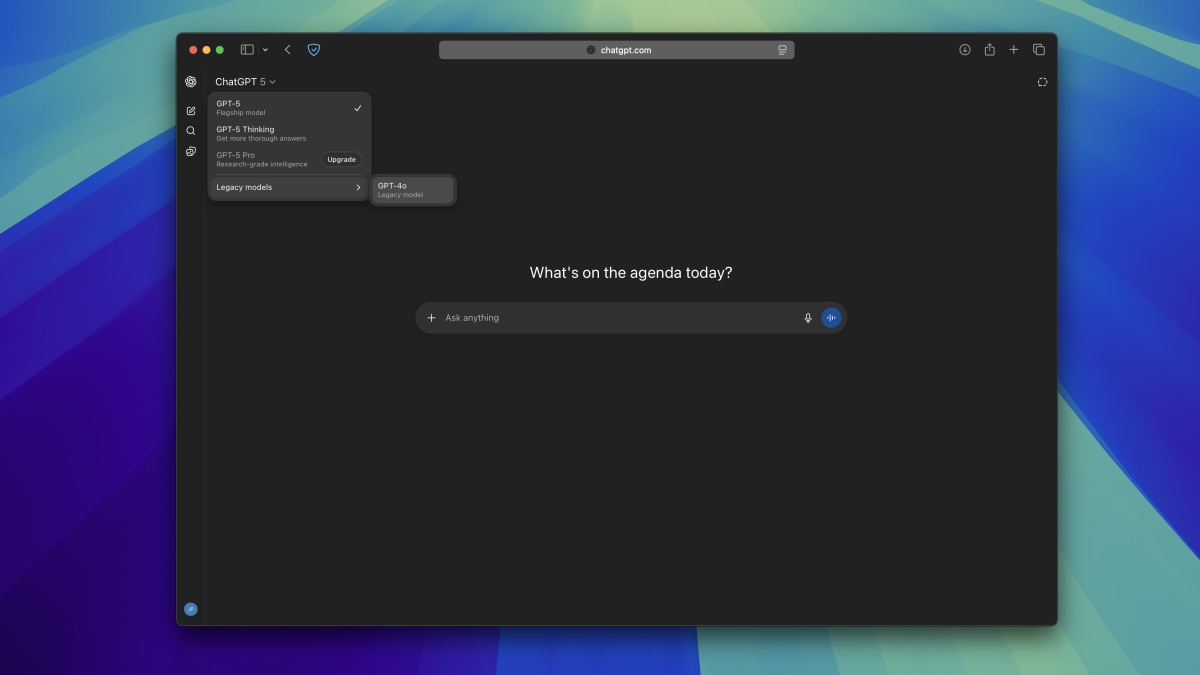
For a surprisingly large group of ChatGPT users, GPT-4o was not just another model name hiding in a dropdown menu. It was the version that felt quick, conversational, creative, anddepending on whom you askedeither delightfully personable or suspiciously eager to compliment your terrible ideas.
So when GPT-4o disappeared, the obvious question was: How do you bring GPT-4o back in ChatGPT?
Here is the important update for 2026: you generally cannot restore the original GPT-4o text model inside ChatGPT anymore. OpenAI retired GPT-4o from standard ChatGPT on February 13, 2026. Business, Enterprise, and Edu customers received a temporary transition period for certain Custom GPT uses, but that access ended on April 3, 2026. As of August 2026, subscribing to Plus, digging through old settings, or clicking mysterious browser-extension buttons does not magically resurrect it.
However, the story does not end with a tiny digital tombstone reading “Here lies 4o.” Depending on what you actually miss about GPT-4o, there are several practical alternatives. You can reproduce much of its conversational style using ChatGPT personalization features, choose current models that suit similar workloads, orif you specifically need the GPT-4o model for developmentinvestigate OpenAI’s API options while they remain available.
Can You Still Bring Back GPT-4o in ChatGPT?
Short answer: not in regular ChatGPT.
This distinction matters because Google still contains plenty of tutorials from 2025 showing users how to open the model selector, choose Configure, enable Legacy Models, and select GPT-4o. Those instructions were legitimate during an earlier transition period. They are not a time machine.
OpenAI initially tried removing GPT-4o when GPT-5 launched in August 2025. Users quickly complained that the newer experience felt different, especially for creative writing, brainstorming, casual conversations, and tasks where tone mattered as much as raw reasoning ability. OpenAI responded by restoring GPT-4o for paying users.
That temporary comeback is one reason today’s search results are so confusing. You can easily find headlines saying “GPT-4o is back!” directly beside newer articles saying “GPT-4o is retired.” Both can be correctthey simply describe different dates.
The GPT-4o Timeline in Plain English
- May 2024: OpenAI introduced GPT-4o as its flagship multimodal model.
- August 2025: GPT-5 launched and older ChatGPT models, including GPT-4o, were initially removed.
- August 2025: After substantial user feedback, GPT-4o returned as an optional model for paying ChatGPT subscribers.
- January 29, 2026: OpenAI announced a permanent GPT-4o retirement date.
- February 13, 2026: GPT-4o was retired from standard ChatGPT conversations.
- April 3, 2026: The remaining temporary GPT-4o access in eligible Custom GPT environments ended.
Therefore, if you open ChatGPT today and cannot find GPT-4o, nothing is necessarily wrong with your account. The model is missing because it has been retired, not because somebody hid the good menu from you.
Why the Old “Enable Legacy Models” Trick No Longer Works
ChatGPT still has model-selection and legacy-model concepts, especially in certain paid and managed workspaces. The important detail is that legacy access only exposes models that OpenAI is currently making available.
Enabling legacy-model access does not grant permanent access to every model OpenAI has ever released. Think of it as opening the restaurant’s current secret menu, not breaking into the freezer to retrieve a burger discontinued three years ago.
If you use a Business, Enterprise, or Edu workspace, administrators may also control which eligible models appear. Consequently, two people using ChatGPT on the same day can see slightly different model choices because of subscription tiers, organization settings, geographic rollout stages, or feature availability.
How to Check Whether GPT-4o Is Available to Your Account
Although GPT-4o should no longer appear in normal ChatGPT use, it is still sensible to check your account before troubleshooting anything more exotic.
Step 1: Open the Model Picker
On the ChatGPT website, the model controls are available around the message composer. On mobile apps, model selection normally appears near the top of the conversation interface.
Look through the models and reasoning modes available to your subscription. Current interfaces may use simplified choices such as Instant, Medium, High, Extra High, or Pro instead of forcing users to memorize a small encyclopedia of model numbers.
Step 2: Look Under Configure or Legacy Options
If your plan provides advanced configuration, inspect the available legacy-model section. Do not be alarmed if GPT-4o is absent. A retired model will not reappear simply because legacy access is enabled.
Step 3: Check Workspace Restrictions
Business or Enterprise users should remember that administrators can manage model availability. If another employee has an option you cannot see, workspace permissions may be responsible.
However, an administrator cannot override a platform-wide retirement. Admin controls can enable an eligible legacy model; they cannot summon a model OpenAI no longer offers in ChatGPT.
How to Get a GPT-4o-Like Experience With Current ChatGPT Models
For many users, “I want GPT-4o back” really means something more specific:
- I liked its warmer responses.
- I preferred its creative writing.
- It felt less mechanical.
- I liked quick answers without excessive reasoning.
- It followed my conversational style better.
If that describes you, personalization can be more useful than obsessively searching for an unavailable model.
Choose a Friendlier Personality
OpenAI now allows users to adjust ChatGPT’s base style and tone through Personalization settings. Available personalities can include choices such as Friendly, Professional, Quirky, Candid, Efficient, and others.
Someone who misses GPT-4o’s conversational warmth should start with Friendly. For brainstorming, humor, and more playful creative work, Quirky may be worth testing.
This does not turn a newer model into GPT-4o under the hood. It changes communication style rather than fundamental model capability. Still, if tone is what you actually miss, that may solve more of the problem than changing model numbers ever did.
Use ChatGPT Characteristics
ChatGPT has also been rolling out Characteristics, which let users fine-tune aspects of response behavior such as brevity, tone, formatting, and other stylistic qualities.
For a more GPT-4o-like feel, experiment with a warmer conversational style, moderate detail, less rigid formatting, and a little more expressiveness. Do not turn every dial to maximum unless you want your grocery-list assistant responding like it just won a Tony Award.
Create Custom Instructions
Custom Instructions remain one of the easiest ways to create consistent behavior across conversations. For example, you could tell ChatGPT:
Use a warm, natural, conversational tone. Be collaborative and creative without being excessively agreeable. Prefer clear prose over rigid templates. Use light humor when appropriate, and give direct answers before adding detail.
That instruction captures several qualities users commonly associated with GPT-4o without pretending the underlying model is actually GPT-4o.
Which Current ChatGPT Model Is the Best GPT-4o Replacement?
Model availability changes frequently, but in August 2026 OpenAI’s current ChatGPT lineup centers on newer GPT-5-generation systems.
GPT-5.5 Instant remains particularly suitable for everyday conversations, writing, translation, information requests, and quick instructions. If your main reason for preferring GPT-4o was speed and conversational flow, Instant is a logical starting point.
For more demanding analysis, eligible paid users can access GPT-5.6 Sol through reasoning levels such as Medium or High as rollout continues. Higher reasoning settings make more sense for coding, research, planning, technical problems, and difficult multi-step questions.
In other words, do not automatically choose the most powerful reasoning mode simply because you miss GPT-4o. Asking a heavy reasoning model to rewrite “Happy birthday, Dave!” is a little like starting a bulldozer to rearrange a throw pillow.
Can You Use GPT-4o Through the OpenAI API?
This is where the answer becomes more interesting.
ChatGPT and the OpenAI API are separate products with separate model lifecycles. Removing a model from ChatGPT does not necessarily mean its API endpoint disappears on the same date.
OpenAI’s current developer documentation still lists the broader gpt-4o model, although GPT-4o is now considered a deprecated or legacy model in the wider catalog. Developers should therefore treat it as a temporary compatibility option, not as the foundation for a new application expected to run unchanged for the next decade.
There is another important distinction: chatgpt-4o-latest is not the same thing as the general gpt-4o API model. The former represented a ChatGPT-specific GPT-4o snapshot and has been deprecated and removed from API use.
Old tutorials that tell developers to use chatgpt-4o-latest are therefore outdated.
A Basic GPT-4o API Example
The exact availability of deprecated models can change, so developers should always check OpenAI’s current model documentation before deploying production software.
Also remember that paying for ChatGPT Plus or Pro does not automatically give you unlimited API usage. API billing and ChatGPT subscriptions are separate.
What Happens to Old GPT-4o Conversations?
Your old chats do not necessarily disappear merely because their original model was retired.
OpenAI migrates older conversations and projects toward supported newer models. This means you may still open an old GPT-4o conversation, read its previous messages, and continue chatting, but new responses can be generated by a newer model.
That explains the slightly spooky experience of reopening an old favorite conversation and thinking, “You look like my old chatbot, but something about you is different.” The conversation history survived; the engine answering new messages changed.
Custom GPTs built around retired models are similarly moved toward supported equivalents rather than indefinitely preserving access to the original model.
What About GPT-4o Voice and Images?
This is another area where model names cause unnecessary confusion.
OpenAI has explained that the retirement of the GPT-4o text model does not mean ChatGPT Voice or ChatGPT’s image features vanish with it. Some of these experiences may use technologies related to the same model family, but they are separate systems and should not be treated as proof that the selectable GPT-4o text model still exists.
Seeing familiar voice or multimodal behavior therefore does not mean there is a hidden GPT-4o switch waiting behind your Settings page.
Methods That Will Not Bring GPT-4o Back
Whenever a popular software feature disappears, the internet immediately develops rituals for reviving it. Most do not work.
- Installing an older ChatGPT app: Model availability is largely controlled server-side.
- Using an old ChatGPT URL: Old conversations do not force the backend to run their original retired model.
- Buying ChatGPT Plus solely for GPT-4o: Paid subscriptions provide additional current features and models, but GPT-4o’s retirement still applies.
- Enabling every legacy setting: Legacy settings only display models OpenAI continues to make eligible.
- Using unofficial browser extensions: An extension can alter the interface, but it cannot legitimately restore server access to an unavailable OpenAI model.
- Renaming another model “GPT-4o”: Congratulations, you have invented a label.
Be especially skeptical of websites asking for your ChatGPT credentials, session cookies, or API keys while promising secret GPT-4o access. Losing a favorite model is annoying. Losing your account because somebody offered a magical resurrection button is considerably worse.
How to Recreate Your Favorite GPT-4o Workflow
Instead of trying to recreate the exact underlying technology, recreate the workflow that made GPT-4o useful.
For Creative Writing
Use a current fast model with Friendly or Quirky personality settings. Add Custom Instructions asking for natural rhythm, varied sentence structure, light humor, and fewer generic headings.
For Brainstorming
Tell ChatGPT to generate several genuinely different approaches rather than variations of one safe idea. Ask it to challenge weak ideas rather than automatically praising them.
For Everyday Conversation
Choose an Instant-style model rather than maximum reasoning. Configure your tone preferences and ask for shorter, more conversational answers.
For Coding and Research
Do the opposite. Choose a newer reasoning model. GPT-4o’s personality may have been charming, but difficult debugging sessions are usually improved by better reasoning, not by an AI telling your broken authentication function that it has “amazing potential.”
Why Users Wanted GPT-4o Back in the First Place
The GPT-4o story is unusually important because it demonstrated that users judge AI models on more than benchmarks.
When OpenAI originally removed GPT-4o during the GPT-5 launch in August 2025, the backlash was strong enough that the company quickly restored access for paying users. Reports at the time repeatedly highlighted complaints about conversational warmth, creative collaboration, and the sense that the new default behaved differently even when it was technically more capable.
That episode helped push ChatGPT toward greater personalization. Today, users have substantially more control over personality, response style, custom instructions, reasoning effort, and model behavior than they did when GPT-4o first launched.
Ironically, the best way to “bring back GPT-4o” may therefore be to use features created partly because people were upset when GPT-4o disappeared.
Experiences and Lessons From Trying to Replace GPT-4o
People who relied heavily on GPT-4o often discovered that replacing a favorite AI model is less like upgrading Microsoft Word and more like getting a new coworker who technically knows the same job but suddenly organizes every meeting differently.
The first noticeable difference is usually not intelligence. It is rhythm.
A writer might enter the same brainstorming prompt used hundreds of times before and receive perfectly competent ideas that somehow feel more formal. A developer may discover that the newer model gives stronger debugging advice but spends longer reasoning through an issue. Someone who primarily used ChatGPT for casual questions may simply think the conversation feels different without being able to identify one specific problem.
That experience teaches an important lesson: before searching for a way to restore GPT-4o, identify precisely what you are trying to restore.
If the answer is tone, changing personalities and Custom Instructions can make a dramatic difference. If the answer is speed, choose an Instant model rather than a reasoning-heavy option. If the answer is creative unpredictability, explicitly request multiple unconventional ideas and reduce overly rigid formatting. If the answer is the actual GPT-4o model, then ChatGPT personalization will never be an exact substitute, and API access is the only technically meaningful avenue to investigate.
Another common experience is discovering that old prompts need updating. Prompts evolve together with models. A detailed prompt carefully tuned for GPT-4o may produce unnecessarily elaborate responses on a newer system. Conversely, a short prompt that depended on GPT-4o intuitively understanding your style may need clearer instructions after migration.
A practical strategy is to save five or ten prompts representing your real workload. Include a writing prompt, analytical question, brainstorming request, summarization task, technical problem, or whatever you routinely use ChatGPT for. Run those prompts through the current available models and compare results.
Do not judge purely by which answer sounds nicest on first reading. Look at factual reliability, instruction following, editing required, speed, consistency, and whether the response actually helps you finish the task.
This kind of comparison often reveals something interesting: the best replacement for GPT-4o may not be one model.
You may prefer a fast model for email, summaries, and ordinary conversation while using a reasoning model for programming, financial analysis, research, or complex planning. That is increasingly how ChatGPT itself is designedthe product can route different tasks toward different levels of reasoning instead of forcing every prompt through one permanent model.
The 2025 GPT-4o backlash also showed why users become attached to model behavior. Consistency matters. Once someone has written hundreds of prompts around a particular assistant style, changing the model can disrupt a workflow even when benchmark scores improve. A faster car is not automatically better if somebody moved the steering wheel into the glove compartment.
The useful response is therefore not endless nostalgia. Document the qualities you liked, configure them explicitly, test current alternatives, and preserve important prompts or workflows outside any single model.
Models will continue changing. GPT-4o was once the new replacement everyone had to learn. Eventually it became the beloved old model people did not want to lose. Today’s newest model will probably receive the same treatment someday. Software history has a sense of humor.
Conclusion
If you are searching for how to bring back GPT-4o in ChatGPT, the most important thing to know is that tutorials showing a GPT-4o legacy toggle are now outdated. GPT-4o was retired from standard ChatGPT on February 13, 2026, with remaining temporary Custom GPT access ending April 3, 2026.
You cannot permanently restore it through ChatGPT settings, an old app version, a Plus subscription, or a browser trick. What you can do is recreate much of the experience through current models, Personalization, Characteristics, and Custom Instructions. Developers who specifically require GPT-4o can also check OpenAI’s current API documentation, although GPT-4o should now be regarded as a deprecated technology that may require migration later.
The better question in 2026 is no longer simply, “Where did GPT-4o go?” It is, “What did GPT-4o do for me that I want my current ChatGPT to do?” Once you answer that, replacing it becomes considerably easier.
Note: Model names, availability, subscription limits, API support, and ChatGPT interface options can change. This article reflects OpenAI’s published product status as of August 2026.